IP Video Intercom Paging Console User Manual
13
Set monitor, the output channel of sound source can be selected for loudspeaker,
receiver loudspeaker and line output.
When multiple terminals are monitored circularly, the monitoring interval of each
terminal is set and monitor the next terminal according to the set time.
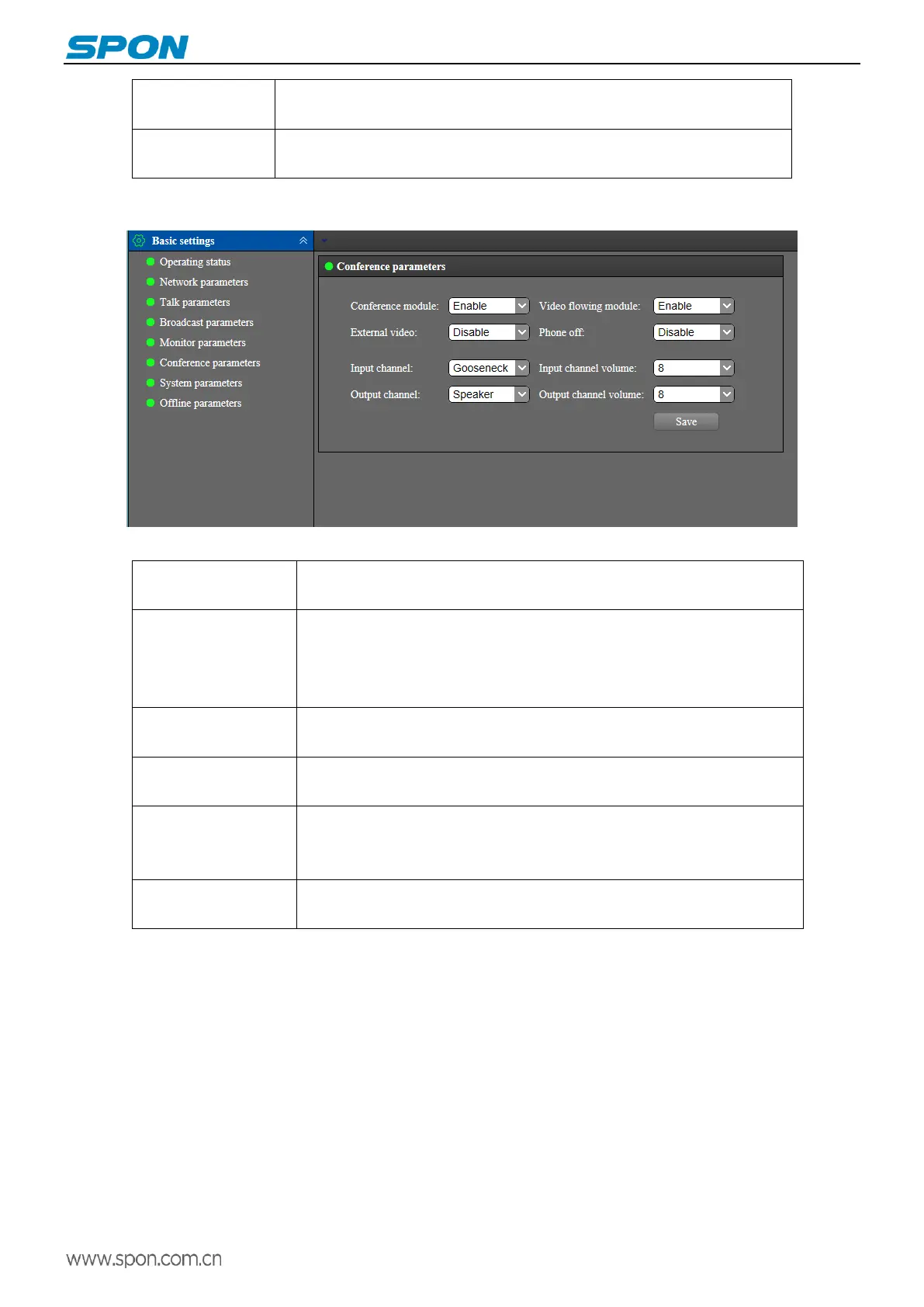
Conference parameters
The meanings of the parameters are as follows:
Set ON or OFF the conference module, which is enabled by default. Disabled,
terminal screen have not conference module
When enabled, during the video conference, participants raise hands to speak,
the video can turn to the speaker automatically when get the agreement from
host. When disabled there is no this function, and the host can manually switch
videos by clicking the screen video icon.
When enabled, the handset can be hung up to end the conference.(the default
is disabled)
Enable: support external camera
Disable: not support
When setting up the conference, the input channel of the sound source can be
selected, including goose neck microphone pole, built-in microphone,
microphone and line input.
When the conference is set up, the output channel of sound source can be
selected for loudspeaker and line output.



 To Next Page