5.4.2 Login – Displaying yield data – Changing settings
1. Enter the following address in your Internet browser: www.solare-energiewende.de. Ensure
that scripts and cookies for www.solare-energiewende.de are permitted in the browser.
ð
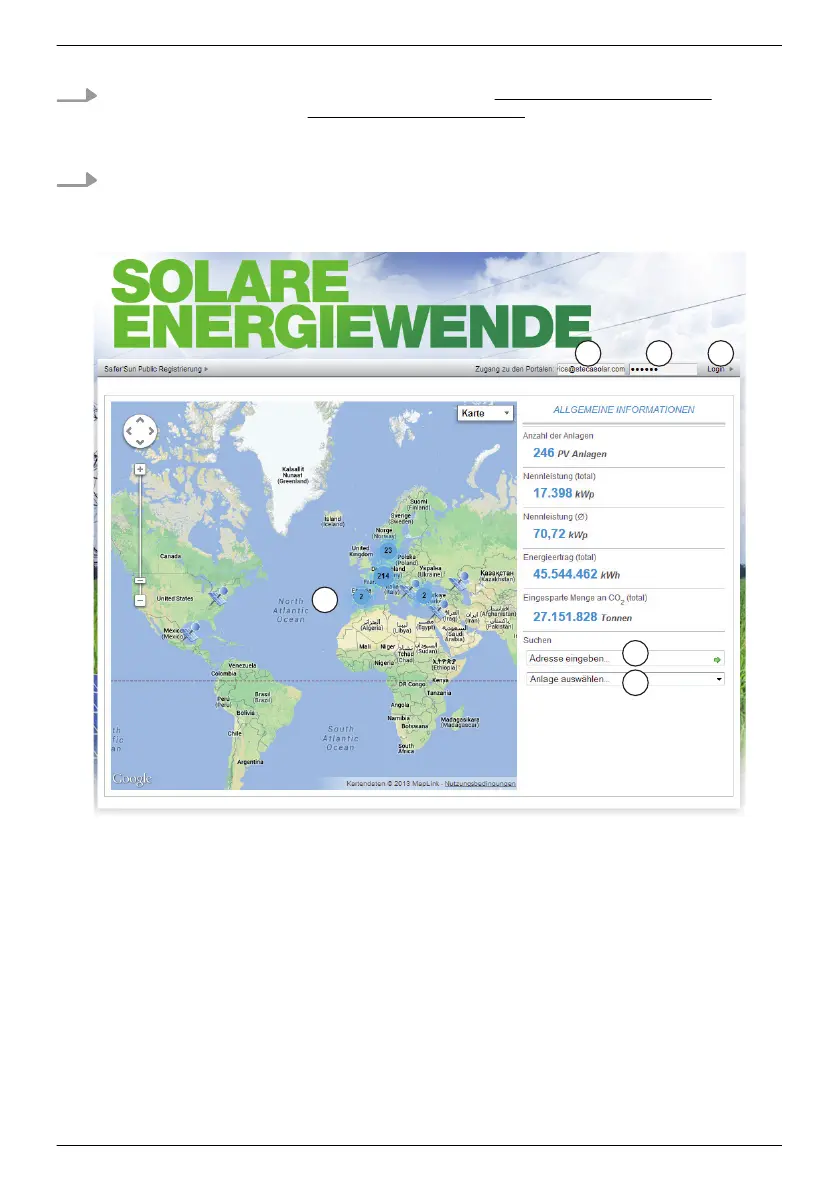
The home page of the Internet portal as shown in
Fig. 21 is displayed.
2. The functions as per the legend shown in Fig. 21
are available on the home page of the
Internet portal.
Fig. 21: Home page of the Internet portal
①
Entry field User name (= email address)
②
Entry field Password
③
Button for logging in after ① and ② have been entered. After logging in, the functions as per
the legend shown in
Ä
Fig. are available.
④
Data entry field for the postal address of the system that is to be displayed (login not required).
⑤
Data entry field for the name of the system that is to be displayed.
⑥
Map for searching for systems.
EN
747,431 | Z09 | 2015-09-30
59










 To Next Page