77
Appendix C: Wave Utilities
© 2017 Stenograph
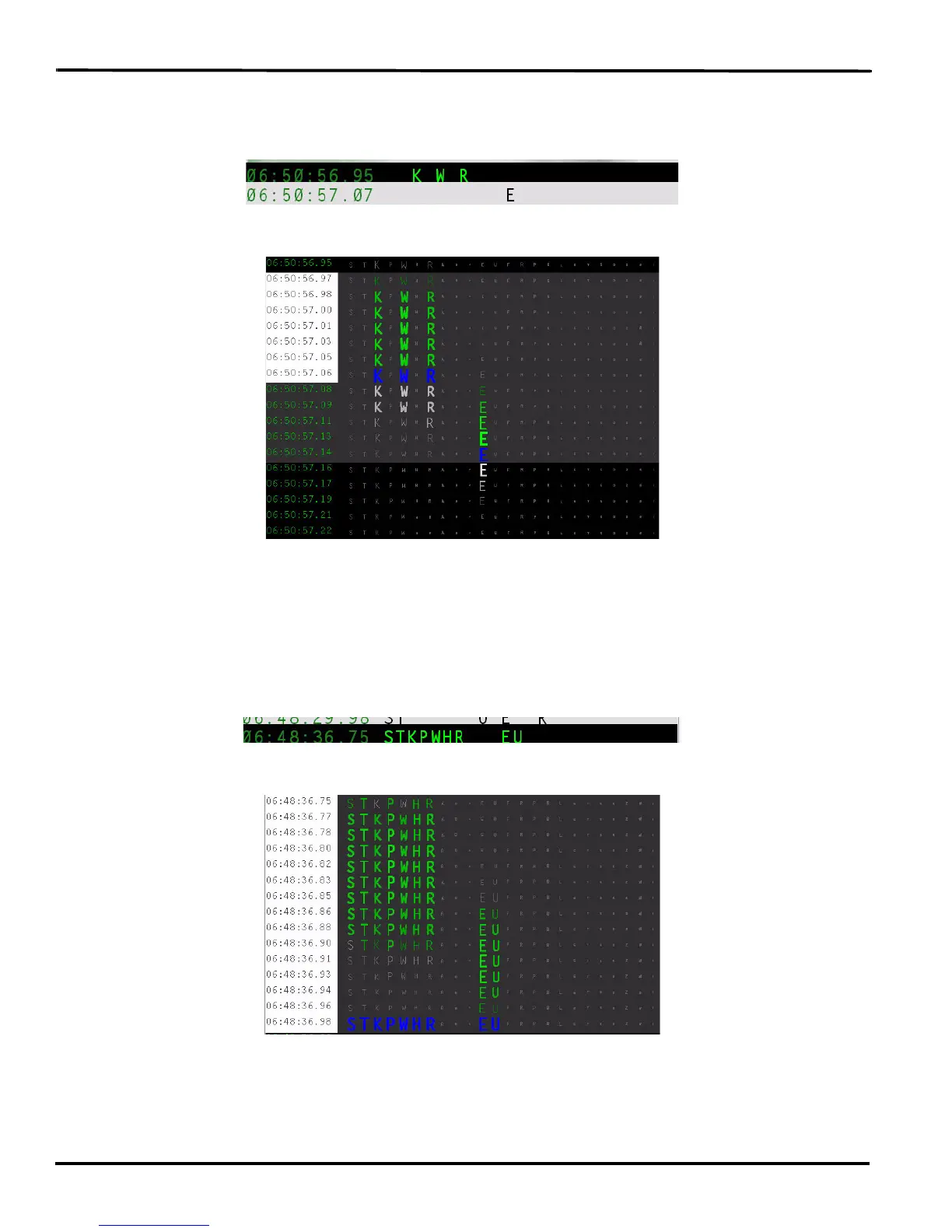
Example 2
The steno outline for the word, “yes” occurs in the steno notes. This two stroke outline was intended to
be written as a single stroke.
Double clicking in the TrueView column displays the steno strokes in Expanded view.
The “K” “W” and “R” keys display in green and register together, as indicated by the blue but are then
dragged, as shown by the light gray color and no longer register while the “E” key is depressed. All the
intended keys did not get pressed or released at the same time resulting in the single stroke splitting into
two strokes.
Example 3
The steno outline for the “Q” followed by the word “I” occur in the steno notes. This one stroke outline
was intended to be written as two strokes.
Double clicking in the TrueView column displays the steno strokes in Expanded view.
The “S” “T” K” “P” “W” “H” and “R” keys display in green and continue to display in green when the “E”
and “U” keys are depressed. The keys intended for the first stroke were not released before the keys for
the keys for the second stroke were depressed. All the keys register together, as indicated by the blue
color.



 To Next Page