11
Commissioning with TwinCAT®
ID 441896.05
WE KEEP THINGS MOVING
Operation manual
70
4. Start the TwinCAT
®
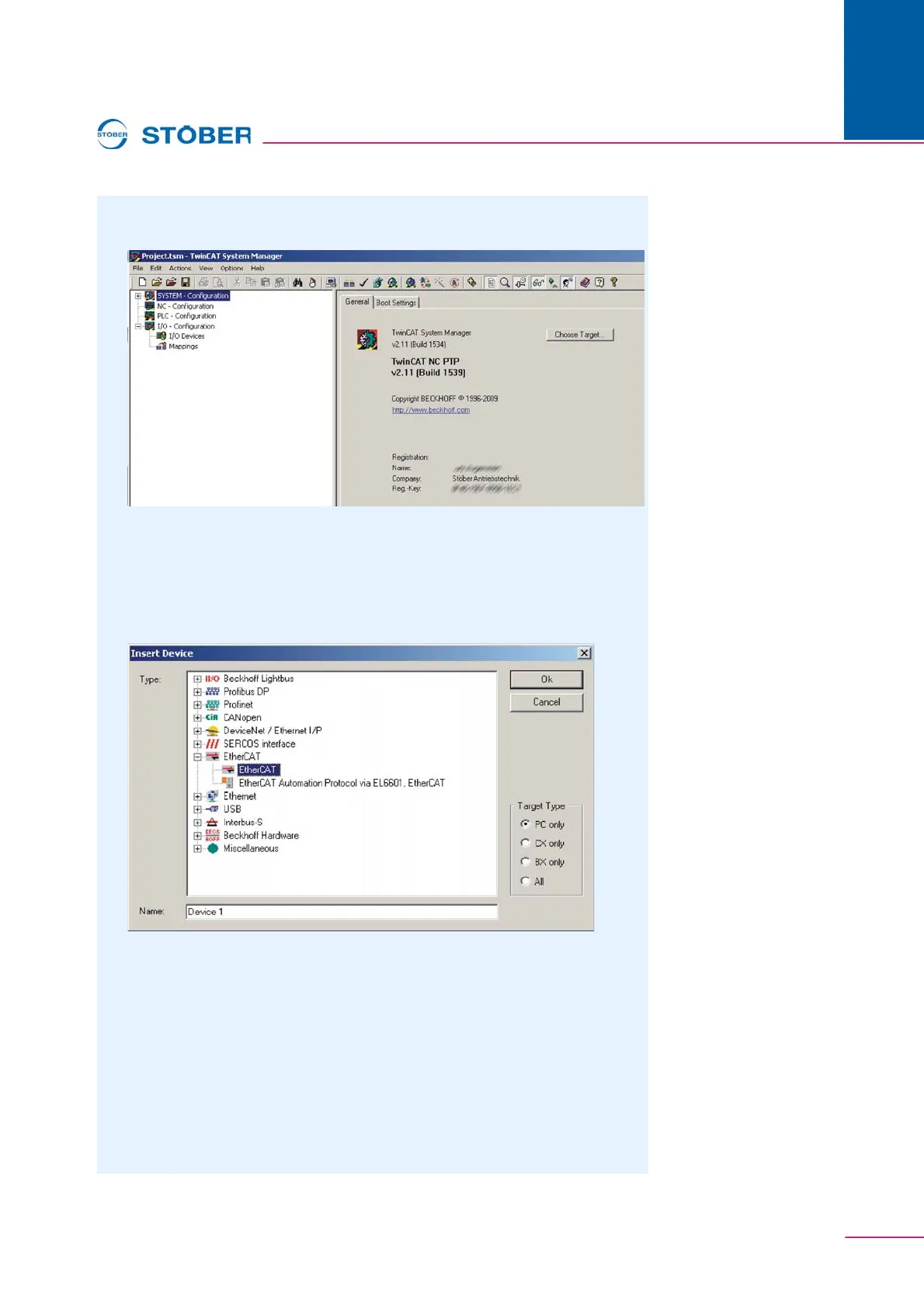
System Manager. shows the screen which appears after
the program has started.
Fig. 11-1 View of the TwinCAT
®
System Manager after its start.
5. In the project tree select I/O-Configuration.
6. Using the right mouse button click I/O Devices.
7. In the context menu click Append Device.
8. In the dialog screen Insert Device select EtherCAT and then EtherCAT.
Fig. 11-2 Adding an EtherCAT device
9. Exit the dialog screen by pressing the Ok button.
10. Exit the dialog screen Device Found At Address which appears next by
pressing the Cancel button.
The driver for the EtherCAT master function is activated. Device 1 -
(EtherCAT) appears under I/O Devices in the project tree.
11. Connect the cabling from the EtherCAT socket of the controller to the stations
and turn on the power supply of the devices.
12. Using the right mouse button, click Device 1 (EtherCAT) in the TwinCAT
System Manager.



 To Next Page