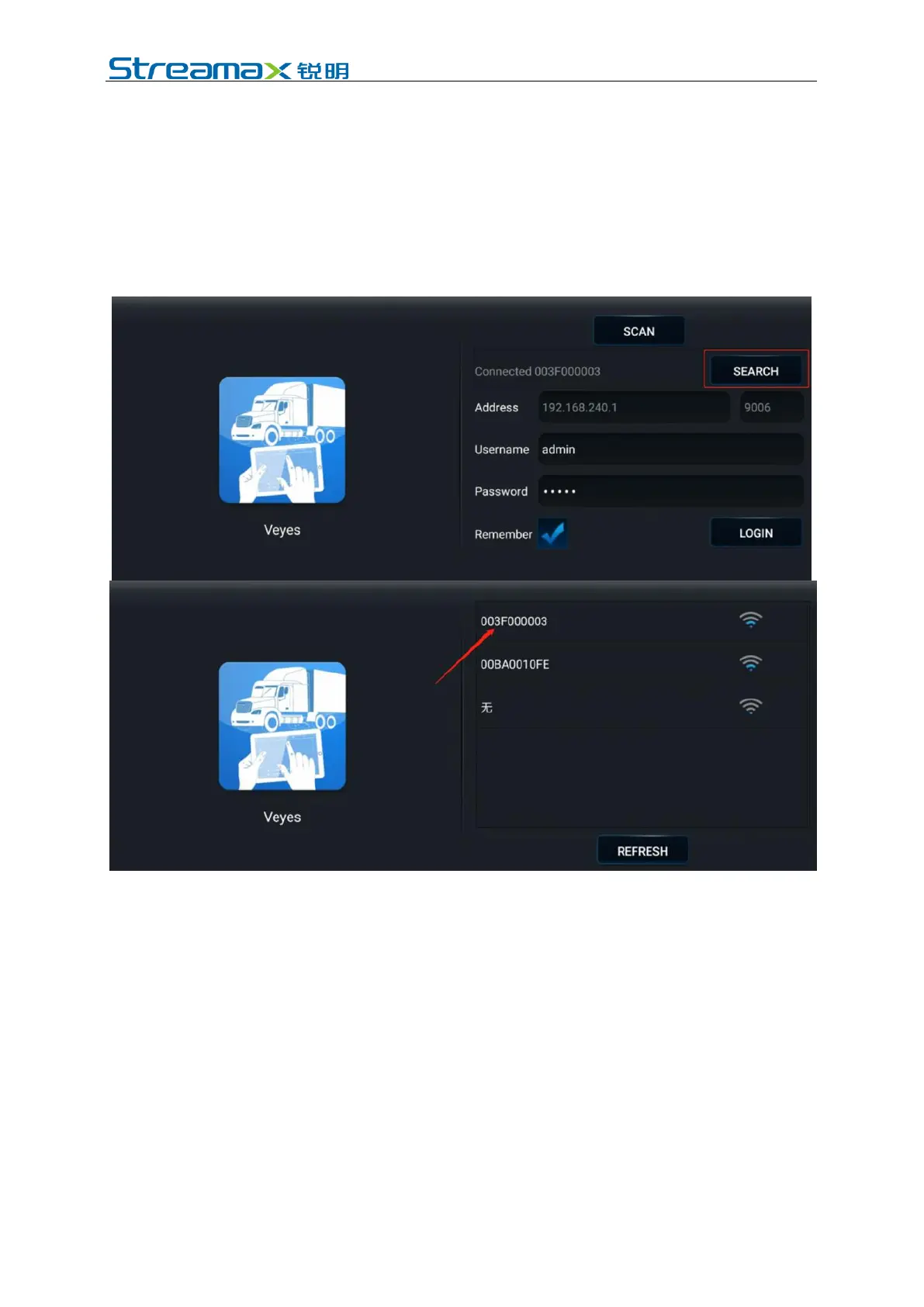
interface.
*Note:
Within 3 min after startup, the DVR will automatically enable the WIFI
transmission mode for debugging and connection with APP. If no connection is
established with any APP within 2 min, the Wi-Fi hotspot of the DVR will be OFF.
In the login interface, enter the corresponding user name and password and click
Login to enter the operation interface. The default username/password is
admin/admin.
Click the [Login] to enter the operation interface.
5.1.2 Installation Parameters Measurement of the ADAS Camera Lens
Measure the vertical height (accurate to cm/inch) from the ground to the AD Plus
front camera lens with a box staff or tape and take it as the ADAS camera lens
installation height. Measure the horizontal distance from the ADPlus front camera
lens to the outermost edge of the left tire (when viewed outside the vehicle and
facing the left side of the vehicle head) and take it as the left margin of the ADAS
camera lens. Measure the width of the vehicle head (the distance between the
outermost edges of the tires on both sides) and the length of the vehicle head (the
horizontal distance from the ADAS camera lens to the license plate). Refer to the
figure below for the example of distance measurement.
Note: When the vertical height from the ground to the AD Plus front camera lens is
measured, read the height value after making sure that the box staff or tape is
perpendicular to the ground.



 To Next Page