5.1.3 Calibration of ADAS Camera Lens
5.1.3.1 Calibration Parameter settings
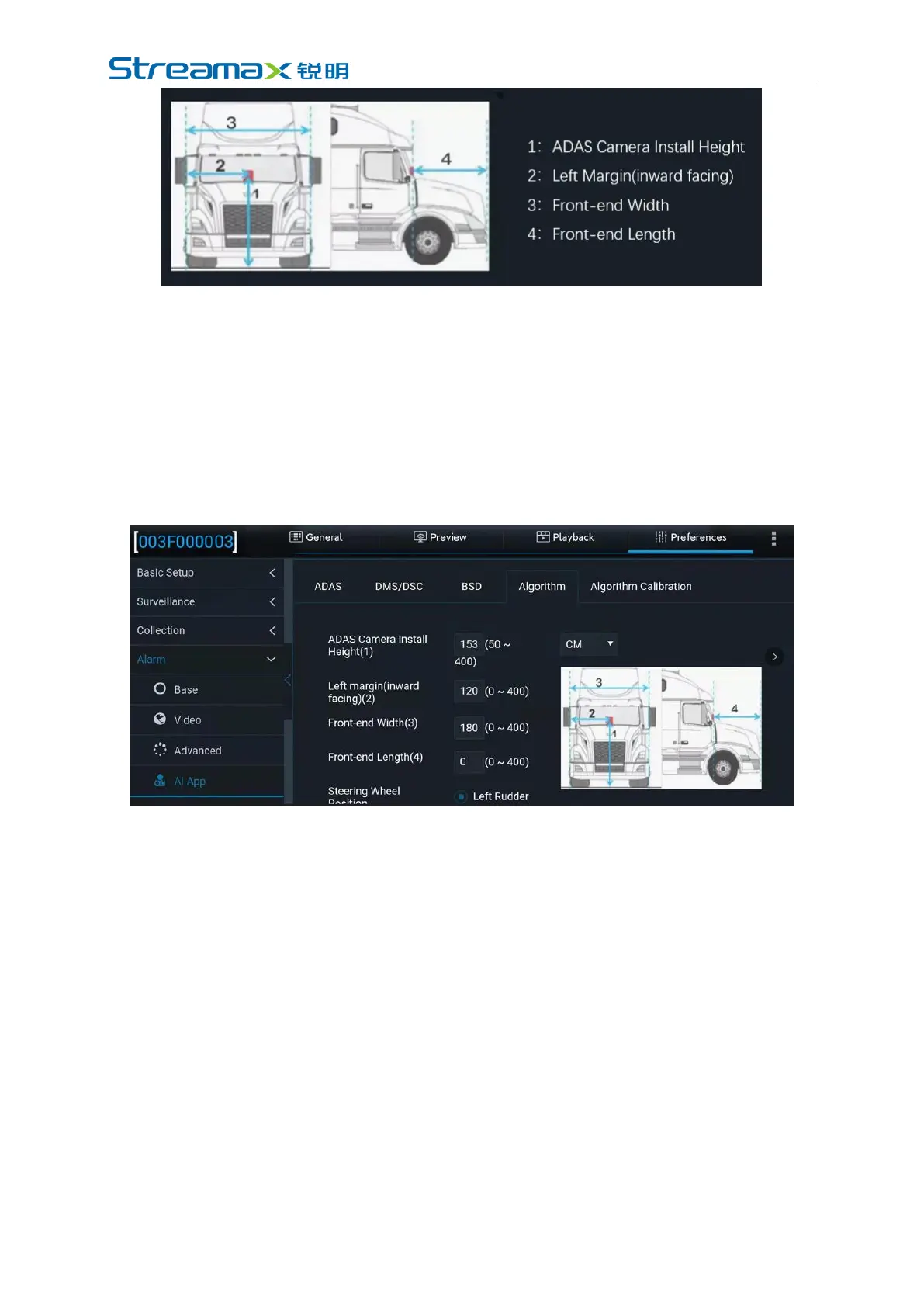
After entering the Veyes operation interface, click [Preferences]> [Alarm]> [AI
App]> [Algorithm], as shown in the figure below:
The ADAS calibration height can be in centimeters or inches. In the parameter input
boxes, fill in the ADAS camera lens installation height, the left margin of the
ADAS camera lens, and the width and the length of the vehicle head read in the
previous step, respectively. Click [Save] after filling in the parameters. This
automatic calibration method is recommended.
5.1.3.2 Automatic calibration
For Manual calibration in other devices, there are 2 methods available—the long-
distance calibration method and the short-distance calibration method. However,
since ADPlus is capable of automatic calibration, it is only required to enter the
relevant parameters manually in the manual calibration process, and it is not
necessary to perform the long-distance and short-distance calibration procedures
completely. The operation steps are as follows:
1. On the homepage, click [Preview] to enter the preview interface and click [AI
Calibration] at the lower left corner of the screen to enter the calibration
selection



 To Next Page