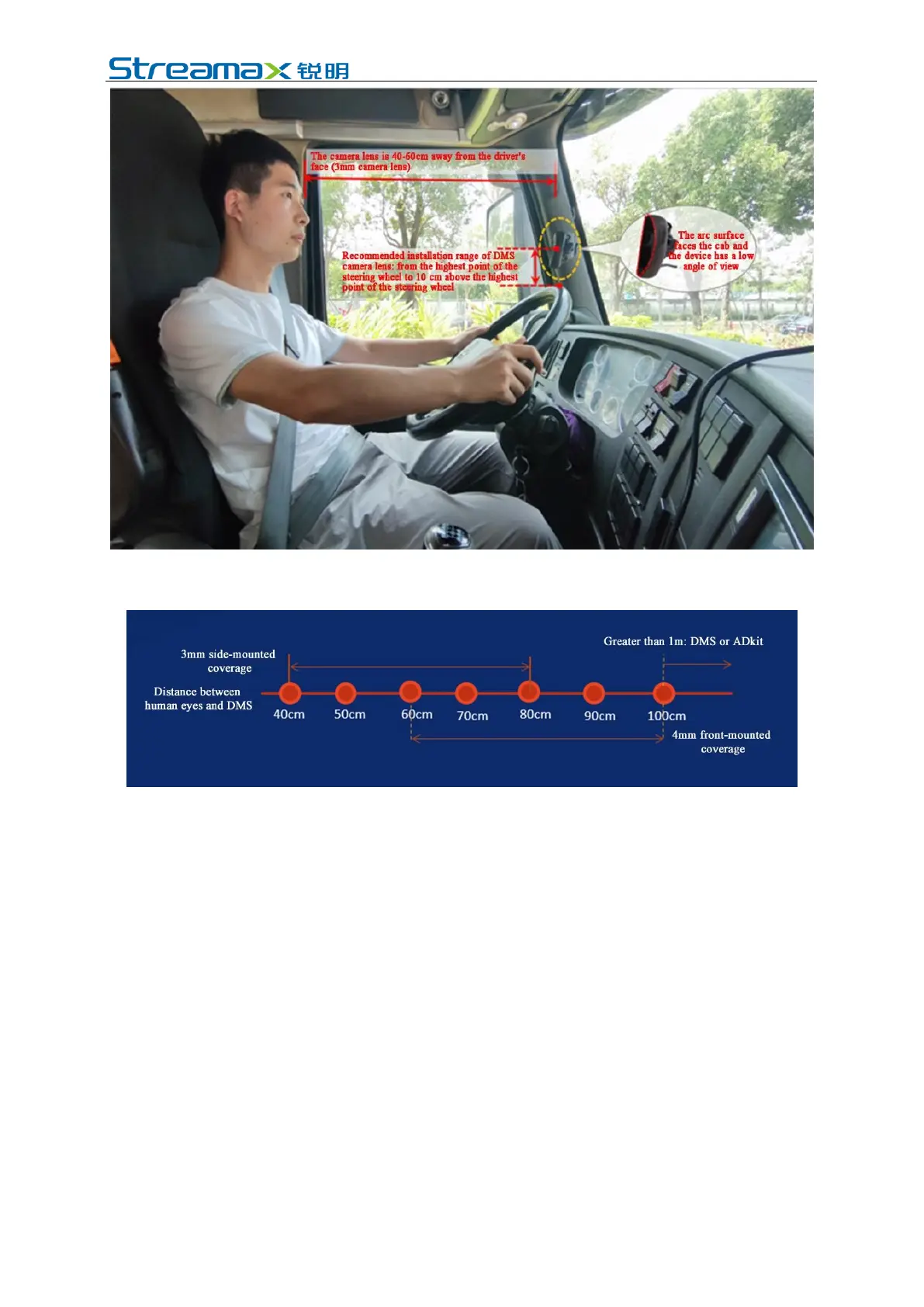
Different cameras have different "camera and driver distance" coverage, and the
coverage is described as follows:
For cameras larger than 100 cm, DMS or ADkit is recommended.
6.1.2 Requirements for Installation Angle
Auxiliary adjustment through real-time preview screen after the equipment is
powered on:
1. Adjust the angle of the DMS camera up and down, and left and right, to ensure
that the driver's face appears in the middle of the video screen and the lower
edge of the screen is below the driver's chest.
2. Make sure that the fill light of the DMS camera faces toward the driver's face
(the fill light shall not face toward the seat belt; otherwise, it will lead to
overexposure of video).
3. Make sure that there is no other object (such as steering wheel) in the DMS
video screen that will block the driver's face and the seat belt features.
4. Make sure that there is no other object (for example, the steering wheel) in the
DMS video screen that will obstruct the driver's face and the seat belt features.



 To Next Page