35
Troubleshooting
There may be a number of causes of abnormal operation. Occasionally receivers can hang (just as a PC
will do from time to time). In this case, you should disconnect the
from mains power, wait
30 seconds and then reconnect it to mains power. If the unit is still not operating correctly, refer to the
following table for the indicated problem and likely solution.
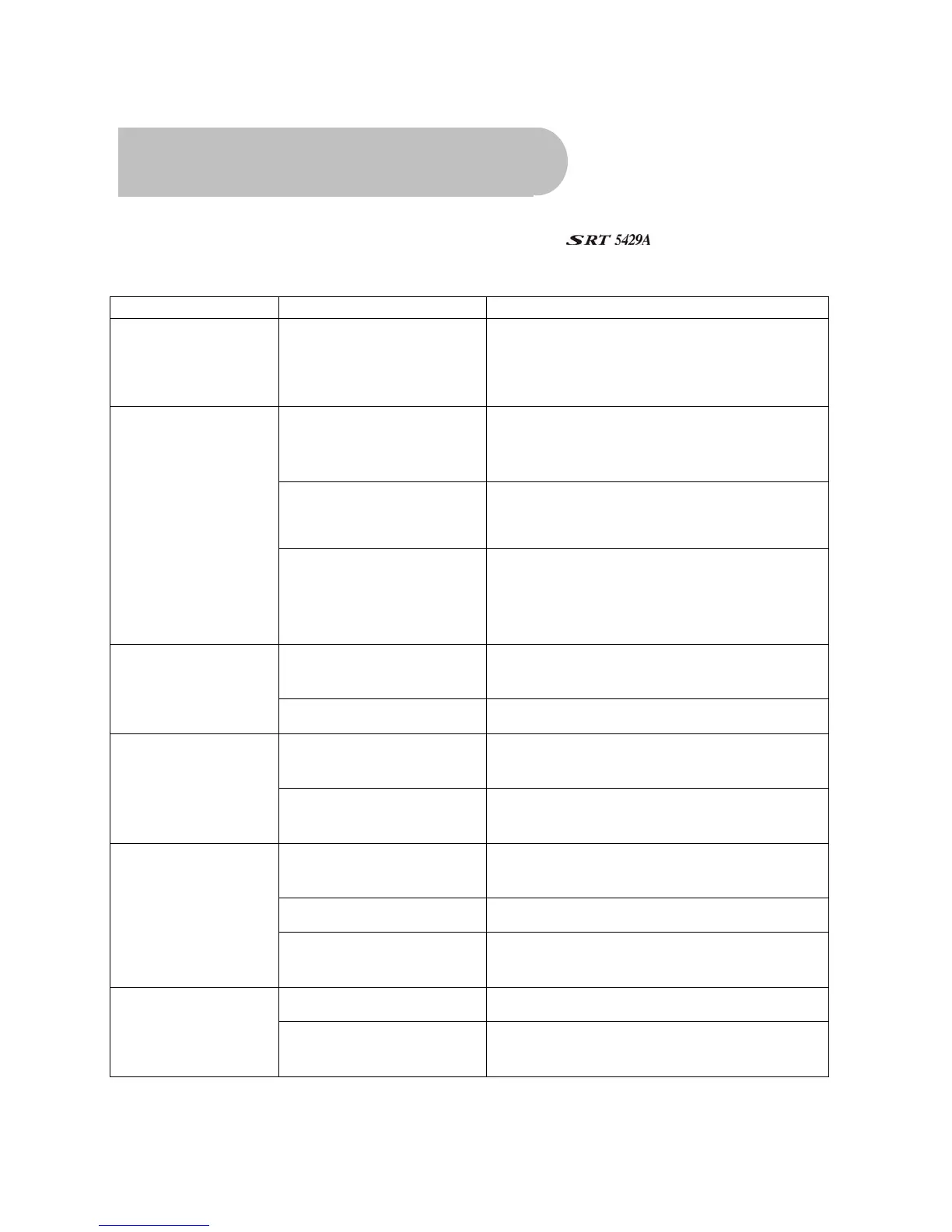
Symptoms Possible causes Solution
Indicators on front
panel do not light up
AC power cord is not
connected
Check that the power cord is plugged into the
wall socket.
Make sure the power switch is on.
The cables connecting the
TV and the receiver are not
properly connected
Make sure that the correct cable is connected
between the TV and the receiver, and that the
antenna is connected.
The TV mode is not correct Check that the correct video or AV input has
been selected on your TV.
No picture and sound
Incorrect video definition If you have a Composite or S-Video connection to
your TV, video definition must be set to 576i.
Press EXIT and then FORMAT on the remote
control until you see a picture.
Insufficient signal strength Check that the antenna cable is securely plugged
in and that the signal is adequate.
Picture and/or audio
glitch
Electrical interference Check that all antenna cabling is quad-shielded.
The receiver or TV is in
mute mode
Press the MUTE button on the receiver and on
the TV.
No sound
Initial volume level has not
been set on your TV
Select the desired TV volume level using the TV
remote control.
Batteries not inserted, or
incorrect polarity
Insert batteries, ensure the batteries are
inserted as per the diagram inside battery cover
Batteries are flat Change the batteries in the remote control.
Remote control is not
working
Remote control is outside
the range of operation
Aim the remote control directly at the receiver.
Files are of wrong format. Check that the format
is, MP3.
Music files on a USB
memory stick don’t
appear
Files are not at the root or
top level.
Move the files out of folders or directories.



 To Next Page