8
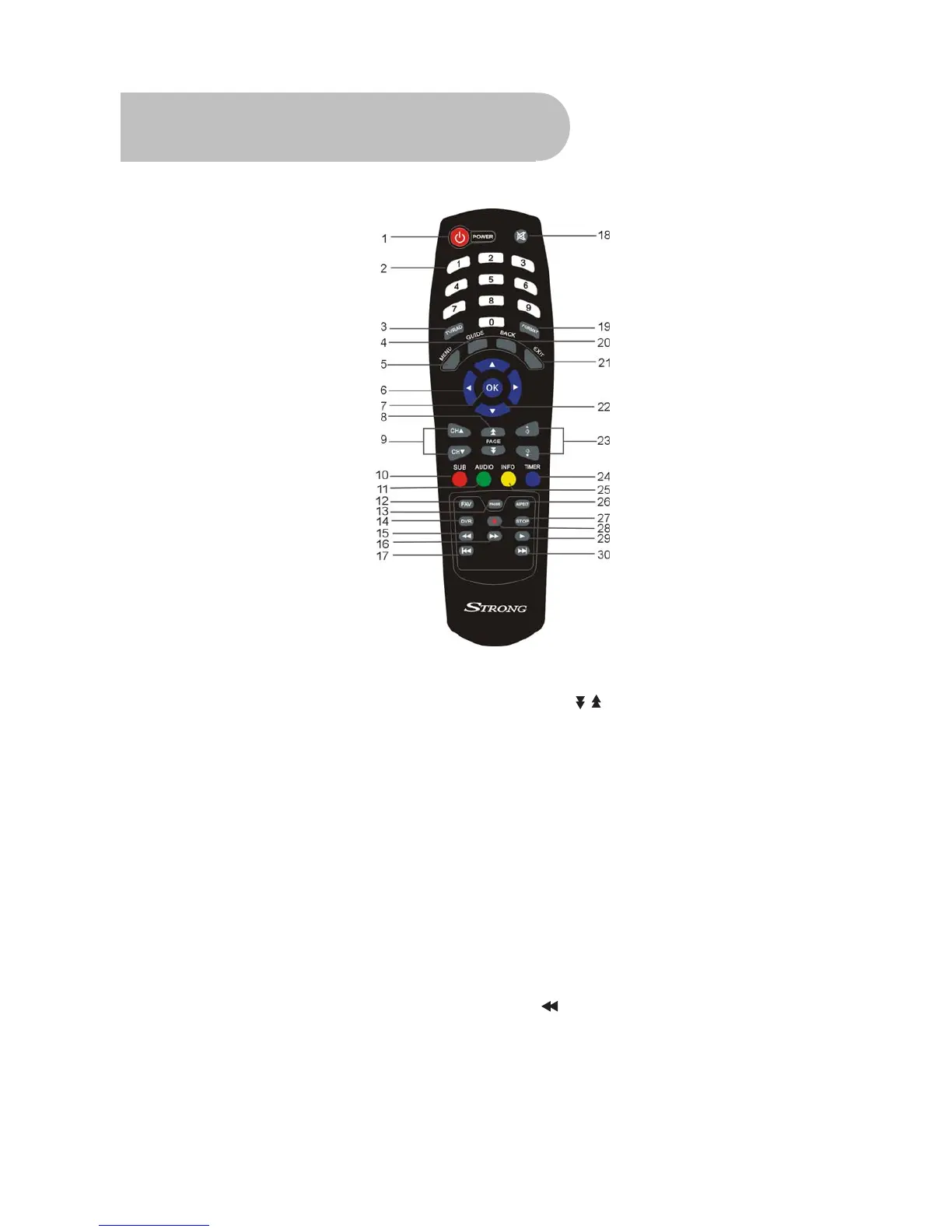
Remote Control
1. STANDBY: To switch to stand-by mode when the
receiver is on (or vice versa)
2. Numeric Keys (0–9): To choose a channel directly,
or to enter numeric information in a menu
3. TV/RAD: To switch between TV and radio (and vice
versa)
4. GUIDE (Electronic Program Guide): To show the TV
and radio program guide
5. MENU: To display the main menu, or return to a
previous menu
6. ( / )▲▼: To change the channel, or to move the
cursor up or down in a menu
7. OK: To show the channel list in viewing mode, and
to select an item (or confirm a choice) in a menu
8. PAGE
/ :
To move to the next or previous
page
9. CH ( / )▲▼: To change the channel, or to
move the cursor up or down in a menu
10. SUB: To turn subtitles on or off
11. AUDIO: To choose speakers (left, right or
stereo), audio format and audio language
12. FAV: To display the favourites list in
viewing mode, and to select a favourite
13. PAUSE: To freeze the screen
14. DVR:To Access DVR Menu directly
15.
To fast rewind a movie or music track



 To Next Page