Instruments and controls/Multi function display
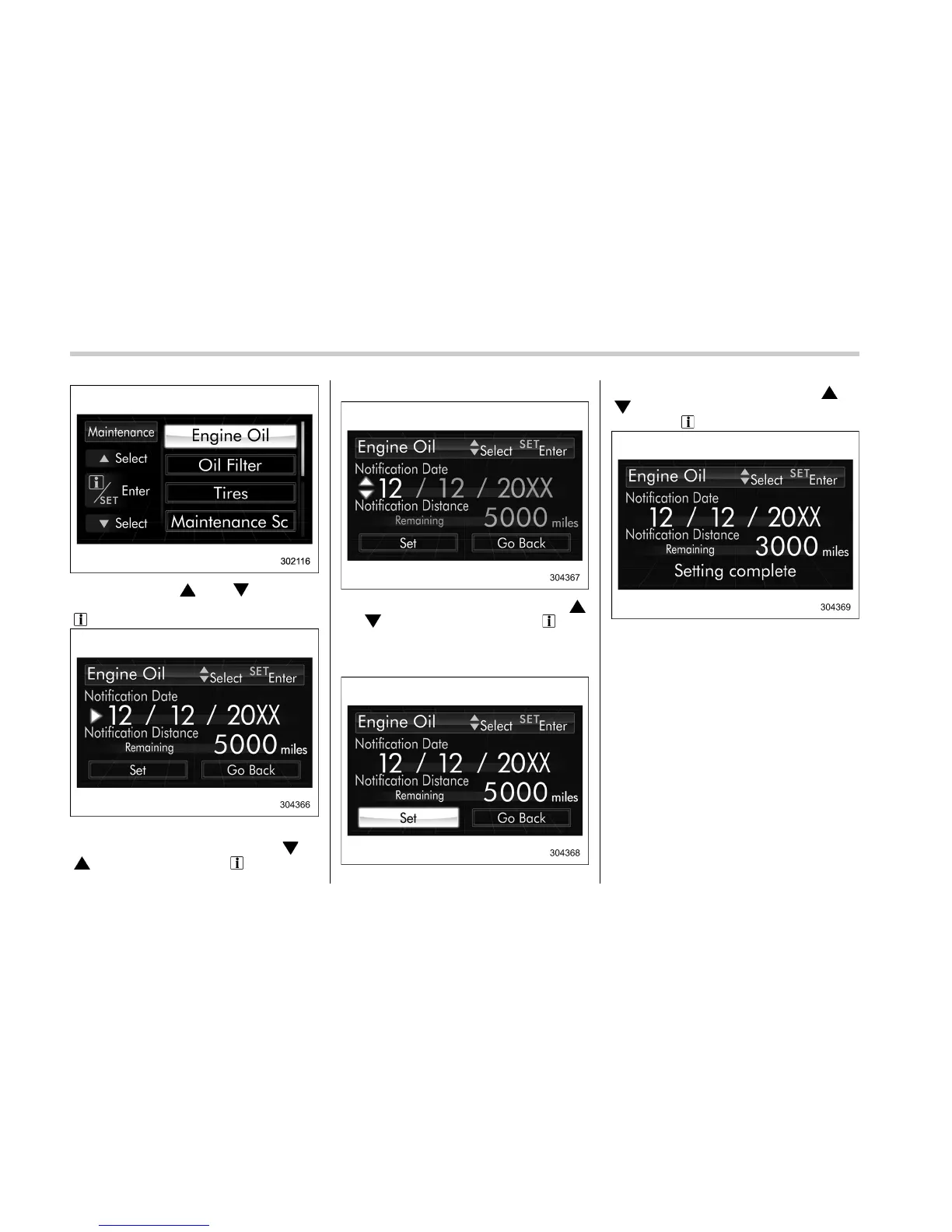
2. Operate the “ ” or “ ” switch to
select the “Engine Oil” item. Then pull the
“
/SET” switch toward you.
3. Select the setting location (month, day,
year or distance) by operating the “
” or
“
” switch. Then pull the “ /SET” switch
toward you.
4. Select a number by operating the “ ”
or “
” switch. Then pull the “ /SET”
switch toward you.
If you also want to change the setting for
another location, repeat steps 3 and 4.
5. Select “Set” by operating the “ ” or
“
” switch and confirm the setting by
pulling the “
/SET” switch toward you.
6. The system will notify you that the
setting is complete.
NOTE
. The notification will be displayed
with information of both date and
distance or either date or distance in
accordance with the setting
. When “__” is selected for either the
“Month”, “Day”, “Year” or “Distance”
item instead of numbers, the set noti-
fication will be deactivated.
. If the notification continues for 15
days or more, the system will display
“__” on the screen.
. When the distance announcement
3-68















 To Next Page