Black plate (99,1)
一般Model "A8140GE-A" EDITED: 2007/ 12/ 13
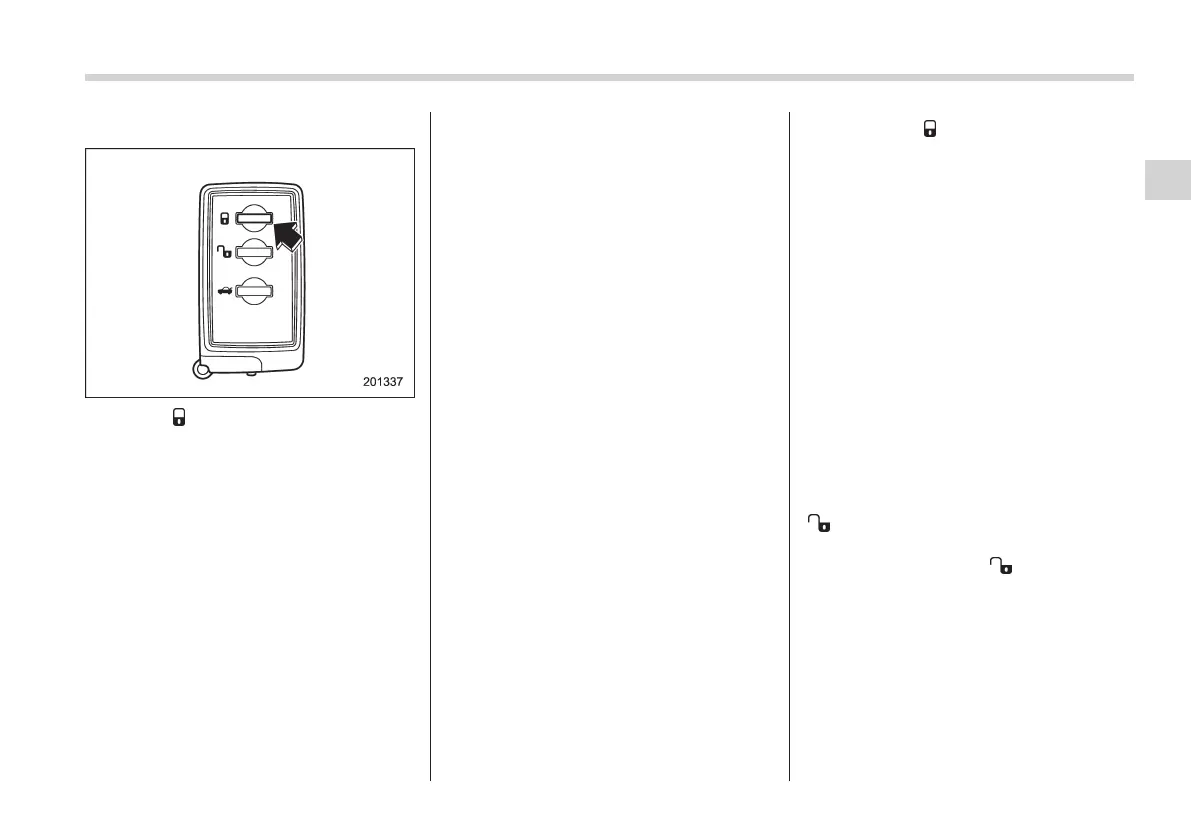
! Locking
When the “ ” button on the access key is
pressed near the vehicle, all doors includ-
ing the rear gate will be locked. Also, the
hazard warning flashers will flash once.
! Automatic locking (except vehicle
with double locking system)
If any of the doors or the rear gate was not
opened within 30 seconds after unlocking,
they will be automatically locked again.
When the vehicle is equipped with the
genuine SUBARU navigation system,
enabling/disabling of the automatic lock-
ing function and the time until the auto-
matic locking takes place can be set on
the monitor screen. For details, please
refer to the Owner’s Manual supplement
for the naviga tion system . When the
vehicle is not equipped with the genuine
SUBARU navigation system, the setting
can be changed at SUBARU dealers. For
more details, we recommend that you
contact a SUBARU dealer.
NOTE
. The operating range of the auto-
matic locking function is approximately
1 m from the vehicle, however when it
operate in a location when operating in
a location with strong radio waves or
noise (e.g., near a radio tower, power
plant, broadcast station and area where
wireless equipment is used), the oper-
ating ranges may change.
. Before leaving the vehicle, make
sure that it is locked.
. If any of the doors or the rear gate is
open, the function does not operate.
. Enabling/disabl ing of the hazard
warning flashers and the time that the
interior light stays illuminated can be
set at SUBARU dealers. For more
details, we recommend that you con-
tact a SUBARU dealer.
. When the “
” button on the access
key is pressed while the access key is
placed too close to the vehicle body,
unlocking by the keyless access func-
tions may not work. In such a case, the
functions will recover by unlocking
using the remote keyless entry system.
! Door unlock selection function (ex-
cept vehicles with double locking
system)
The door unlock selection function makes
it possible to unlock the driver’s door
without unlocking any other doors.
! Unlocking doors with the unlock
function
The unlocking procedure of this function is
as follows.
1. With all doors closed, pressing the
“
” button on the remote control causes
only the driver’s door to unlock.
2. If you press the “
” button again
within 5 seconds of unlocking the driver’s
door, all of the other doors and the rear
gate will be unlocked.
The op erational /non-operatio nal setting
for this function can be changed by a
SUBARU dealer.
Operational: Only the driver’s door is
unlocked.
Keys and doors 2-15
– CONTINUED –
2














 To Next Page