SunFounder PiCar-X Kit
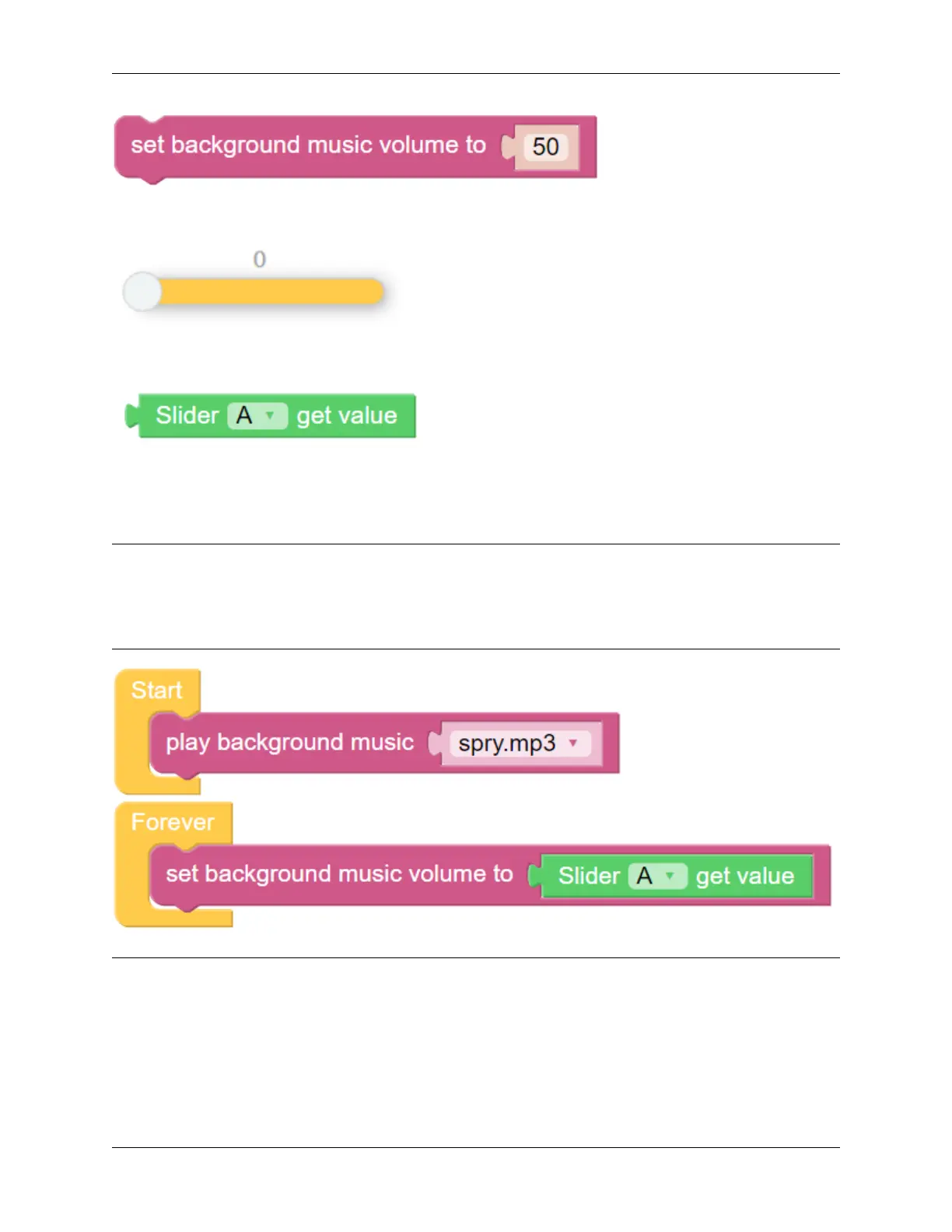
The block set background music volume to will adjust the volume between the range of 0 to 100.
Drag a Slider bar from the Remote Control page to adjust music volume.
The slider [A] get value block will read the slider value. The example above has slider ‘A’ selected. If there are multiple
sliders, use the drop-down menu to select the appropriate one.
EXAMPLE
Note:
• You can write the program according to the following picture, please refer to the tutorial: How to Create a New
Project?.
• Or find the code with the same name on the Examples page of the EzBlock Studio and click Run or Edit directly.
Note: Hello, welcome to the SunFounder Raspberry Pi & Arduino & ESP32 Enthusiasts Community on Facebook!
Dive deeper into Raspberry Pi, Arduino, and ESP32 with fellow enthusiasts.
Why Join?
• Expert Support: Solve post-sale issues and technical challenges with help from our community and team.
• Learn & Share: Exchange tips and tutorials to enhance your skills.
• Exclusive Previews: Get early access to new product announcements and sneak peeks.
134 Chapter 6. Play with Ezblock



 To Next Page