SunFounder PiCar-X Kit
Why Join?
• Expert Support: Solve post-sale issues and technical challenges with help from our community and team.
• Learn & Share: Exchange tips and tutorials to enhance your skills.
• Exclusive Previews: Get early access to new product announcements and sneak peeks.
• Special Discounts: Enjoy exclusive discounts on our newest products.
• Festive Promotions and Giveaways: Take part in giveaways and holiday promotions.
Ready to explore and create with us? Click [] and join today!
6.13 Music Car
This project will turn the PiCar-X into a music car that will travel around your home, playing cheerful music. This
project will also show how the PiCar-X avoids hitting walls with the built-in ultrasonic sensor.
TIPS
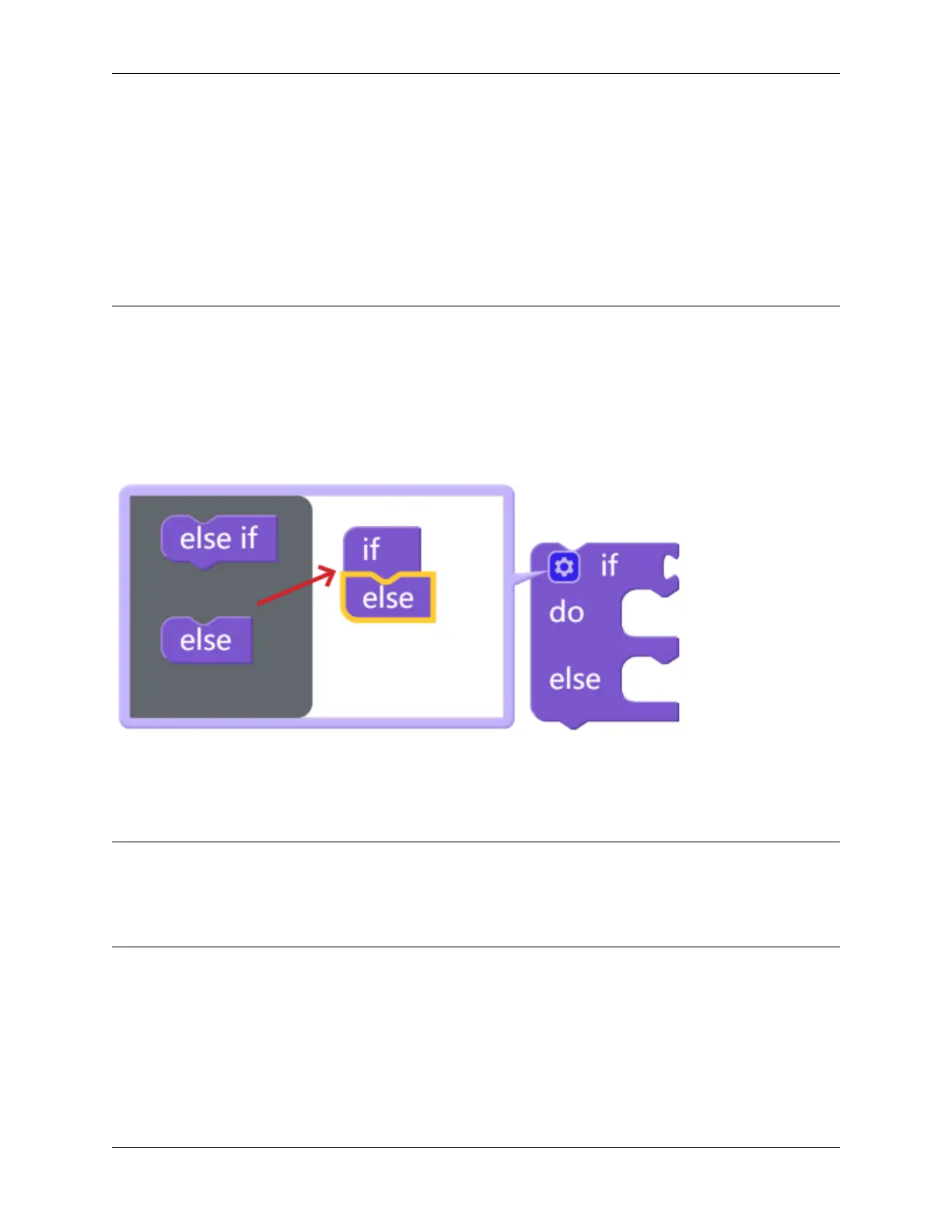
To implement multiple conditional judgments, change the simple if do block into an if else do / else if do block. This
is done by clicking on the setting icon as shown above.
EXAMPLE
Note:
• You can write the program according to the following picture, please refer to the tutorial: How to Create a New
Project?.
• Or find the code with the same name on the Examples page of the EzBlock Studio and click Run or Edit directly.
138 Chapter 6. Play with Ezblock



 To Next Page