SunFounder PiCrawler Kit
• Expert Support: Solve post-sale issues and technical challenges with help from our community and team.
• Learn & Share: Exchange tips and tutorials to enhance your skills.
• Exclusive Previews: Get early access to new product announcements and sneak peeks.
• Special Discounts: Enjoy exclusive discounts on our newest products.
• Festive Promotions and Giveaways: Take part in giveaways and holiday promotions.
Ready to explore and create with us? Click [] and join today!
For Windows Users
For Windows 10 or higher users, remote login to a Raspberry Pi can be achieved through the following steps:
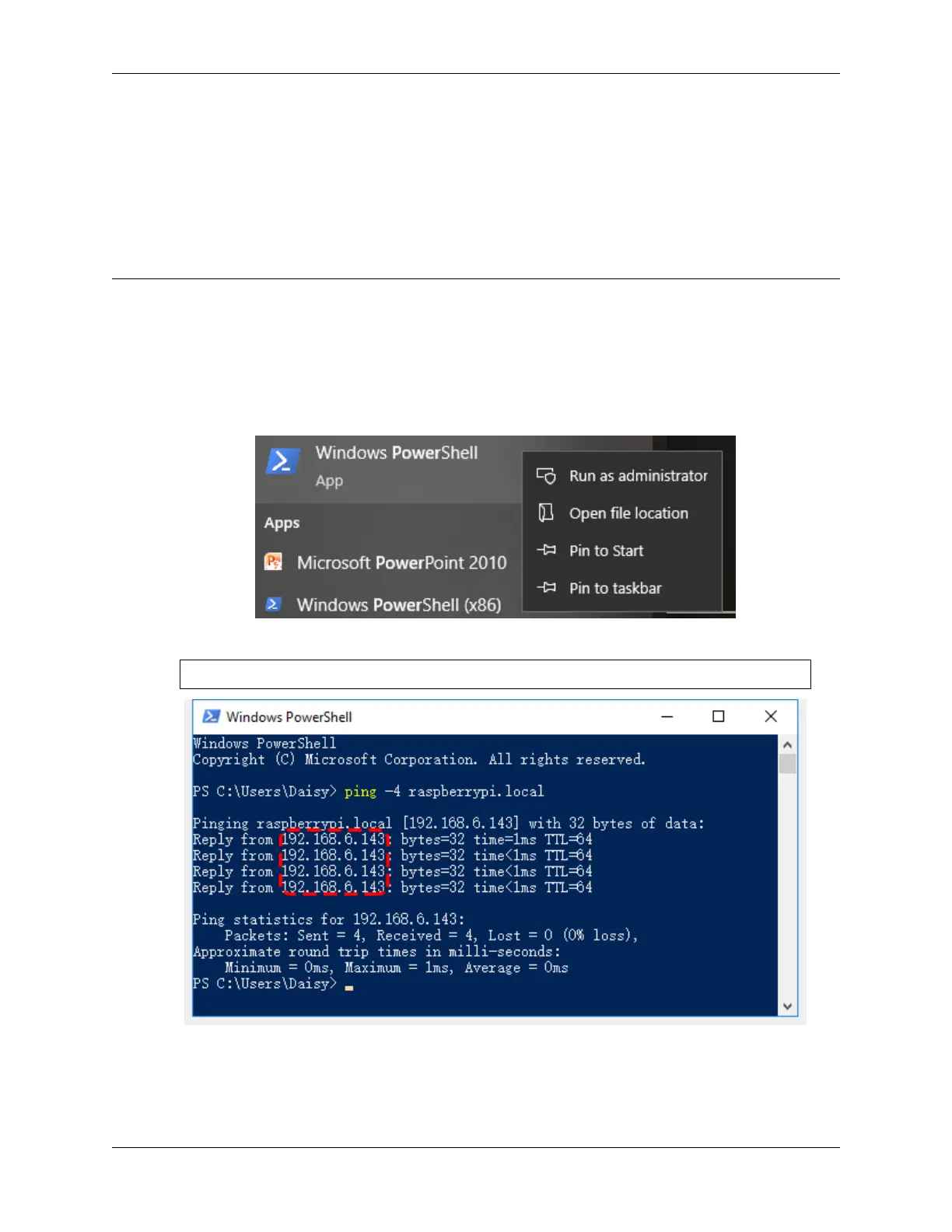
1. Search for powershell in your Windows search box. Right-click on Windows PowerShell and select Run as
administrator.
2. Determine your Raspberry Pi’s IP address by typing ping -4 <hostname>.local in PowerShell.
ping -4 raspberrypi.local
The Raspberry Pi’s IP address will be displayed once it’s connected to the network.
• If the terminal displays Ping request could not find host pi.local. Please check
the name and try again., verify the hostname you’ve entered is correct.
3.1. Quick Guide on Python 25



 To Next Page