SunFounder PiCrawler Kit
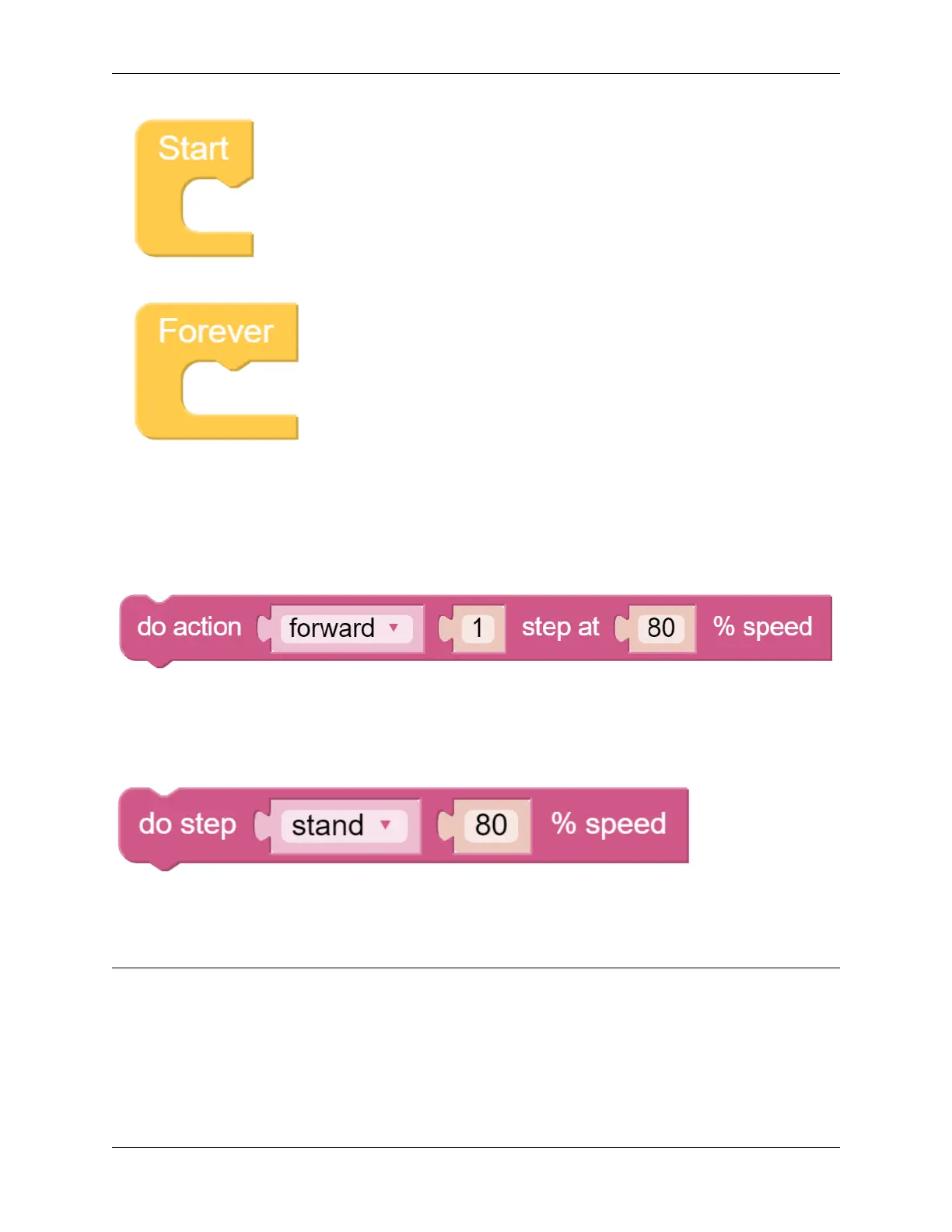
All Ezblock projects contain these two blocks. The Start block runs at the beginning of the program and is executed
only once, and is often used to set variables; the Forever block runs after Start, and will be executed repeatedly, and
is often used to implement main functions. If you delete these two blocks, you can drag them back from the Basic
category on the left.
Next you need to understand the following blocks.
do action allows PiCrawler to perform basic actions. You can modify the options in the first groove. For example,
select “Turn Left”, “Back” and so on. The second groove can set the number of executions of the action, and only
integer numbers greater than 0 can be written. The third groove can set the speed of the action, and only integers within
0~100 can be written.
do step is similar to do action, but it is not an action but a static posture. Such as “stand”, “sit”.
Both blocks can be dragged from the PiCrawler category on the left.
Note: Hello, welcome to the SunFounder Raspberry Pi & Arduino & ESP32 Enthusiasts Community on Facebook!
Dive deeper into Raspberry Pi, Arduino, and ESP32 with fellow enthusiasts.
Why Join?
• Expert Support: Solve post-sale issues and technical challenges with help from our community and team.
• Learn & Share: Exchange tips and tutorials to enhance your skills.
• Exclusive Previews: Get early access to new product announcements and sneak peeks.
94 Chapter 4. Play with Ezblock



 To Next Page