
EasyManua.ls Logo

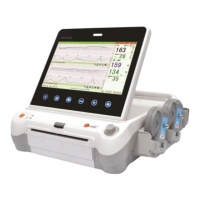
SUNRAY SRF618B6 - User Manual

SUNRAY SRF618B6
72 pages
Print Icon
To Next Page IconTo Next Page
Loading...
F
F
F
e
e
e
t
t
t
a
a
a
l
l
l
M
M
M
o
o
o
n
n
n
i
i
i
t
t
t
o
o
o
r
r
r
M
M
M
o
o
o
d
d
d
e
e
e
l
l
l
:
:
:
S
S
S
R
R
R
F
F
F
6
6
6
1
1
1
8
8
8
B
B
B
6
6
6
U
U
U
s
s
s
e
e
e
r
r
r
s
s
s
M
M
M
a
a
a
n
n
n
u
u
u
a
a
a
l
l
l

Table of Contents

Questions and Answers

  • A
    Alyssa McdanielAug 14, 2025
    Why is the trace/display inconstant on my SUNRAY SRF618B6?
    • B
      Brad GreeneAug 15, 2025
      If you are experiencing an inconstant trace or display with your SUNRAY Measuring Instruments, it might be due to several reasons. The position of the ultrasound transducer might be improper, so adjust it until a better signal is received. A loose belt could also be the cause, so try tightening it. If there's too much aquasonic coupling gel, wipe off the excess. Frequent fetal movements or maternal movement can also interfere; in these cases, delay monitoring or ask the patient to stay still. Finally, ensure you are using the recommended quantity of aquasonic coupling gel.
  • M
    Michelle TurnerAug 18, 2025
    What to do if the recorder does not work on SUNRAY SRF618B6 Measuring Instruments?
    • A
      annebarnesAug 18, 2025
      If your SUNRAY Measuring Instruments recorder isn't working, first, ensure it has been started by pressing the PRINT key. Check to see if it has run out of paper and, if so, load more paper. Also, make sure the paper drawer is securely locked by sliding it in until both latches click. If these steps do not resolve the issue, maintenance or replacement may be required.
  • B
    Brandon CoxAug 21, 2025
    Why is the trace quality bad or TOCO baseline fluctuant on SUNRAY SRF618B6 Measuring Instruments?
    • R
      Rebecca GonzalezAug 21, 2025
      If you are getting a bad trace quality or fluctuant TOCO baseline on your SUNRAY Measuring Instruments, the belt might be too tight or too loose, so adjust it accordingly. Alternatively, the belt might have lost its elasticity and need replacing. Maternal or frequent fetal movements can also cause this issue, so request the patient to remain still or delay monitoring.
  • K
    Katrina FernandezAug 25, 2025
    How to fix noise issues with SUNRAY SRF618B6 Measuring Instruments?
    • D
      dcoxAug 25, 2025
      If you are experiencing noise with your SUNRAY Measuring Instruments, try turning down the volume as it might be set too high. The noise could also be due to interference from a mobile phone or another electromagnetic source; try turning off or moving the source of interference. Alternatively, move the monitor to a place with less interference.
  • M
    Mrs. Tiffany Wilson MDAug 28, 2025
    What to do if SUNRAY SRF618B6 Measuring Instruments has a paper jam?
    • K
      kbrownAug 28, 2025
      If you encounter a paper jam in your SUNRAY Measuring Instruments, it might be due to incorrect loading or damp paper. Ensure you load the paper correctly and protect the paper from moisture.
  • M
    michael91Aug 31, 2025
    Why is there a feint or no trace on my SUNRAY Measuring Instruments?
    • K
      Katherine GutierrezAug 31, 2025
      If you are getting a feint or no trace on your SUNRAY Measuring Instruments, ensure that you are using the paper recommended by the manufacturer. Also, check that the paper drawer is locked properly by sliding it in until both latches are secured. If the issue persists, the adjusting nuts of the print head might be unbalanced, and you should contact the manufacturer for service.
  • R
    Rhonda BishopSep 3, 2025
    Why is the FHR doubtful on SUNRAY SRF618B6 Measuring Instruments?
    • R
      riverscourtneySep 3, 2025
      If you are getting a doubtful FHR reading on your SUNRAY Measuring Instruments, it could be wrongly recording the maternal heart rate. Try changing the position of the ultrasound transducer. It's also possible the transducer isn't well-placed, leading to mixed noise being recorded, so adjust its position.
  • M
    Matthew GilesSep 7, 2025
    How to troubleshoot no display and power off on SUNRAY SRF618B6?
    • T
      travis87Sep 7, 2025
      If your SUNRAY Measuring Instruments has no display and the power indicator is off, first check the power cable to ensure it is tightly connected. If it is, the fuse might be blown, so try changing it. Also, if you are using battery power, ensure that the battery is not depleted; connect to an AC power supply.
  • J
    Jordan TaylorSep 12, 2025
    Why is the TOCO sensitivity too high on SUNRAY SRF618B6?
    • A
      Ann SmithSep 12, 2025
      If the TOCO sensitivity on your SUNRAY Measuring Instruments is too high (greater than 100 units), it could be because the body pressure from the uterus to the TOCO transducer is higher than average. Ensure there is favorable contact between the patient's skin and the TOCO transducer. If needed, change the position of the TOCO transducer.

Summary

Manufacturers Statement

Terms Used in this Manual

Safety Labels and Definitions

Explains WARNING, CAUTION, and NOTE labels for user safety and equipment care.

Chapter 1 Safety Guidance

Indications, Contraindications, and Patient Populations

Specifies who the monitor is for and when it should not be used.

Critical Warnings and Safety Notes

Lists crucial warnings for electrical safety, modifications, and general operation.

Definition and Symbols

Explains symbols and definitions for device operation and understanding.

Chapter 2 Overview of the Instrument

Instrument Functions, Configurations, and Components

Details the monitor's intended use, optional features, and provides a component overview.

Keys, Control Knob, and Accessories

Describes the purpose and operation of the monitor's control keys, knob, and accessories.

Screen Interface and Ordering Information

Presents the main interface and lists part numbers for the Fetal Monitor.

Chapter 3 Installation Guide

Unpacking, Battery, and Power Connection

Covers unpacking, battery installation, and connecting the power cable.

Chapter 4 Alarm Management

Alarm Classification, Audible, and Visual Alerts

Explains alarm types, severity levels, and audible/visual alarm indicators.

Alarm Review, Treatment, Testing, and Defaults

Guides on responding to alarms, testing functions, and default settings.

Alarm Information and System Alarms

Lists specific alarm messages and system-related technical alarms.

Chapter 5 Printing

Recorder Functions, Paper Loading, and Print Settings

Describes recorder features, how to load paper, and select print settings.

Printing Traces and Understanding Output

Explains how to print traces, select ranges, and interpret the printed output.

Chapter 6 Settings

System Settings Configuration

Covers language, screen color, alarm volume, and other system-level adjustments.

Fetal Settings Configuration

Details settings for FHR range, display speed, trace separation, and alarm limits.

Chapter 7 Pre-monitoring Preparation

Power On, Screen Adjustment, Date;Time Setting

Instructions for turning on the monitor and adjusting the screen angle and time.

Transducer Connection, Placement, and Verification

Covers connecting transducers and verifying correct installation and functionality.

Chapter 8 Fetal Monitoring

Confirming Fetal Life and Ultrasound Monitoring

Explains how to confirm fetal life and the process of FHR monitoring with ultrasound.

Monitoring Multiple FHRs, Uterine Activity, and Fetal Movement

Details procedures for monitoring multiple fetuses, uterine contractions, and fetal movements.

Wireless Transducers, Monitoring Start, Patient Info, Review, and File Management

Discusses wireless transducer use, starting monitoring, patient data, review, and file management.

Chapter 9 After Monitoring

Completing and Switching Off the Monitor

Covers steps for finishing monitoring, printing, and safely powering down the device.

Chapter 10 Maintenance and Cleaning

Monitor, Transducer, and Battery Maintenance

Details visual, routine, and mechanical inspections, plus transducer and battery care.

Cleaning and Disinfecting Procedures

Offers detailed steps for cleaning and disinfecting transducers and reusable belts.

Recorder Cleaning, Sterilization, and Disposal

Covers cleaning the recorder, sterilization, and proper disposal of the monitor.

Chapter 11 Product Specifications

Safety, Environmental, Physical, and Performance Specs

Details safety classifications, operating conditions, physical attributes, and performance metrics.

Recorder and Battery Specifications

Lists specifications for the monitor's recorder and its batteries.

Chapter 12 Abbreviation

Common Abbreviations

Lists abbreviations and their corresponding full names for user reference.

Chapter 13 EMC Information

EMC Testing and Emissions Management

Discusses EMC testing, emissions, immunity, and reducing electromagnetic interference.

Chapter 14 FCC Statement

FCC Compliance and Usage Guidelines

Details FCC rules, interference handling, and radiation exposure limits.

Chapter 15 Ultrasonic Related Information

Ultrasound Principles, Effects, and Parameters

Covers the basics of ultrasound, ALARA, effects, and relevant parameters.

References, Statistics, and Measurement Uncertainties

Lists cited references, statistical data analysis, and measurement uncertainties.

Chapter 16 Troubleshooting

Troubleshooting Guide

Provides a table of problems, possible causes, and solutions for common issues.

SUNRAY SRF618B6 Specifications

General IconGeneral
TypeRF Signal Generator
ModulationAM, FM, PM, Pulse
Accuracy±1 dB
Harmonics≤ -30 dBc
DisplayLCD
InterfacesUSB, LAN, GPIB
Power Supply100-240 VAC, 50/60 Hz