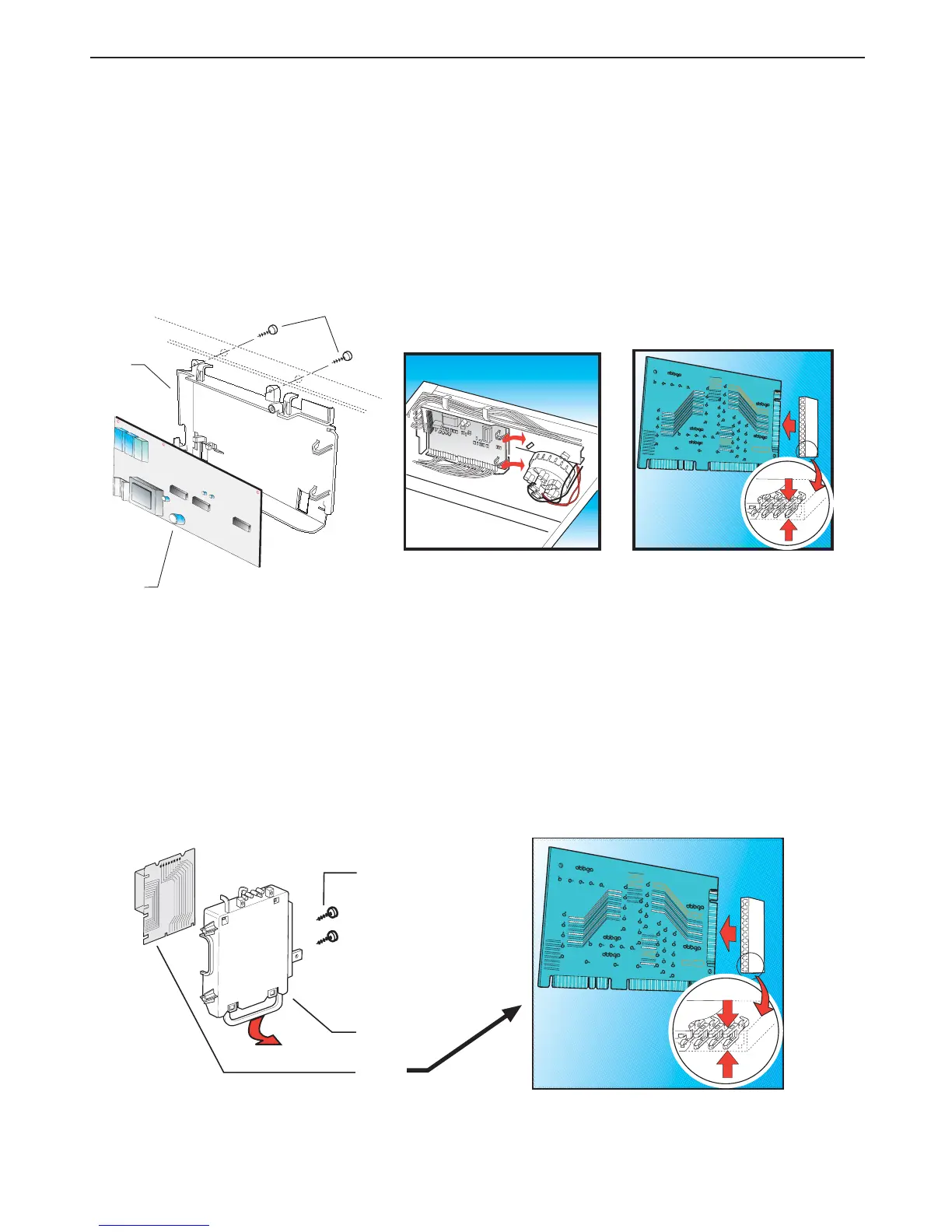
Step 10 Removing the electronic wash module (A210) and/or support (A200):
(a) Remove the rear cover (Step 2).
(b) Remove the top cover (Step 1).
(c) Remove the two fixing screws (A220) securing the module mounting box (A200).
(d) Remove the module mounting box (A200) from its housing, then delicately remove the electronic
module (A210) by levering on the plastic locking clips.
(e) Carefully disconnect the electric connectors.
(f) To re-assemble, follow the same procedure in reverse order, making sure that the connectors are
tight in order to avoid false contacts.
Step 10 For 33 cm and 39 cm washing machines:
Removing the electronic module (A210) and/or the electronic module support (A200):
(a) Remove the rear cover (Step 2).
(b) Remove the two fixing screws (A220) securing the module mounting box (A200).
(c) Remove the module mounting box (A200) from its housing, then delicately remove the electronic
module (A210) by levering on the plastic locking clips.
(d) Carefully disconnect the electric connectors.
(e) To re-assemble, follow the same procedure in reverse order, making sure that the connectors
are tight in order to avoid false contacts.
A200
A220
A210
A220
A200
A210


 To Next Page