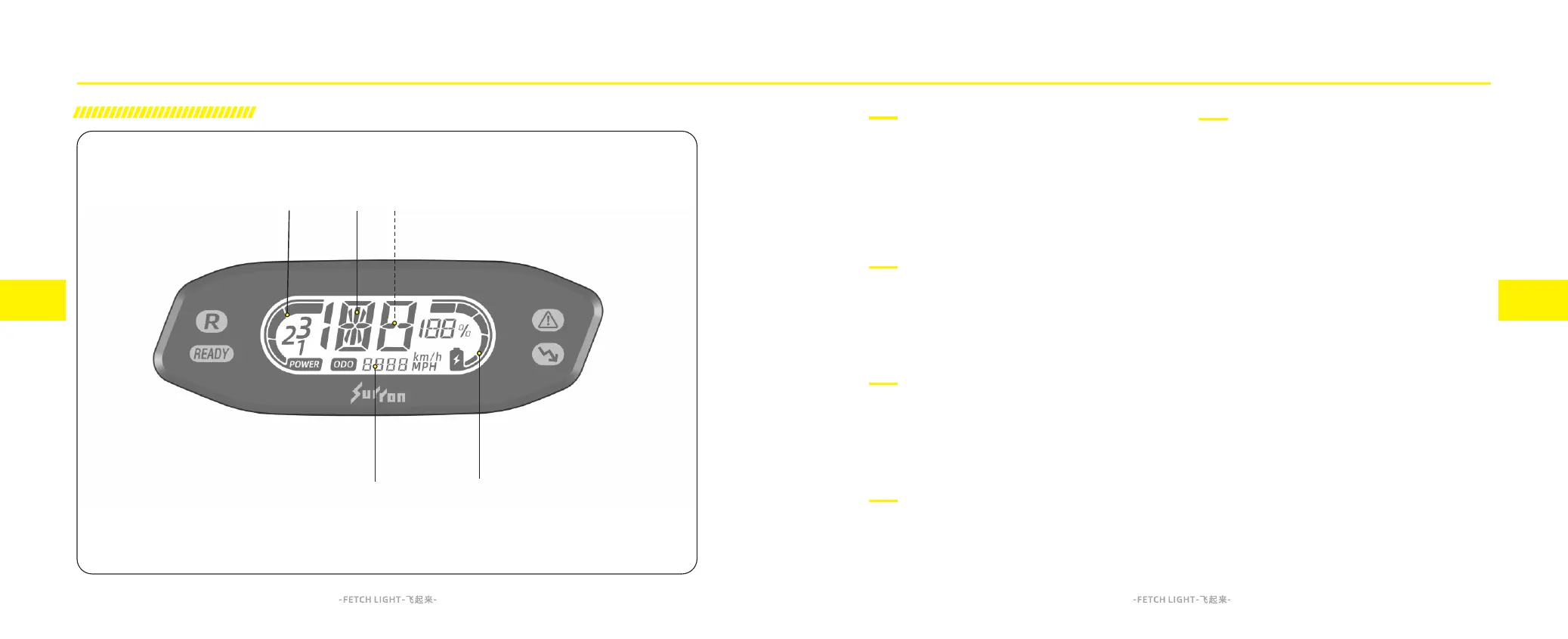
A. Power mode
This area displays the power mode corresponding the
Power mode of level 1, level 2, level 3.The Power mode
can be set using the Hyper Bee remote control or by
using a combination of buttons on the left combination
switch. For description and operation, please refer to
"Feature Introduction", on page 6.4.
B. Speedometer
The speedometer displays in either kilometers per hour
(km/h) or miles per hour (mph).For description and
operation, please refer to "Feature Setting", on page
5.1.
C. Warning Code Display
When a system fault has been detected, the corresponding
Warning Code will be displayed in this area. For Warning
Code explanation, please refer to "Troubleshooting" on
page 11.4.
D. Charge Indicator
This indicator displays the SoC (State of Charge) of your
battery pack., which is similar to the fuel gauge on a
gasoline powered motorcycle.
E. Odometer
The odometer displays the total distance the motorcycle
has been ridden in kilometers or miles. For more
information, please refer to page 5.1.
Display and Indicator
4.1
4.2
Dashboard introduction
Display and Indicator



 To Next Page