_ _ _ _ _ _ _ _ _ _ _ _ _ N O T E _ _ _ _ _ _ _ _ _ _ _ _ _
Volume adjustment only affects the Hyper Bee Remote
volume, not the speaker volume on the vehicle
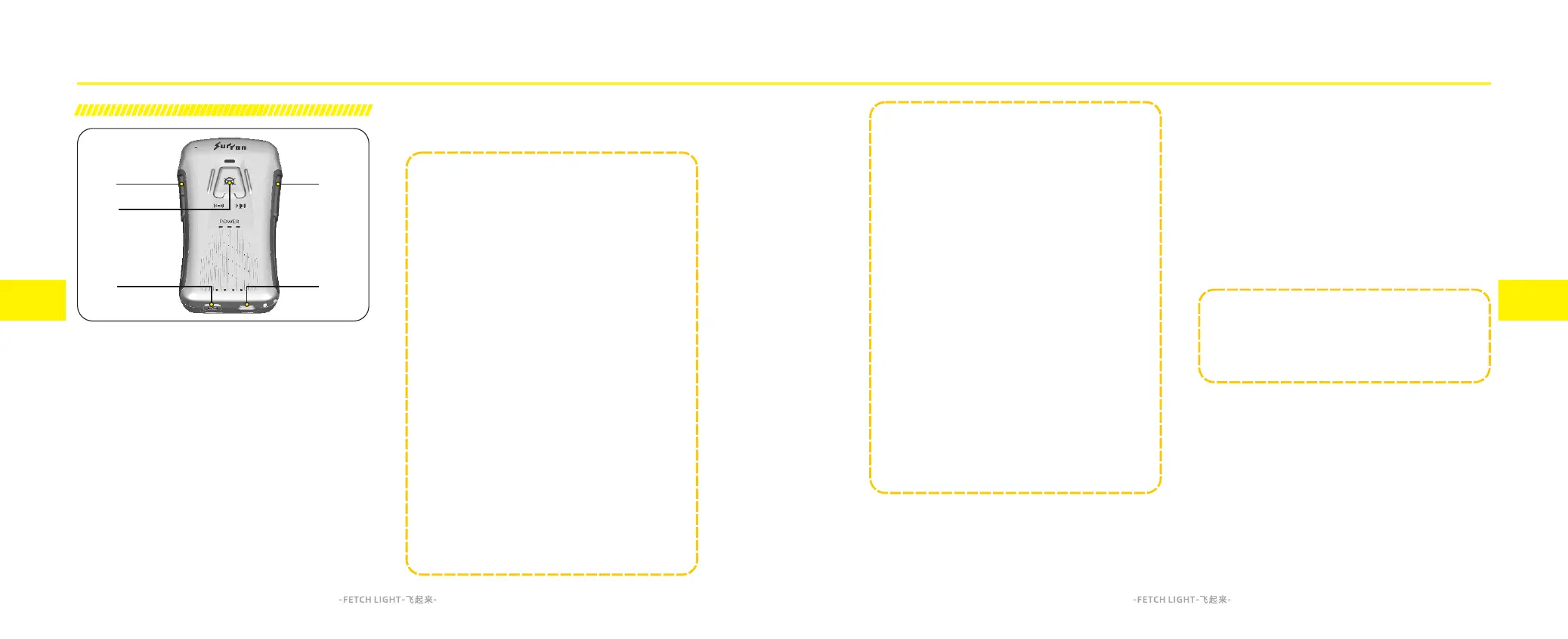
C. Hyper Bee Remote Volume Up/Down Buttons
Short press “+” button to increase the Hyper Bee
Remote volume.
Long press “+” button to rise the Power mode level.-
Short press “-” button to decrease the Hyper Bee
Remote volume.
Long press “-” button to lower the Power mode level.-
While powered on, long press and hold both the “+”
button and “-” button power to switch the audio
language of Hyper Bee Remote.
D. Emergency Power Cut Button
When the Hyper Bee Remote is properly paired and
connected to the vehicle, you can short press the
emergency power cut button on the Hyper Bee Remote
in case of unexpected situations during vehicle use. This
will immediately cut off the vehicle’s power output, and
the Hyper Bee Remote will audibly announce "Vehicle
power OFF," with the emergency power cut indicator
showing a steady red light.
6.5
Introduction of Hyper Bee Remote Functions
A. Power Button
Hyper Bee Remote Power On:Long press the power
button for 2 seconds.
Hyper Bee Remote Power Off:While powered on, long
press the power button for 2 seconds.
Hyper Bee Remote Battery Check (When OFF):Short
press the power button, and the battery indicator will
light up to show the current battery level of the Hyper
Bee Remote.
Hyper Bee Remote Motorcycle Pairing Mode (When
OFF):Long press the power button and hold until
Connection Status Indicator flashing blue light.
B. Charging Port
This is the charging interface for the Hyper Bee Remote.
6.6
Feature introduction Feature introduction
3. Do not store the Hyper Bee Remote with less
than 1 bar of the battery level.
4. When the Hyper Bee Remote is not use for a
long period of time, it is recommended to check
the battery level every 3 months and recharge it to
more than 3 bars.
5. Do not let water flood into the Hyper Bee Remote;
Do not get Hyper Bee Remote close to open fire.
If you encounter the following situations, please
stop charging and disconnect the power supply
immediately, and do not use the Hyper Bee Remote,
contact after-sales service or immediately:
1, Smell burning during charging;
2,The surface temperature of the Hyper Bee
Remote is too high;
3, The built-in battery of the Hyper Bee Remote is
bulging, causing deformation of the remote case.
_ _ _ _ _ _ _ _ _ _ _ _ _ N O T E _ _ _ _ _ _ _ _ _ _ _ _ _
The input power is a 5W USB-C connection (5V/1A).
Please use the original accessories for charging
and unplug the power promptly after the battery is
fully charged to avoid potential battery damage
Please take the Hyper Bee Remote out of the
accessory box immediately after receiving the
motorcycle and charge the Hyper Bee Remote
battery State of Charge (SoC) to full.
The Hyper Bee Remote has a built-in lithium
battery, to avoid the degradation of the battery's
performance due to environmental reasons,
please do not use and store it exceed the working
temperature range.
1. Please use the Hyper Bee Remote within the ambient
temperature range of -20℃ ( -4°F) ~60℃ (140°F).
2. Do not charge the Hyper Bee Remote below 0°C
(32°F) and above 45°C(113°F).



 To Next Page