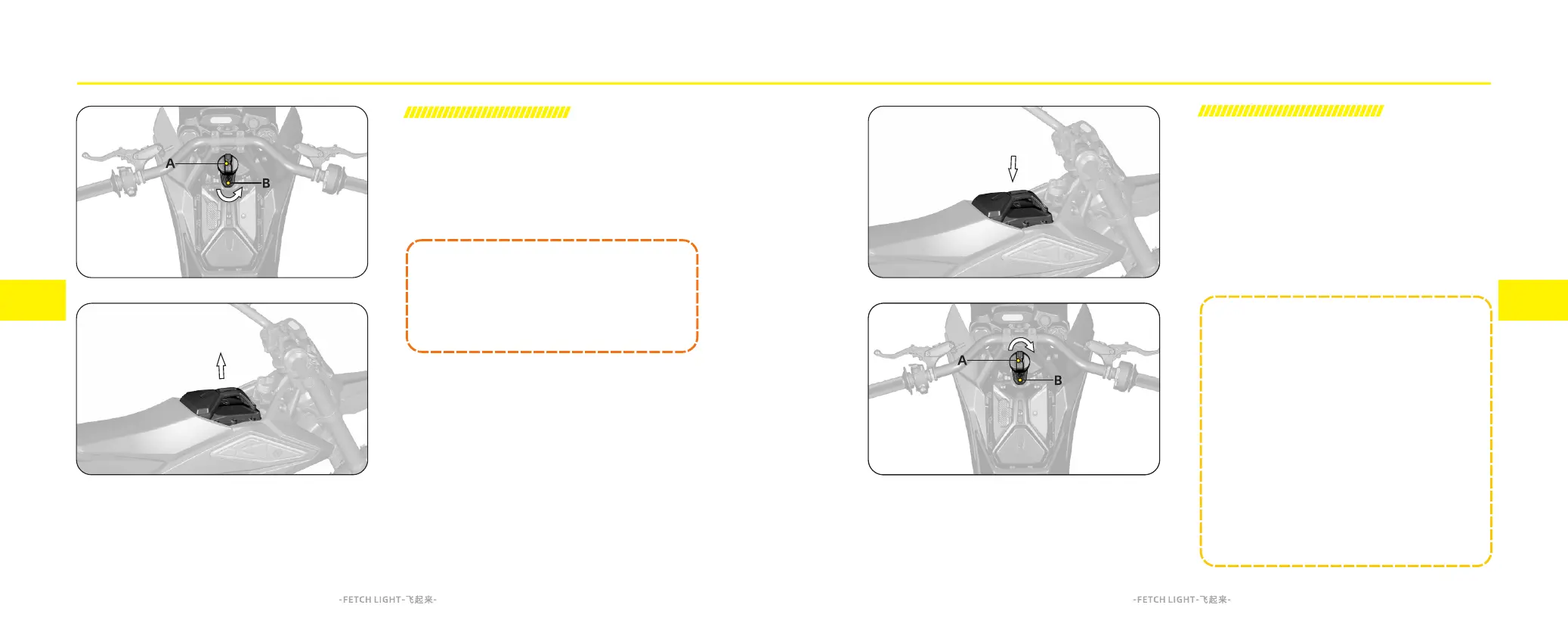
Battery Pack Installation
1.Ensure the battery locking arm is fully to its right most
position
2.Put the battery pack in the battery compartment.
3.Rotate the tightening knob A clockwise to move the
battery locking arm B is positioned above the battery
and tighten the knob to secure the battery pack. Double
check that they battery is firmly retained as it may cause
vehicle damage or even personal injury during riding if
it is loose.
Battery Pack Removal
1. Turn off the key switch
2. Rotate the tightening knob A counterclockwise to
move the battery locking arm B fully to its right most
position
3. Remove the battery pack upwards along the arrow
_ _ _ _ _ _ _ _ _ _ _ _ _ N O T E _ _ _ _ _ _ _ _ _ _ _ _ _
When installing the battery pack, ensure that the
battery locking arm is on the right side and does not
obstruct the installation of the battery pack
Before installing the battery pack, check for any
other objects or water in the battery tray and
discharge socket. If present, clean them thoroughly
before installing the battery pack. Otherwise, it may
lead to improper installation of the battery pack or
poor contact at the discharge socket, which could
result in your motorcycle being damaged
6.11 6.12
_____________WARNING_____________
Before removing or installing the battery pack on
the motorcycle, make sure the key switch is in the
off position to ensure the vehicle is powered off
Feature introduction Feature introduction



 To Next Page