The available features are listed below:
①Energy regenerative (REGEN) level setting (E0 E1 E2
E3)
Factory default is E2(Feature is disabled in E0, and
strengthens in turn from E1 to E3)
②Throttle sensitivity setting (F1 F2 F3)
Factory default is F1(F1 to F3 sensitivity increases in
sequence)
③Horn sound setting (G1~Gn)
Factory default is G1(G1~Gn are different sound effects)
④Tilt protection feature setting (C0 C1)
Factory default is C1(Feature is disabled in C0,and
activated in C1)
⑤Hyper Bee remote pairing mode(T0 T1)
Factory default is T0(T0 is for pairing mode OFF, T1 is for
pairing mode ON)
⑥Bluetooth headset pairing mode(I0 I1)
Factory default is I0(I0 is for Bluetooth headset pairing
mode OFF, I1 is for Bluetooth headset pairing mode ON)
⑦Speed unit setting(M1 M2)
Factory default is M0(M1 is in km/h, M2 is in MPH)
Exit the system feature mode setting:
1.Press and hold the SET button and READY button for
more than 2 seconds to exit the system feature mode
settings
2.When selecting and adjusting features, the system will
automatically exit the system feature mode settings and
save any changes you made if there is no operation for
approximately 10 seconds
Feature Setting
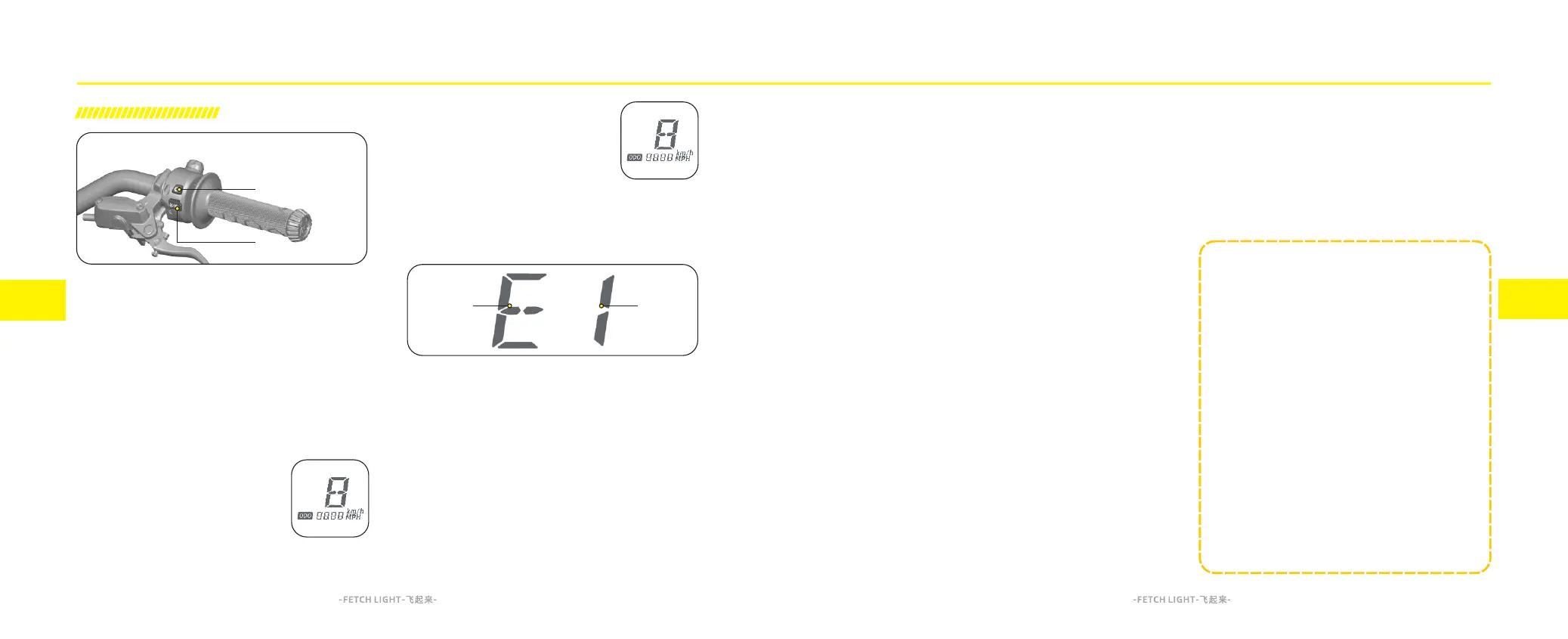
Dashboard setting
The performance features and displays on the dashboard
can be customized to your personal preferences by
using the A and B buttons on the Handlebar Control.
A. SET Button
By using the SET button, you can shift between feature
setting menus and display relevant vehicle functions.
B. READY Button
To select the vehicle's functions by using the READY
button when entered the feature menu.
Speed and odometer unit display
Please refer to the system feature
s et ti n gs f or s w it ch i ng b et w ee n
kilometers and miles.
MPH is displayed when Miles per
Hour(mph) has been selected.km/h is displayed when
Kilometer per Hour (Km/h) has been
selected.
Note: Displays one letter in field A
( D if fe re nt l et te rs a re d is pl aye d
according to different feature modes).
Display one number in field B (Different
Numbers are displayed according to different options
within any selected feature).
System Feature Mode setting:
When the vehicle is stationary, powered on and has not
been put into the READY state, press and hold the SET
button + READY button for more than 2 seconds to enter
the system feature mode.
After entering the system feature mode, short press the
SET button to shift between vehicle functions such as E2,
C1, F1. When the vehicle function is paused, for example
at E2, short press the READY button to adjust the level to
E3, E0, E1, etc., cycling through in order until the level
you want is reached. If there is no button operation after
10 seconds, it will automatically exit and save any
changes you have made to your settings.
5.1
5.2
_____________N OTE_____ _ _ _ _ _ _ _ _
When in system feature mode setting, the vehicle
cannot be ridden. You need to exit the system
feature mode setting and press the READY button
to enable your motorcycle to be ridden
Be advised that the tilt sensor can be activated
when performing jumps or stunts resulting in an
unanticipated loss of power. To extend the life
span and the safety of the battery pack, when the
battery state of charge (SOC) is over 95% or the
battery internal temperature is outside the range
of -8°C to 50°C, the energy regenerative function
will be disabled, The Alarm AL-128 will appear on
the Warning Code Display area
Feature Setting



 To Next Page