©2022 Sveaverken. All rights reserved. 14
Sveaverken F100 Auto Steer System Software User Manual
To download the vehicle information from the cloud to the control terminal, tap
Sync
.
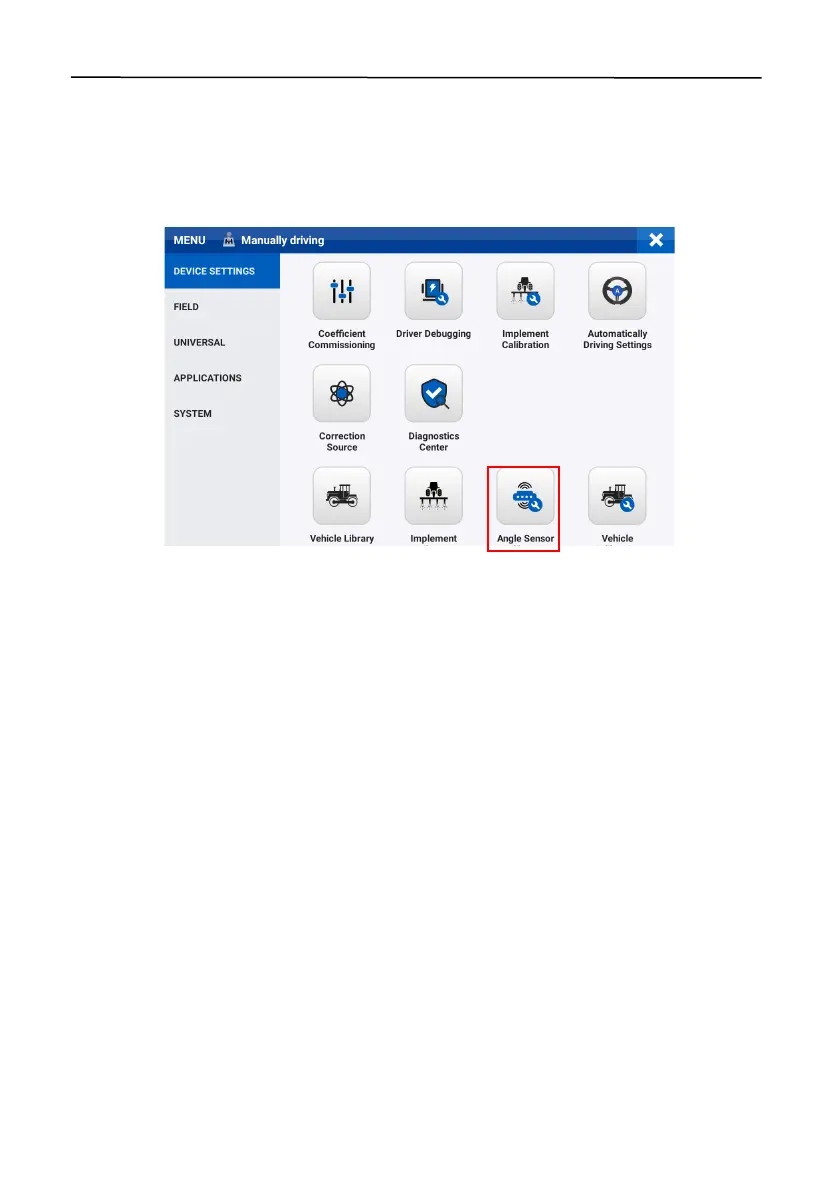
2.7 Calibrating the Angle Sensor
After setting the vehicle parameters, calibrate the angle sensor to ensure the steering control
accuracy. Choose
MENU
>
DEVICE SETTINGS
>
Angle Sensor Calibration
. Select the sensor type,
and the corresponding settings screen appears.
Figure 22.
Select Angle Sensor Calibration
2.7.1 No Angle Sensor
When no angle sensor is installed, select
No Angle Sensor
for the sensor type, and the
corresponding settings screen appears.
Vehicle steering speed ratio
Turn t he s t e er ing w heel from t h e le ft l i m it posi t ion t o the right limit position, and record the
number of turns. The vehicle steering speed ratio is the value multiplied by 6.
Maximum turning angle
The maximum a n g l e that the wheels can tu rn to the left or r i g h t f r o m t h e a ligned po s ition .
Compensation coefficient
After setting the vehicle steering speed ratio and maximum turning angle, you need to adjust the
compensation coefficient, if the straight line performance is less than satisfactory in the
autosteering mode. The default value is 0. When the steering wheel responds too slowly, increase
the value, which cannot exceed 10. If the steering wheel responds too fast, decrease the value
moderately.



 To Next Page