©2022 Sveaverken. All rights reserved. 40
Sveaverken F100 Auto Steer System Software User Manual
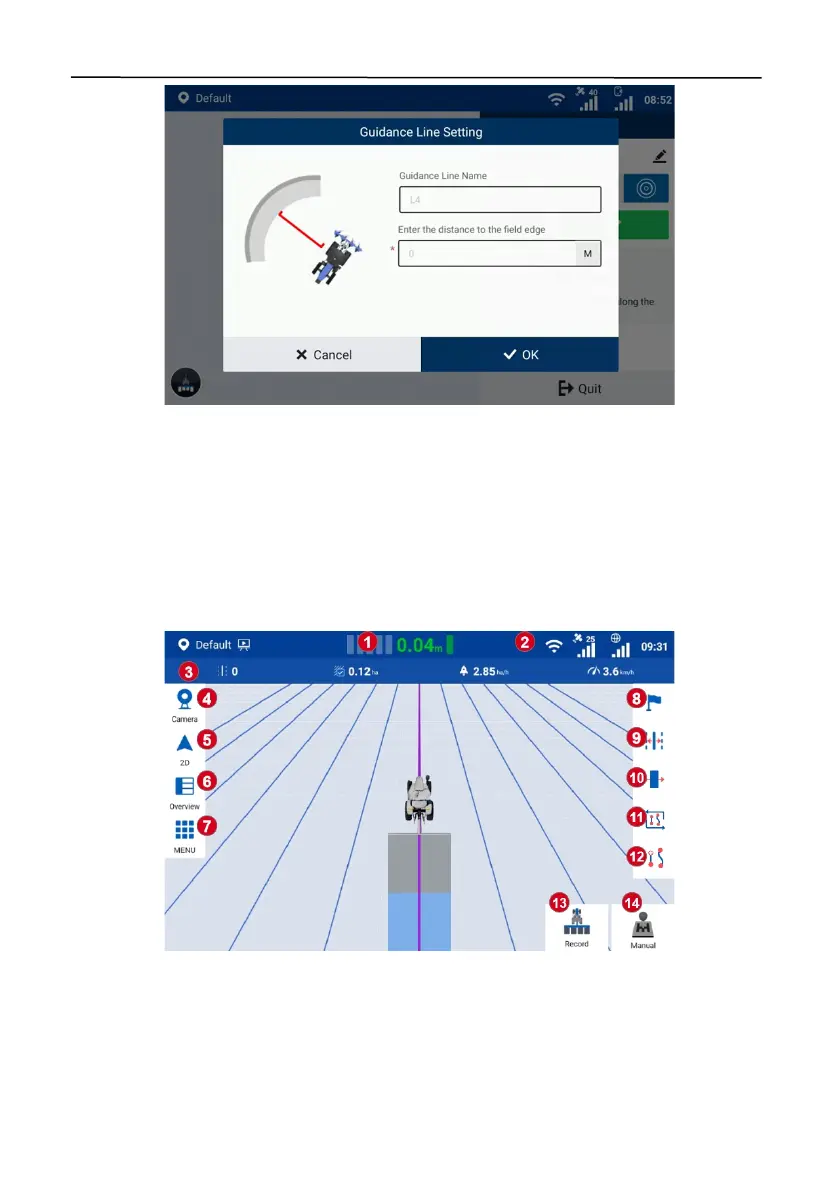
Figure 71.
Enter the distance to the field edge
Note
: During a task operation with a pivot pattern, when you are returning to the start point after
finishing one circular path, stop the autosteering operation according to the on-screen instructions
20 m away from the start point, drive the vehicle manually to the next circular path, and repeat the
above steps until operations along all circular paths are completed.
4 Starting the Task
4.1 Home Screen Elements
Figure 72.
Home screen elements
1.
Offset value:
Displays the offset of the current path relative to the guidance line.
2.
Signal strength icons:
Shows the strength of the satellite signal (satellite tracking), RTK
correction signal, or other correction source signals.
3.
Real-time task operation data:
Shows the current task operation data, including, from left to



 To Next Page