67 ©2022 Sveaverken. All rights reserved.
Sveaverken F100 Auto Steer System Software User Manual
Turn a r ound
direction selected
The turnaround direction is
selected, but the turnaround is not
started. The turnaround direction
can be changed at this time.
The turnaround direction is
selected, and the turnaround is in
process. The turnaround direction
cannot be changed at this time.
Before the vehicle turns around, follow the instructions on the screen to reduce the speed and raise
the implement. During the turnaround, follow the instructions on the screen to keep a constant
speed and avoid other operations.
Note:
1. When you are using the turnaround mode ①, you only need to keep a low speed during the
turnaround.
2. When you are using the turnaround mode ②, you need to engage the forward or reverse gear
manually as instructed, and keep a low speed during the turnaround.
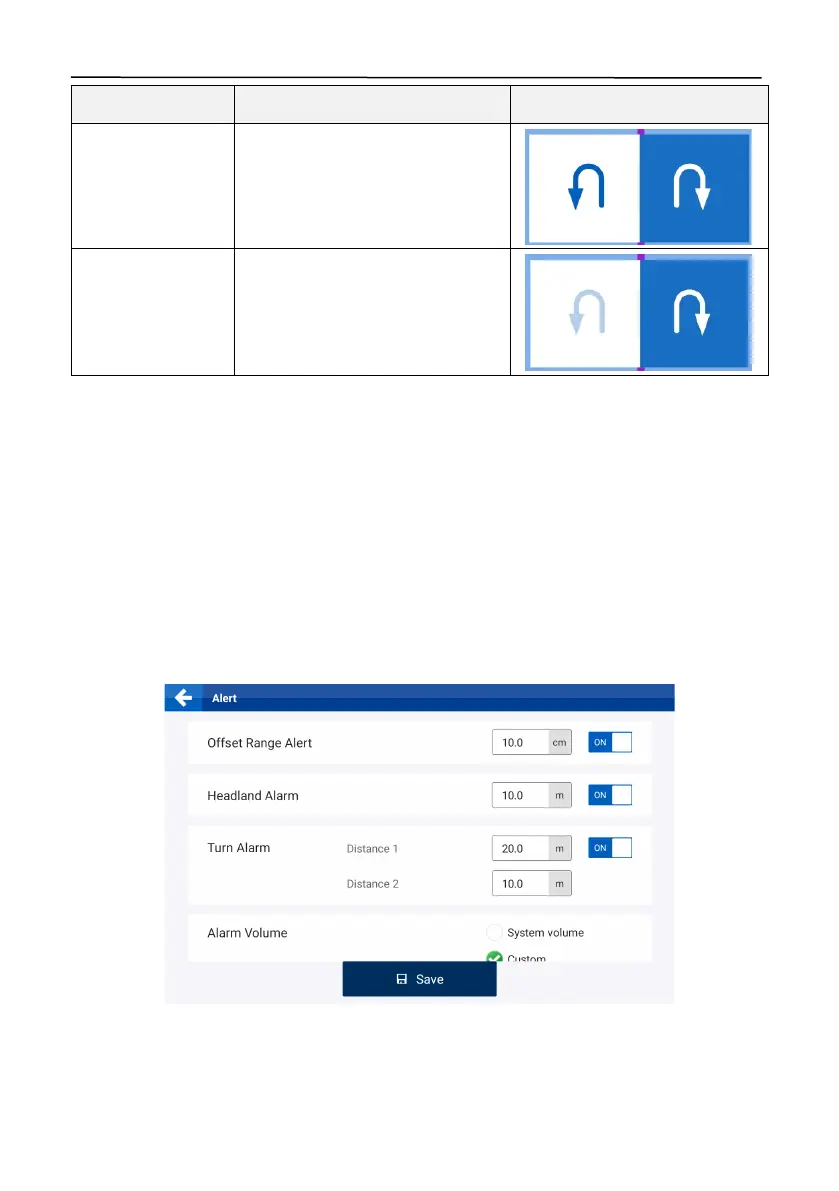
3. To change distance for the system to instruct you to reduce the speed and raise the implement
for turning around, ensure that Basic U-turn is enabled, choose
MENU
>
SYSTEM
>
Alert
, and
change distance 1 and distance 2 for
Tur n A l arm
.
Figure 113.
Basic U-turn and Smart U-turn alarm
5.3 Manual Intervention
This f ea ture is useful when you are unable t o tap on the screen in t im e d uring the autosteering



 To Next Page