©2022 Sveaverken. All rights reserved. 74
Sveaverken F100 Auto Steer System Software User Manual
Note:
1. The Wi-Fi camera is an optional accessory and must be purchased separately.
2. A maximum of two Wi-Fi cameras can be bound.
5.8 Data Transfer
Through the Inte rn et or USB *, the task files can be exported and shared with other control
terminals, and the task files from other control terminals can be imported into the system. The
current version supports the sharing of boundary files and guidance line files.
* please check whether the hardware supports USB data transfer
5.8.1 Via the Internet
You can transfer data to other users of Sveaverken F100 Auto Steer System via the Internet.
Tap
Data Transfer
on the
APPLICATIONS
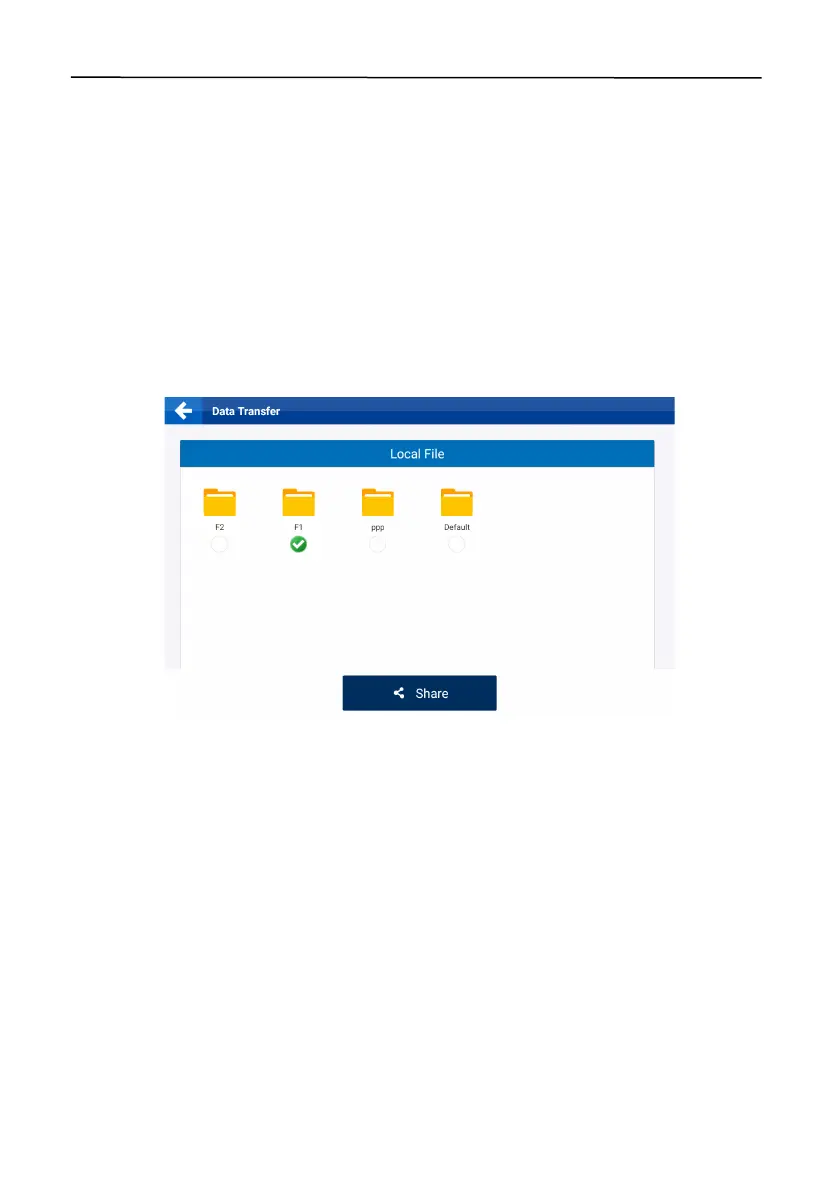
screen, and then select the files to be transferred.
Figure 121.
Select the files
Note:
1. Each field folder represents a field and contains all the task information of the field. Tap the
circle below the folder to select all the boundary files and guidance line files in the folder.
2. Tap the field folder to open it, and then tap the circle below either the boundary folder or the
guidance line folder to select all the files in the folder.
3. Tap the boundary folder or the guidance line folder to open it, and then select one or multiple
files in the folder.
4. Task data cannot be shared online.
Tap
Share
, and a popup appears. Enter the user account of the recipient, select the SN of the
target device, and tap
OK
.



 To Next Page