25 ©2022 Sveaverken. All rights reserved.
Sveaverken F100 Auto Steer System Software User Manual
Figure 42.
Manual calculation
The above installation and commissioning aims to ensure high-accuracy navigation. Before any
operation, you still need to make the following preparations.
3 Preparations
Make the following preparations before any operation:
Check the signal source connection → check the task configuration (create or select a field * →
create or select a task → create or select a boundary * → create or select a guidance line) → check
the implement configuration → obtain heading → start the operation.
* Field and boundary are only included in advanced mode. For basic mode users, only task and
guidance line setting are required.
3.1 Checking the Signal Source Connection
Before any operation, check the signal source connection. Refer to section 2.5 "Connecting to a
Signal Source" for details.
3.2 Checking the Task Configuration
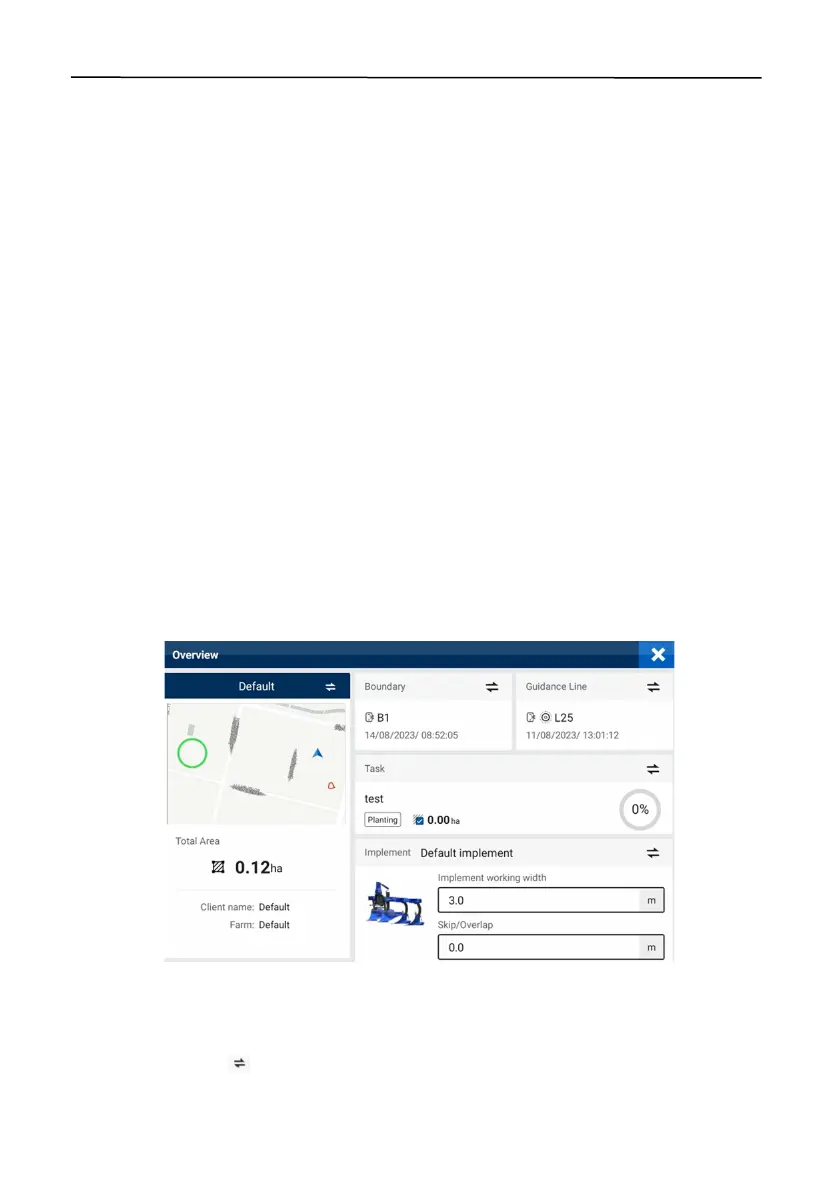
To preview and switch the fields, tasks, boundaries, guidance lines, and implements, tap
Overview
on the home screen. Refer to section 6.4 "Field" for details on how to add, delete, modify, check,
and manage the fields, tasks, boundaries, and guidance lines.
Note: The functions related to fields and boundaries are only available after activating advanced
mode.
Figure 43.
Overview (after advanced mode activated)
3.2.1 Creating or Selecting a Field (Available after activating advanced mode)
The field name, field map, field area, client name, and farm name are displayed on the left of the
Overview
screen. Tap to switch to another field or create a field.



 To Next Page