26 A-96.250.341 / 061015
AMI Powercon
Installation
3.4. Installation of Cation Exchanger
Cation ex-
changer bottle
The bottle containing the cation exchanger is delivered, but not in-
stalled into the flow cell. For transport, an empty bottle has been in-
stalled into the flow cell.
Install cation
exchanger
bottle
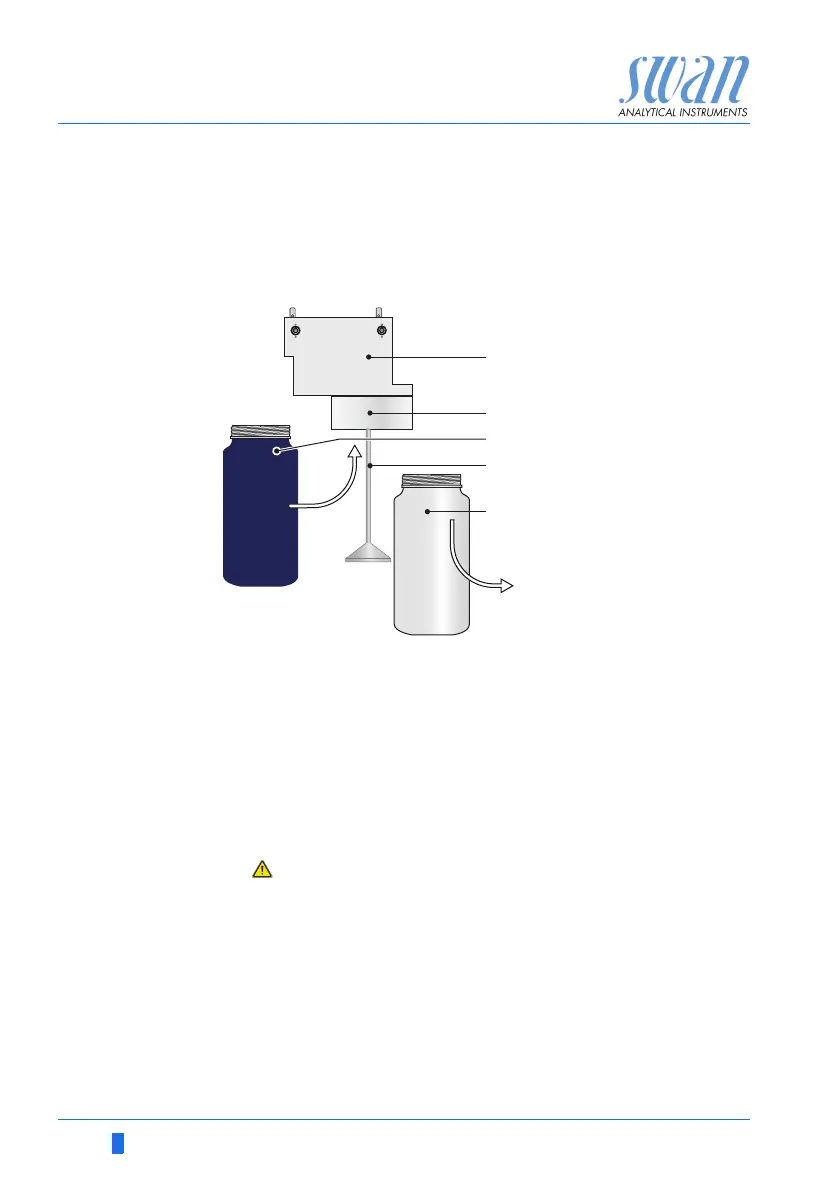
Install the resin bottle as follows:
1 Unscrew and remove the empty bottle [E] from the bottle holder
[B].
2 Fill high purity water into the cation exchanger bottle [C], until
the water level in the bottle reaches the beginning of the thread.
3 Carefully, without spilling water, push the cation exchanger bot-
tle over the inlet filter holder [D] into the bottle holder [B].
4 Screw the cation exchanger bottle into the bottle holder.
Do not tighten the bottle too firmly, this could damage the
gasket.
Pre-rinse setup If you have a pre-rinse set-up, proceed according to “Install cation
exchanger bottle” to install the second cation exchanger bottle.
A
B
C
D
E
Flow cell
Bottle holder
Cation exchanger bottle
Inlet filter holder
Empty bottle
A
B
C
E
D



 To Next Page