48 A-96.250.341 / 061015
AMI Powercon
Maintenance
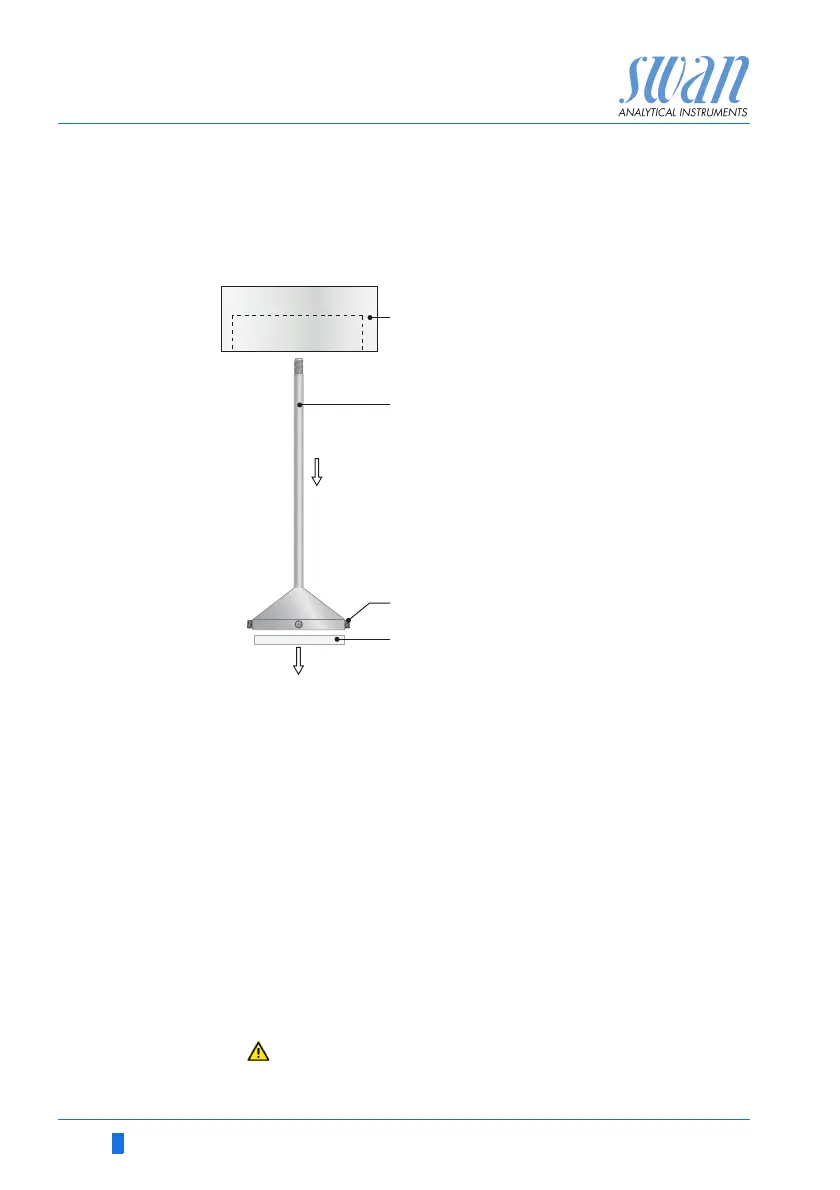
6.5. Changing the inlet filter
The inlet filter of the cation exchanger prevents the resin from en-
tering the flow cell. It is located in the inlet filter holder [B].
1 Stop sample flow.
2 Slightly squeeze the cation exchanger bottle [E] before remov-
ing.
Thus no water will spill out of the flow cell when loosening the
bottle.
3 Unscrew and carefully remove the cation exchanger bottle.
4 For better access to the allen screws [C] unscrew and remove
the filter holder [B] from the bottle holder [A].
5 Loosen the 4 allen screws with a 1.5 mm allen key.
6 Carefully remove the inlet filter [D] with a screw driver no.0 from
the inlet filter holder.
7 Insert a new inlet filter.
8 Tighten the 4 allen screws slightly.
9 Screw the cation exchanger bottle into the bottle holder.
Do not tighten the bottle too firmly, this could damage the
gasket.
A
B
C
D
Bottle holder
Inlet filter holder
Allen screws
Inlet filter



 To Next Page