Equipment details
99
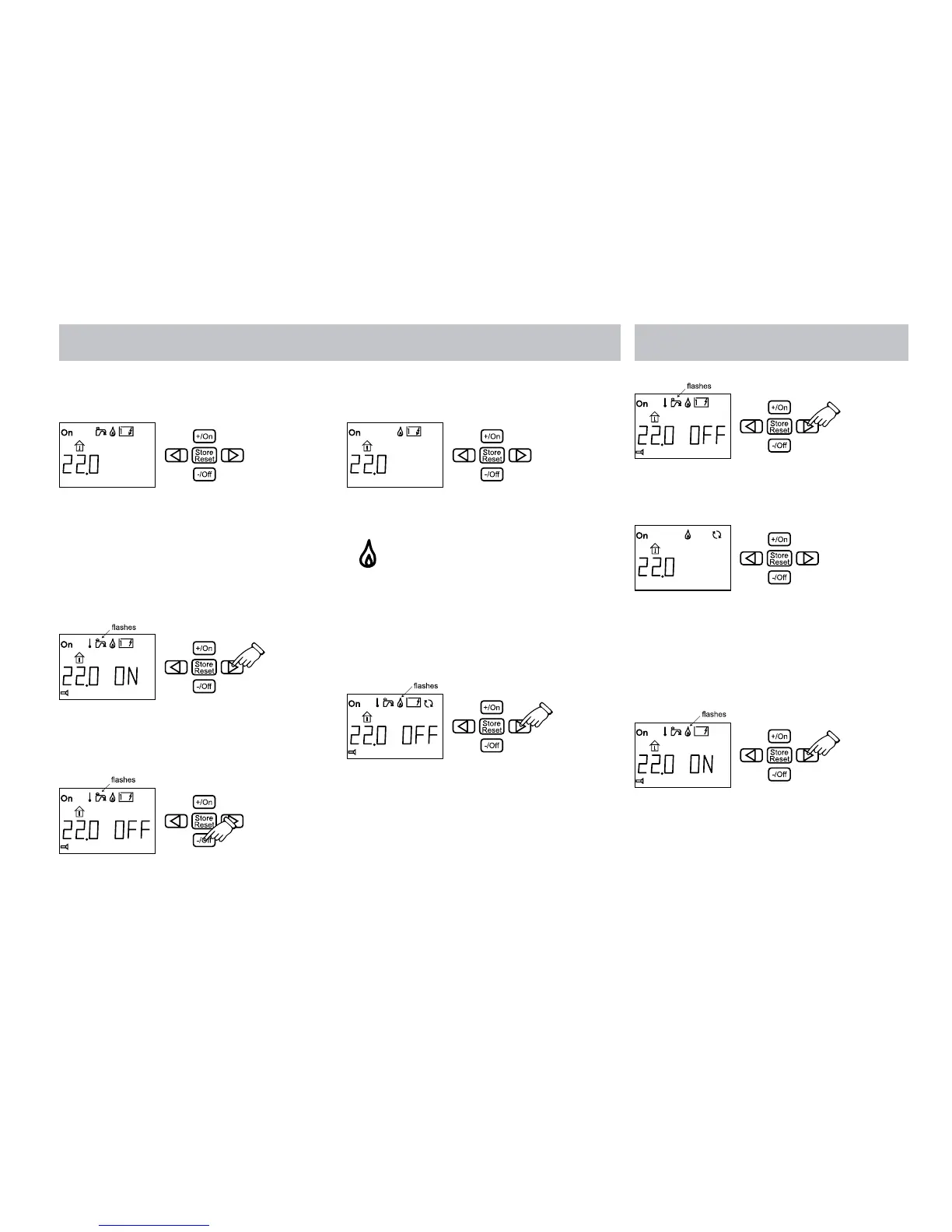
3. The warm water symbol is displayed when
the panel returns to standby.
If you want you can switch off more warm water
before 30 minutes have elapsed.
1. Press the button with the arrow until the
warm water symbol flashes. The “ON” text
is shown next to the temperature on the
display.
2. Switch off the warm water by pressing the
-/Off button. The “OFF” text is shown next
to the temperature on the display.
3. The warm water symbol goes out when the
panel returns to standby.
6. HEATING WITH GAS
Do as follows to activate heating with gas.
1. Press the button with the arrow until the
gas heating symbol flashes. The “OFF” text
is shown next to the temperature on the
display.
2. Select gas heating by pressing the +/On
button. The “ON” text is shown next to the
temperature on the display.
3. The gas heating symbol is displayed when
the panel returns to standby.
Do as follows to switch off the gas heating.
1. Press the button with the arrow until the
gas heating symbol flashes. The “ON” text
is shown next to the temperature on the
display.
2. Switch off the gas heating by pressing the
-/Off button. The “OFF” text is shown next
to the temperature on the display.







 To Next Page