Using Bluetooth 3 - 5
3. Select an action from the drop-down list. Options include:
•
Explore Services on Remote Device
•
Pair with a Remote Device
•
Active Sync via Bluetooth
•
Browse Files on Remote Device
•
Connect to Headset
•
Connect to Internet Using Access Point
•
Connect to Internet Using Phone/Modem
•
Connect to a Personal Area Network
•
Send or Exchange Objects
•
Associate Serial Port.
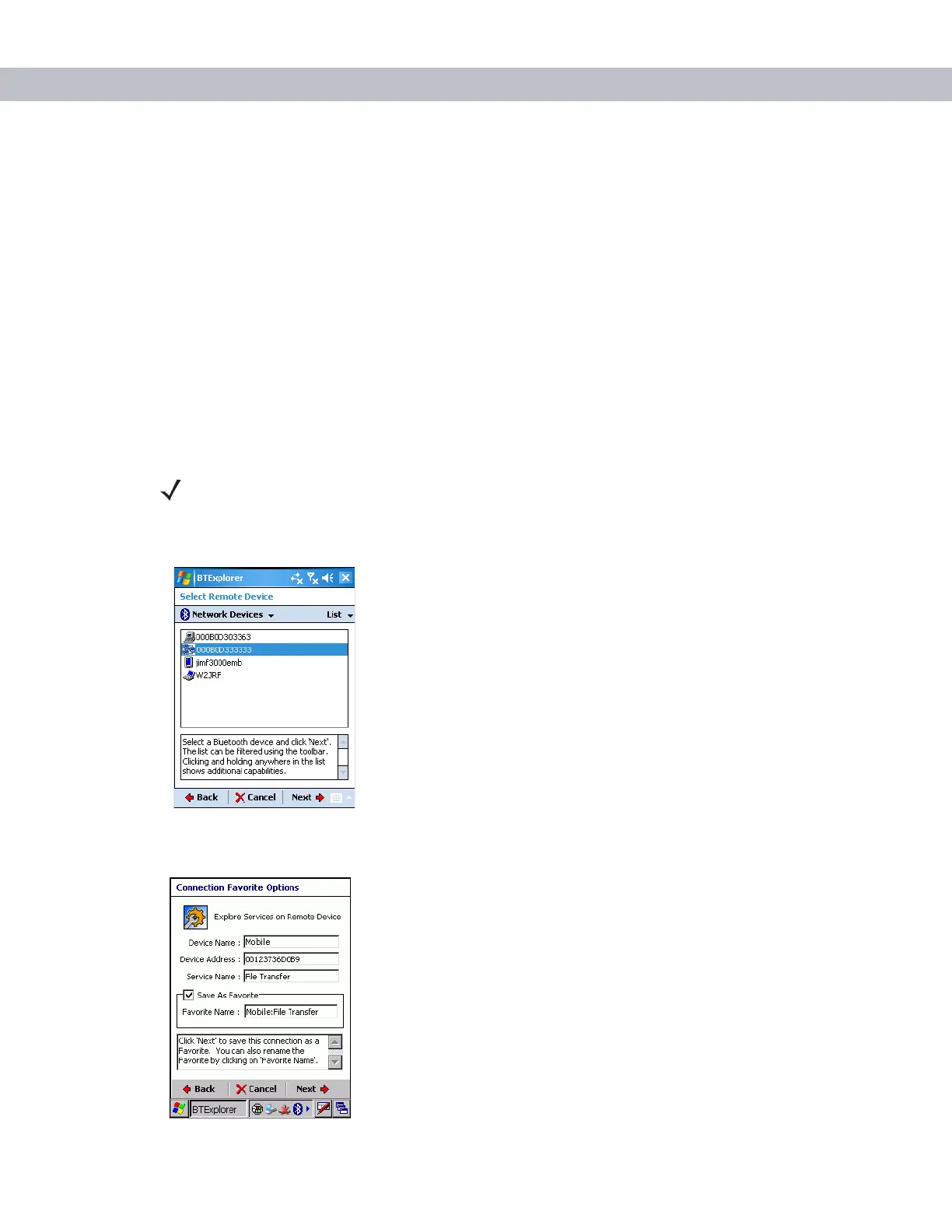
4. Tap Next. The BTExplorer searches for Bluetooth devices in the area and displays the devices in the
Select Remote Device window.
Figure 3-4
Select Remote Device Window
5. Select a device from the list and then tap Next. The Connection Favorite Options window appears.
Figure 3-5
Connection Favorite Options Window
NOTE If you select Active Sync via Bluetooth, ensure that the Bluetooth software is set up
properly on the host device.


 To Next Page