53 FY operation manual
11.8 Proportional Control
Description
Proportional control is one of the simplest ways to control method, controller manipulated value proportional to input error signal,
this chapter explains how to set related parameters.
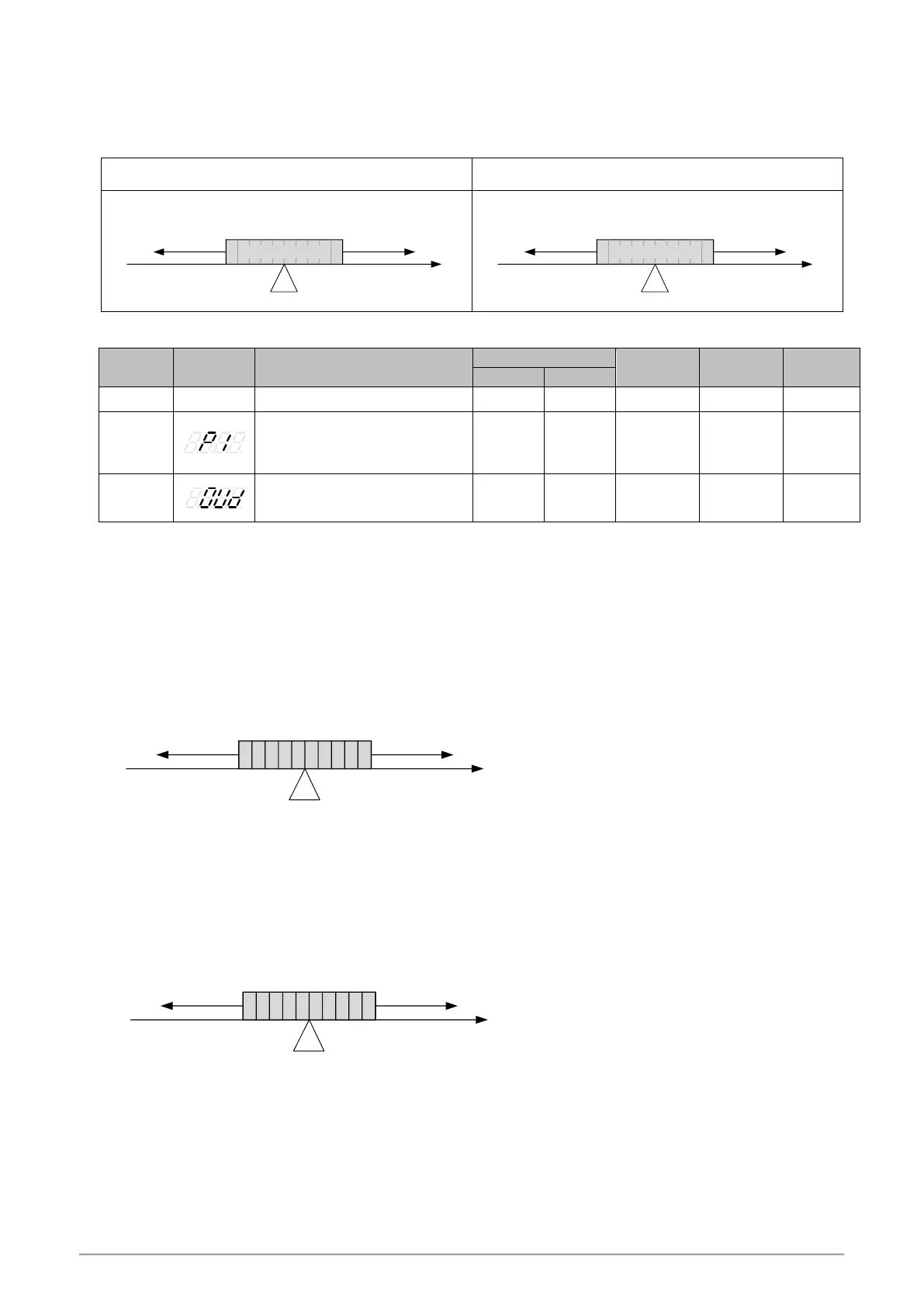
Function Diagram
SV
Output100% Output 0%
50 40 30 20 1060708090 %
proportional band
P(proportional)
PV
SV
Output 0% Output 100%
proportional band
P(proportional)
50 60 70 80 9040302010 %
PV
Parameter
Main output proportional band
0.0 : ON/OFF control
Other values : proportional band
setting value
Control action selection
0 : HEAT reverse action
1 : COOL direct action
Setting step
1. Select control action
2. Determine the proportional band
3. Calculate symmetry value, symmetry value = ( proportional band maximum - proportional band minimum) / 2
4. Set SV, SV = Midpoint of proportional band
5. Full range = (Range maximum – range minimum)
6. Calculate Error% = (symmetry value / Full range) x 100
7. Calculate P = (Error% x 2)
Example 1 :
INP1 = K1(-50.0~600.0) when PV in the range of 90.0 ~ 100.0 output proportional(decrease) SV= ? P= ?
Output 100% Output 0%
proportional band 90.0~100.0
50 40 30 20 1060708090 %
90.0 100.0
95.0
PV
1. OUD = HEAT(Reverse)
2. Proportional band 90.0~100.0
3. Symmetry value = (proportional band maximum - proportional band minimum) / 2 (100.0 - 90.0) / 2 = 5.0
4. SV = Midpoint of proportional band SV= 95.0
5. Full range = (Range maximum – range minimum) 600.0 - (-50.0) = 650.0
6. Error% = (Symmetry value / Full range) x 100 (5.0 / 650.0) x 100 = 0.76923
7. P= (Error% x 2) 0.76923 x 2 = 1.5384(approx 1.5)
Example 2 :
INP1= AN4(0.0~100.0) when PV in the range of 0.0 ~ 100.0 output proportional(increase) SV= ? P= ?
Output 0% Output 100%
proportional band 0.0~100.0
50 60 70 80 9040302010 %
0.0 100.0
PV
50.0
1. OUD = COOL(Direct)
2. Proportional band 0.0~100.0
3. Symmetry value = (proportional band maximum - proportional band minimum) / 2 (100.0 - 0.0) / 2 = 50.0
4. SV = Midpoint of proportional band SV= 50.0
5. Full range = (Range maximum – range minimum) 100.0 - 0.0 = 100.0
6. Error% = (Symmetry value / Full range) x 100 (50.0 / 100.0) x 100 = 50.0
7. P= (Error% x 2) 50.0 x 2 = 100.0
Notes
1. When using proportional control I1 and D1 must be set to 0
2. Full range please check Chapter 4 “Input Range Table”
3. Only using proportional control will eventually have a steady state error


 To Next Page
 Loading...