FY operation manual 60
12.1 Alarm Mode
:SV : Alarm set value X:1 / 2 / 3 (There are up to 3 sets of alarms)
Boot completed, the alarm is ON, when PV ≥ target SV start the
timer, alarm and control function are turned OFF in timed out.
If the RAMP function is used, even if the RAMP SV has not
reached the target SV, the timer will start counting as long as the
condition PV ≥ target SV is met.
*
Please refer to Chapter 11.7
*
This mode only available in ALD1 or ALD2
*
In this mode, the time format is fixed to “hour.minute”
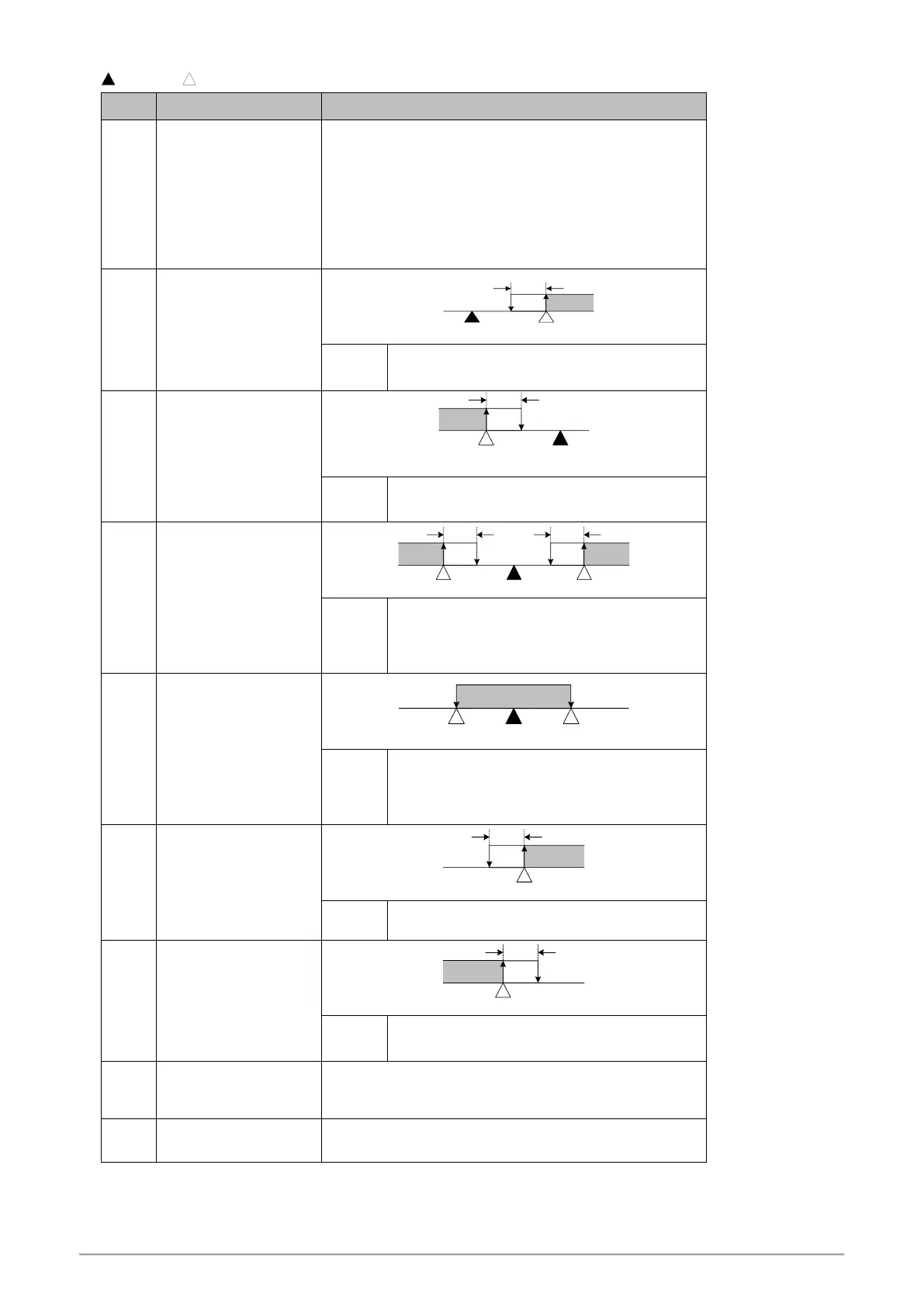
PV ≥ (SV+ALX) → Alarm ON
PV ≤ (SV+ALX-HYSA) → Alarm OFF
*
ALX must to be set to a negative value
PV ≤ (SV+ALX) → Alarm ON
PV ≥ (SV+ALX+HYSA ) → Alarm OFF
PV ≥ (SV+ALX) → Alarm ON
PV ≤ (SV-ALX) → Alarm ON
PV ≥ (SV-ALX+HYSA) → Alarm OFF
PV ≤ (SV+ALX-HYSA) → Alarm OFF
PV ≤ (SV+ALX) → Alarm ON
PV ≥ (SV-ALX) → Alarm ON
PV > (SV+ALX) → Alarm OFF
PV < (SV-ALX) → Alarm OFF
PV ≥ ALX→ Alarm ON
PV ≤ (ALXH-HYSA) → Alarm OFF
PV ≤ ALX→ Alarm ON
PV ≥ (ALX+HYSA) → Alarm OFF
SETA.4=0 When program execution, alarm action
SETA.4=1 When program end, alarm action
*
This mode only available in program type controller
The Alert action, when system in normal condition
(no-error message)


 To Next Page
 Loading...