Tally Dascom 1145/1125+
50
3. You may skip to other customized settings by pressing “Next” or “Back”. Once you press
“OK” to continue with form length measurement, the printer prompts:
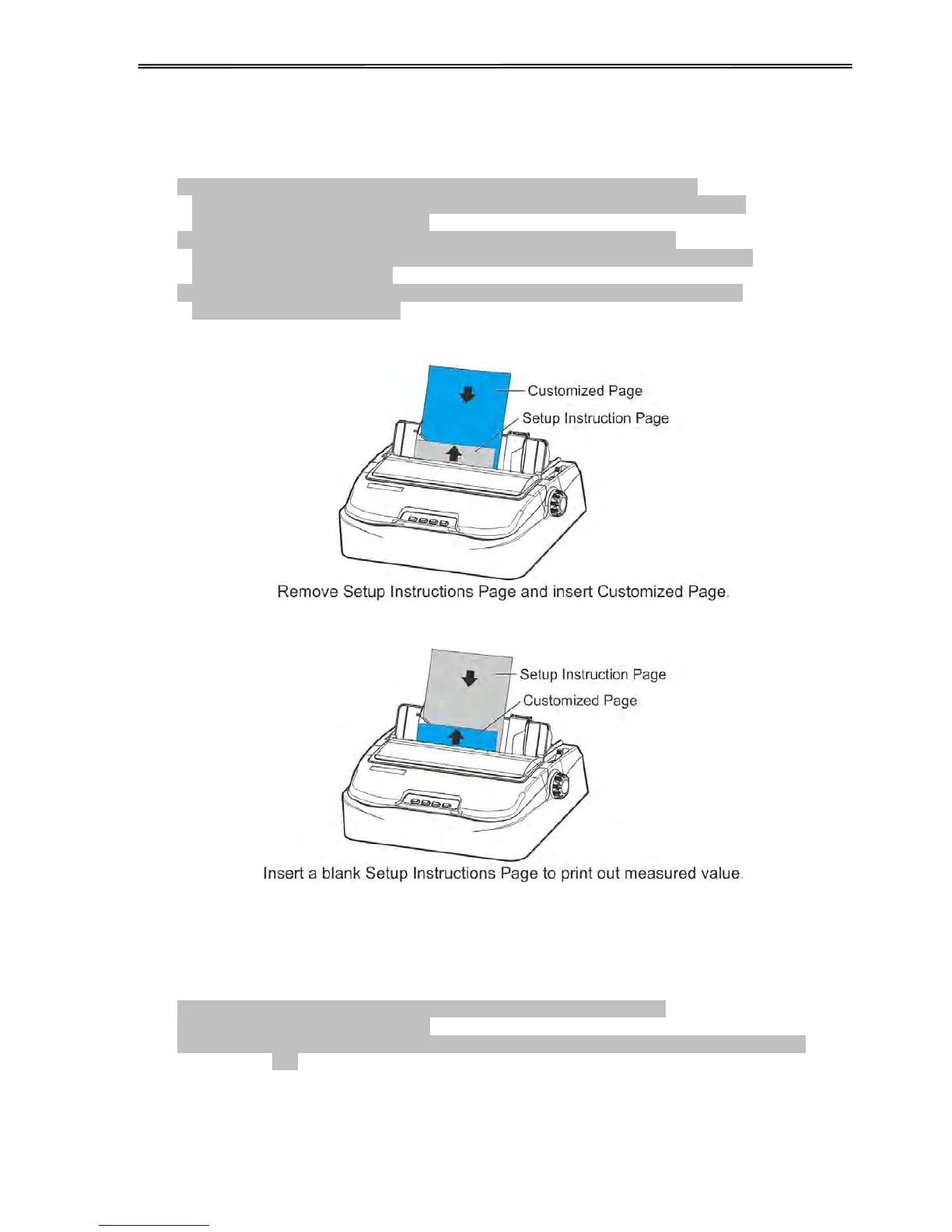
1.Press any key to clear the Setup Instructions Page from the printer. Insert
the Customized Page into the corresponding paper path. Press [LOAD/EJECT] to
load and measure the page length.
2.The printer rolls over the entire Customized Page to measure its length.
After measurement, press [LOAD/EJECT] to load a blank Setup Instructions Page
to report the measured value.
3. Press [LOAD/EJECT] to save the measured value.Repeat the above steps if the
printed value is dissatisfactory.
Illustrations for above step 1 and step 2.
4. Follow the given prompt to unload the conversation form. Load the customized form to
allow the printer to scan the page length. After the measurement, load another
conversation form to let the printer print out the measured length.
The measured form length is: 11.0Inch, approximately equal to 279mm,
accuracy of plus or minus 0.1 inches.
The measured value has been saved. Remeasure ( [LOAD/EJECT]=OK, [ONLINE] =Exit)?
Yes



 To Next Page