Tally Dascom 1145/1125+
14
3 Paper Installation Guide
The printer can handle either single sheets or continuous forms. Single sheets, also called cut
sheets, include envelopes and non-continuous, multipart forms. Continuous forms include
labels and multipart forms fed into the printer using the forms tractors. The printer is able to
print 1~5 plies multipart paper.
Remove the paper-clips. Do not load paper that has been folded or damaged,
wrinkled, or curled.
3.1 Adjusting the Print Gap Lever
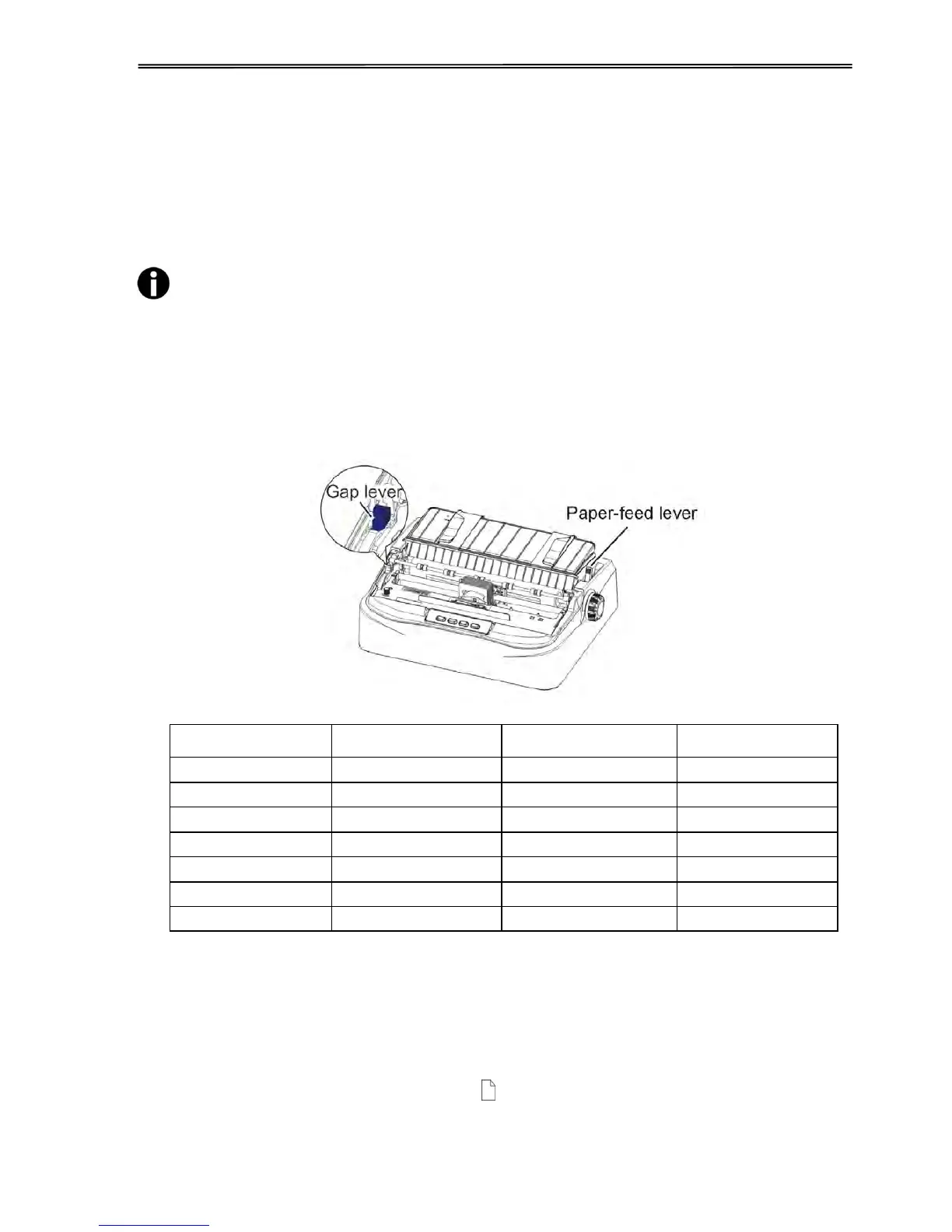
The print gap lever is on the left side of the printer inside the top cover. Take care to adjust the
print gap lever to a suitable position whenever you change the number of copies being printed.
Using the wrong print gap may cause print head damage or paper jams.
There are 2 paper feed modes: friction feed and tractor feed.
3.2 Friction Feed Handling
1. Raise the single sheet feeder until it locks into its mounting.
2. Move the paper-feed lever forward to “ ” for friction feed mode. Make sure that no
paper is in the printer when you switch the paper path.
3. Adjust the print gap lever if necessary.



 To Next Page