78 Chapter 7 - Parameters Description User Manual
7.5 Menu F - FREQ & RAMPS
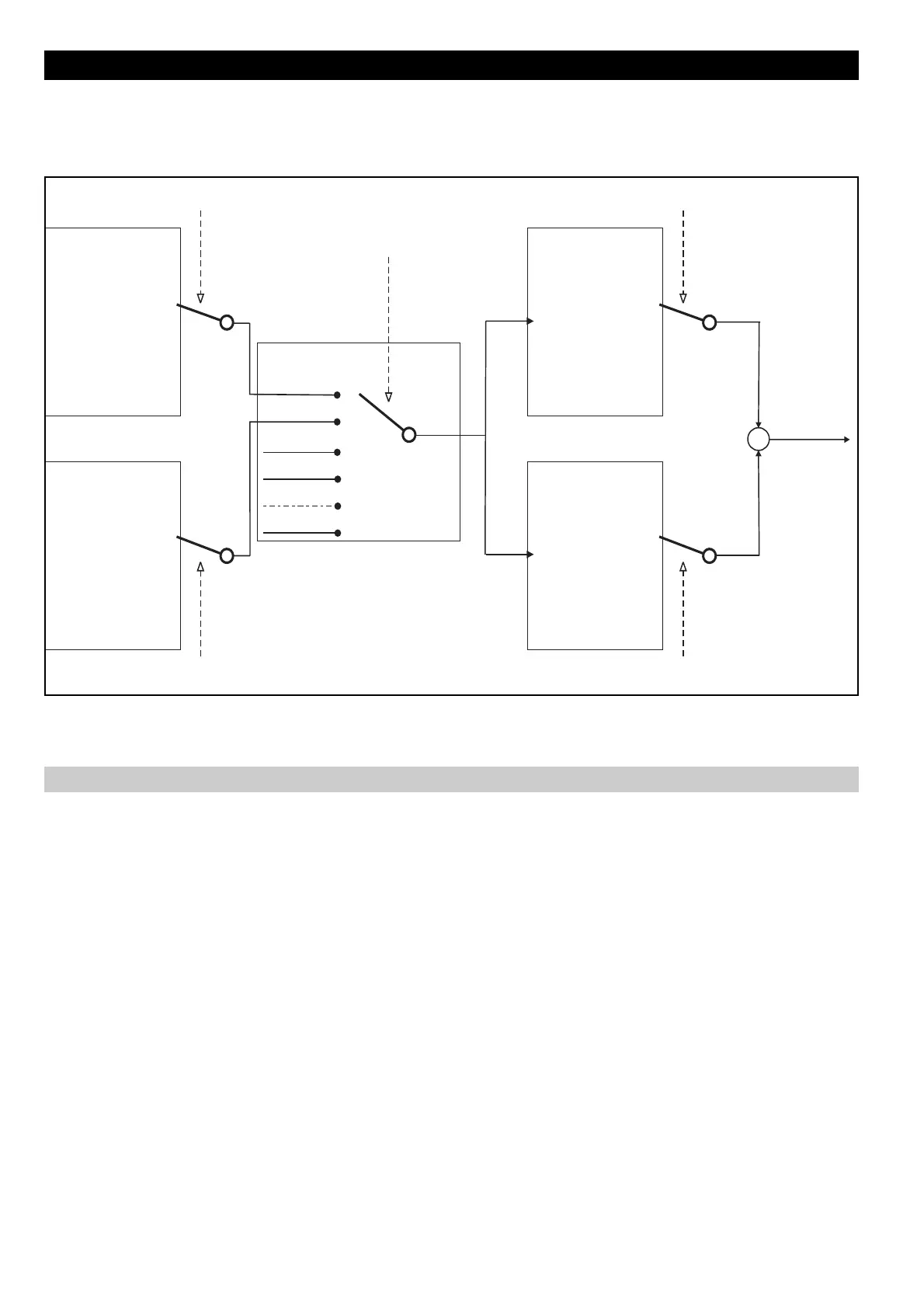
The drawing below, describes the logic for the "Reference selection".
Null 0
AN INP 1 1
2
3
4
MOTORPOT 5
NULL 6
7
FIELDBUS 8
F.100
Null 0
AN INP 1 1
2
3
4
MOTORPOT 5
NULL 6
7
FIELDBUS 8
F.101
Channel 1
Channel 2
o
o
o
o
o
o
o
o
o
o
o
o
o
o
o
o
o
o
Multi Freq. 1
Multi Freq. 2
F.102
F.103
0
1
2
3
Multi Freq. 1 Channel
F.060
Multi Freq. 2 Channel
F.061
Digital Input HW
Multi Freq. Sel
F.107
Null 0
AN INP 1 1
2
3
MULTI SPEED 4
MOTORPOT 5
NULL 6
7
FIELDBUS 8
F.100
Null 0
AN INP 1 1
2
3
MOTORPOT 5
NULL 6
7
FIELDBUS 8
F.101
MULTI SPEED 4
Ref 1
Ref 2
o
o
o
o
o
o
o
o
o
o
o
o
o
o
o
o
o
o
Ref. 1 Channel
F.050
Ref. 2 Channel
F.051
+
+
Reference
Figure 7.5.1: Reference Selection
Motorpotentiometer
F.000 Motorpot ref (Motorpotentiometer reference)
When this parameter is shown, the UP and DOWN keys are activated to increase or decrease the frequency
value.
Pressing the UP and DOWN Keys will cause the motor to increase or decrease its speed respectively until the
keys are released.
The maximum value settable is correlated to Max ref freq (F.020).
To START the motor it is necessary a RUN command.
The Motorpotentiometer reference can also be changed via digital inputs, programmed as
Motorpot up and Motorpot down.
The reset of the reference value, can be executed via digital input programmed as Reset Motorpot.
F.010 Mp Acc / Dec time (Motorpotentiometer Acceleration / Deceleration time)
It sets the acceleration and deceleration ramp time delay (in seconds), for the Motorpotentiometer function.
The delay times are equal for the acceleration and deceleration.


 To Next Page