ENGLISH
35
Listening to FM/AM (1)
1
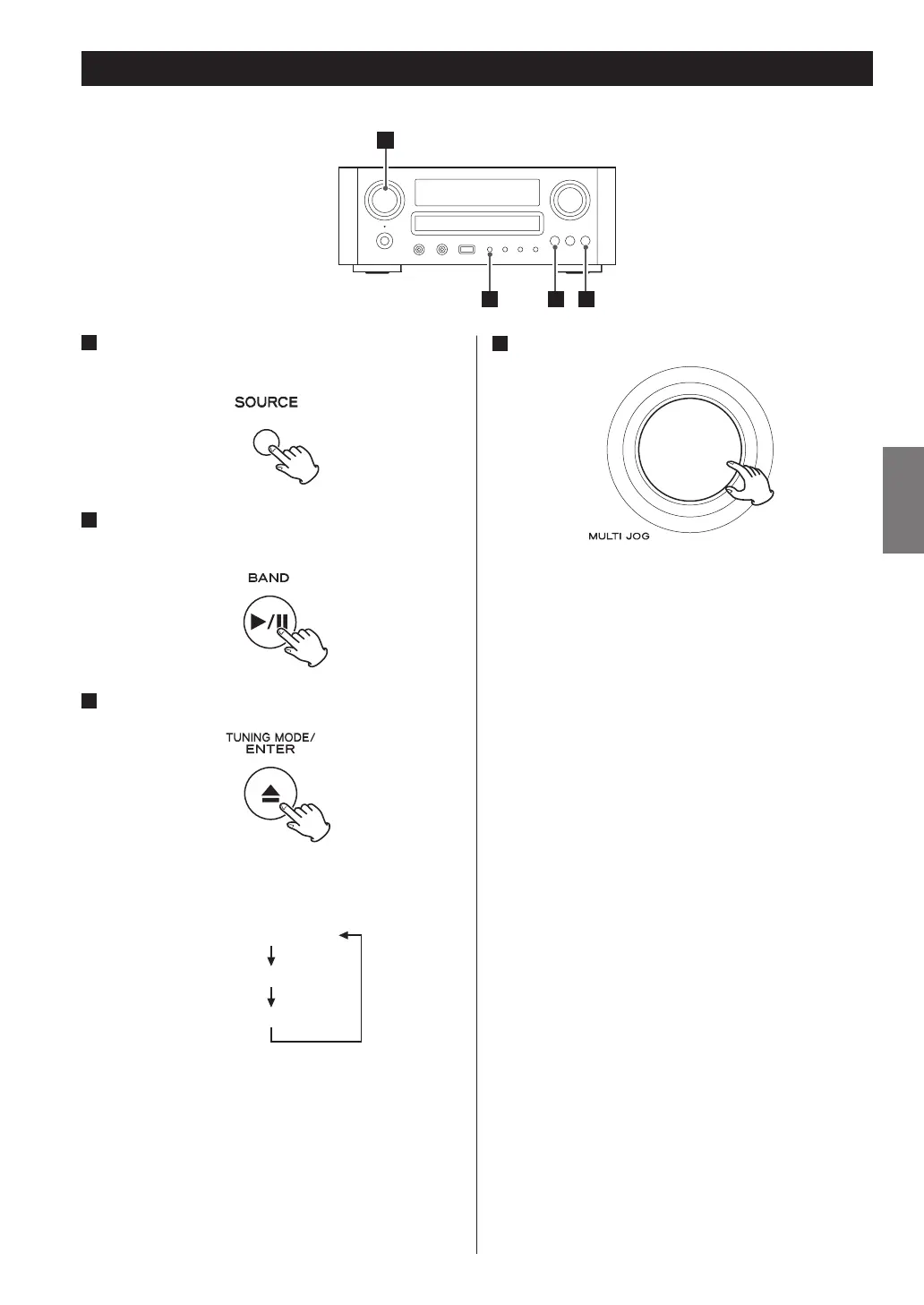
Press the SOURCE button repeatedly to select
TUNER mode.
2
Select FM or AM by pressing the BAND button
repeatedly.
3
Select the desired tuning mode.
Each time the TUNING MODE button is pressed, the
tuning mode changes as follows:
Auto Tune
Preset Tune
1
23
4
Select the station you want to listen to.
Manual tuning mode
Turn the MULTI JOG knob until the station you want to
listen to is found.
On the remote control, press the scroll buttons (˙/¥)
repeatedly.
The frequency changes by a fixed step (FM: 50 kHz
steps, AM: 9 kHz steps).
Auto tuning mode
Turn the MULTI JOG knob to start auto tuning.
When a station is found, the unit tunes in the station
automatically. Repeat this step until the station you
want to listen to is found.
< Press the ENTER button to stop the auto tuning.
Preset tuning mode
Turn the MULTI JOG knob to select a preset channel.
On the remote control, press the skip buttons
(.//) repeatedly.
The selected preset channel is tuned in.


 To Next Page