ENGLISH
9
SUBWOOFER
SPEAKER
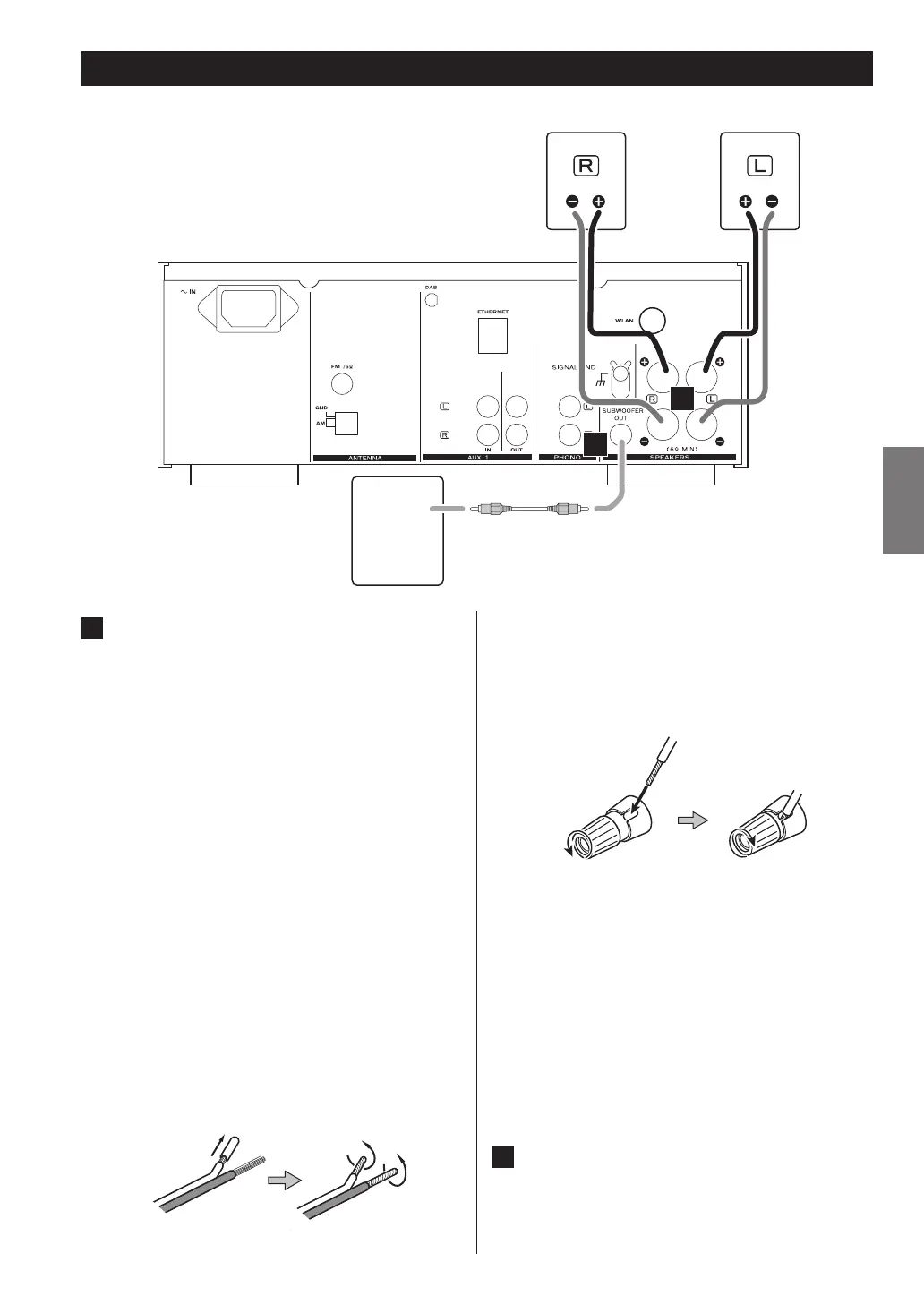
Speaker Connections
A
Speaker Connections
CR-H700DAB’s + (positive) terminals are red ( for the
right speaker) and white (for the left speaker.) The _
(negative) terminals are black.
The + side of the speaker cable is marked to make it
distinguishable from the negative side of the cable.
Connect this marked side to the red and white +
terminals and the unmarked side to the black _
terminals of CR-H700DAB and speakers.
CAUTION
< To avoid damaging the speakers with sudden high-
volume sound, be sure to switch the power off
before connecting the speakers.
< Check the impedance of your speakers. Connect
speakers with an impedance of 6 ohms or more.
< Prepare the speaker cables for connection by
stripping off approximately 10 mm (1/2 inch) or less
(no more as this could cause a short-circuit) of the
outer insulation. Twist the wires tightly together to
avoid tangles:
How to connect
1. Turn the terminal cap counter-clockwise to loosen it.
The speaker terminal caps cannot be fully removed
from the base.
2. Insert the wire into the terminal fully and turn the
terminal cap clockwise to securely connect it:
3. Make sure it is fastened firmly by pulling the cable
lightly.
For European customers
In accordance with European safety regulations, it
is not possible to connect banana plugs into the
speaker terminals on European models. The holes
into which banana plugs are inserted have been
covered with black caps. Connect the speakers
using spades or bare wires. If the black caps become
separated from the terminals, return them to their
original position.
B
SUBWOOFER OUT jack
Connect a commercially available powered
subwoofer.
B
A
LINE
IN


 To Next Page