Auto Tuning
1
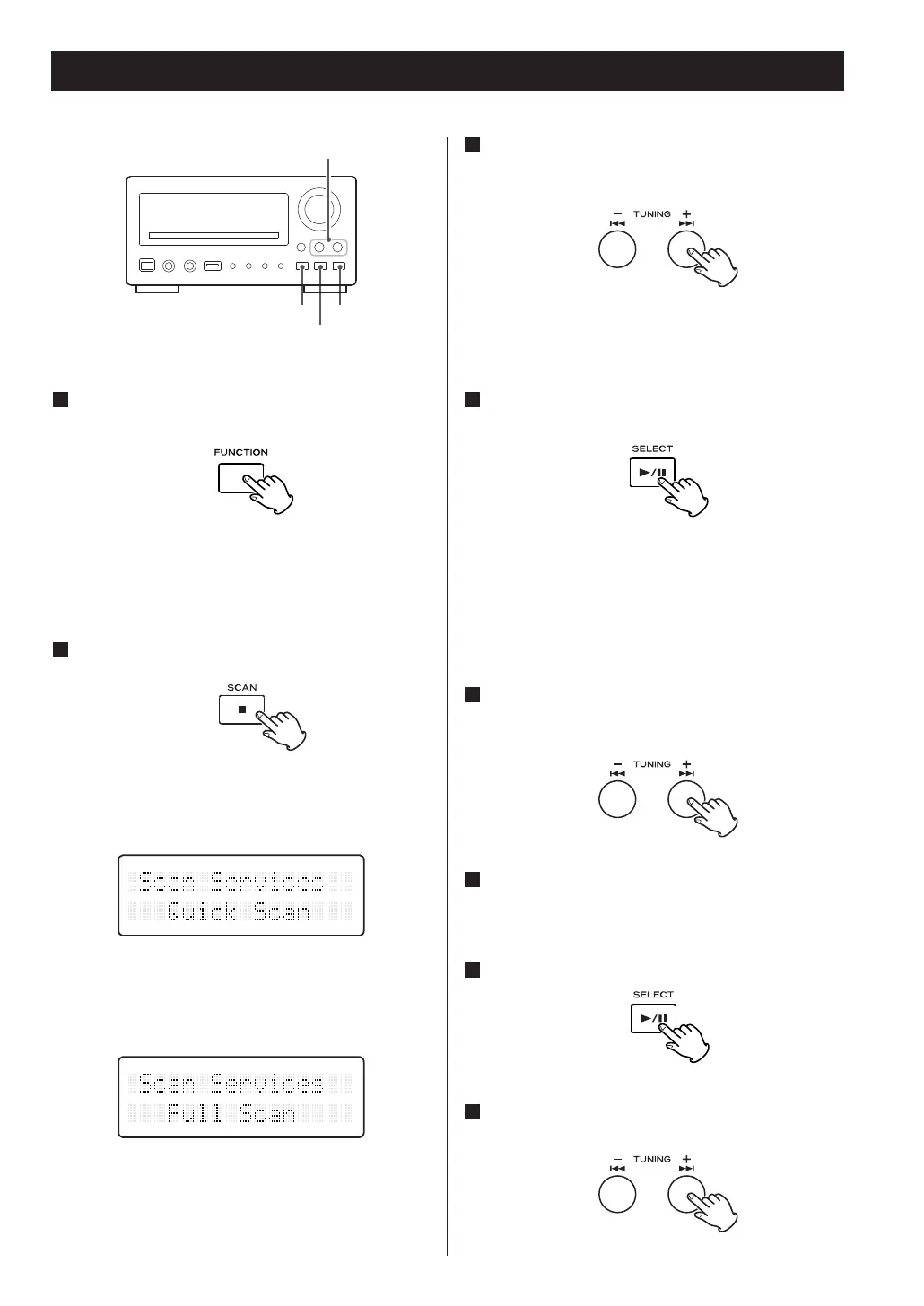
Select DAB using the FUNCTION button (or the
DAB/FM button of the remote control unit).
When the unit is switched to DAB mode for the
first time, the auto tuning process will start
automatically.
2
Press the SCAN button.
The unit will start scanning the stations that you
can listen to. (Quick SCAN: 10B to 13B)
<
Press and hold the SCAN button for longer than 2
seconds to activate ‘Full Scan’ (5A to 13F).
3
When the scanning process has finished, press
the TUNING button (+ or –) to select the
station you want to listen to.
Manual Tuning
1
While listening to DAB radio, press and hold
the SELECT button for longer than a second.
The band name and frequency are displayed.
When the unit receives ensemble broadcast at
selected frequency, the ensemble name will be
displayed in the second line in a few seconds.
2
Press the TUNING button (+ or –) to select the
frequency of DAB-ensemble that contains the
service (station) you want to listen to.
3
Wait a few seconds until the ensemble name
appears on the display.
4
Press the SELECT button.
5
Press the TUNING button (+ or –) to select the
service you want to listen to.
44



 To Next Page