1.FUNCTIONAL DESCRIPTIONS
3
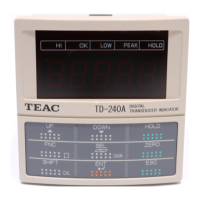
Validates setting items and set values.
Starts the Hold function. To cancel the Hold function,
press key again.
Forcibly resets the indicated value to zero (digital zero function).
When the calibration LOCK is turned off, the digital zero function is
not activated using this key.External DZ input is also disabled.
Cancels setting and returns to the indicated value display.
ENT
HOLD
ZERO
ESC
HOLD
ESC
setting in progress Indicated Value display


 To Next Page