5.SETTING OF FUNCTIONS
33
5-2. High / Low Limit Comparator Mode
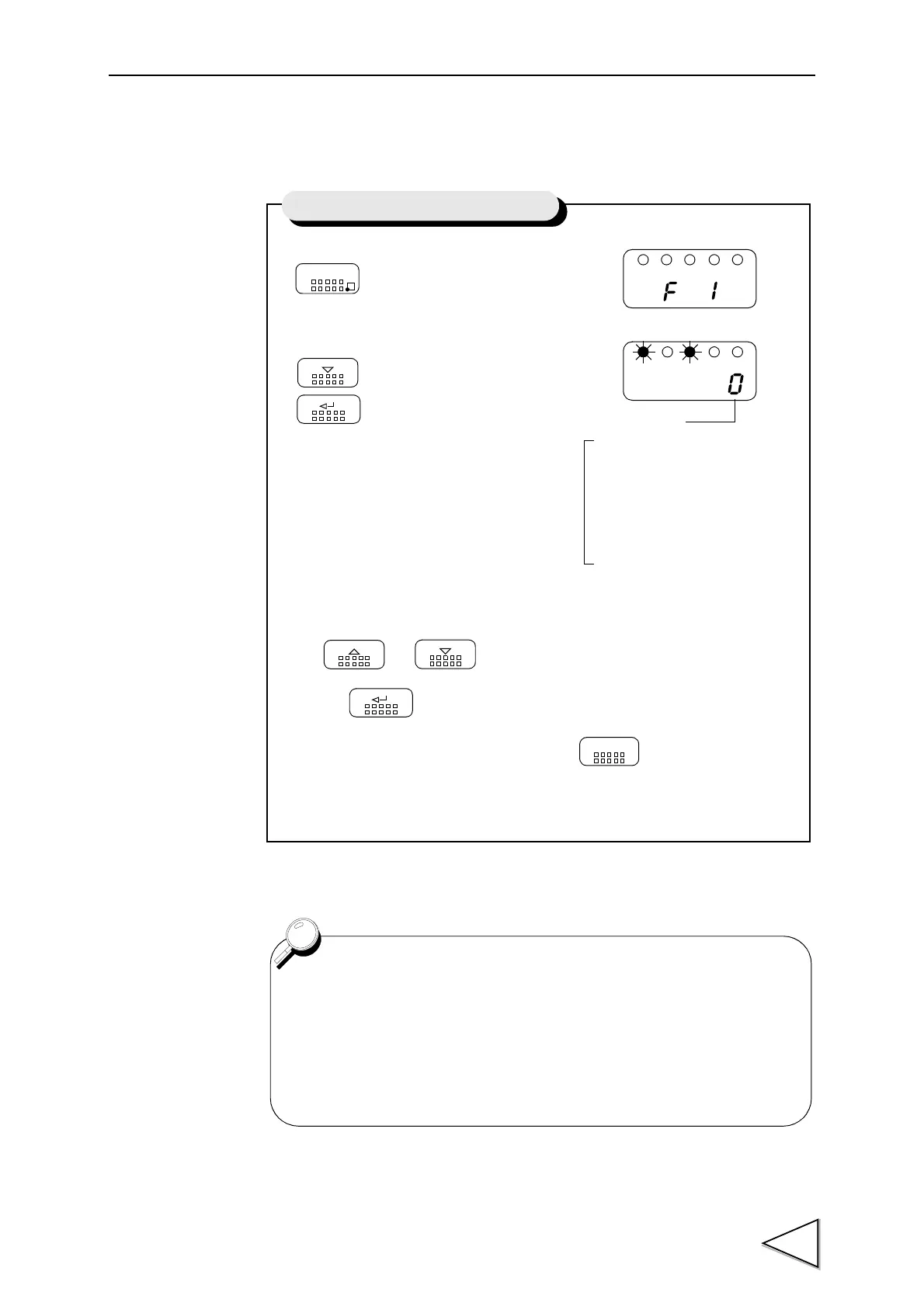
1)Select setting mode 1.
2)Select high / low limit comparator mode.
Use and keys to set the high
/ low Limit Comparator Mode,
then use key to validate the setting.
To return to the indicated value display, press key.
FNC
DOWN
Press three times.
ENT
UP
DOWN
ENT
ESC
High / Low Limit Comparator Mode
High / Low Limit
3:
Comparison is made at stable
2:Comparison is always made
1:Comparison is made in the
0:Comparison is always made.
Comparator Mode
status except for near zero.
except for near zero
stabl status.
Except for Mode 0 (Comparison is always made) of the High / Low
Limit Comparator Mode, setting is closely related to Near Zero and
Motion Detect functions. For details, see Near Zero on page 38 and
Motion Detect on page 41 .


 To Next Page