9.RS-232C INTERFACE(TD-2404)
66
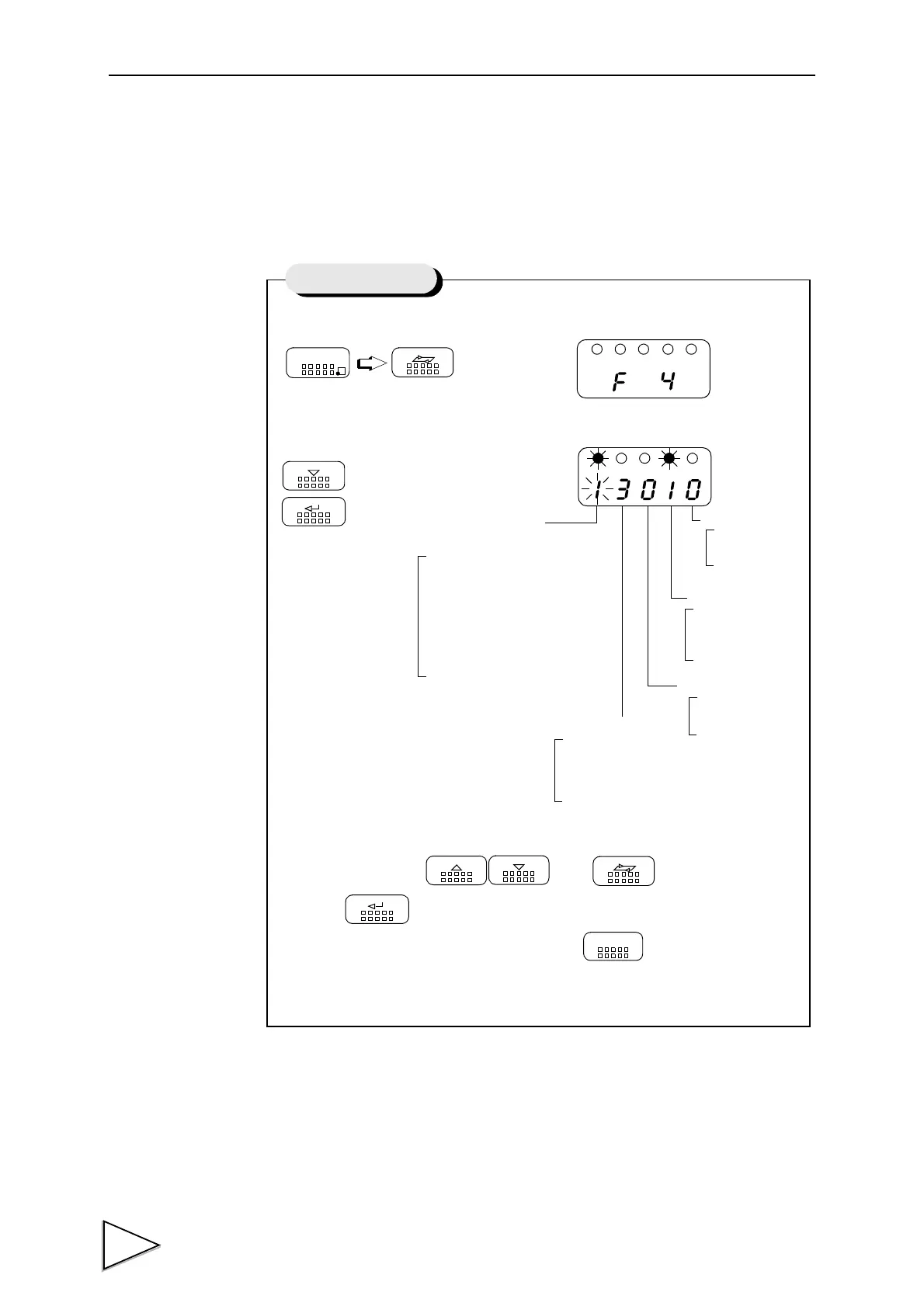
9-2. Setting RS-232C Interface
This will set the RS-232C communication conditions of TD-240A.
1) Select setting mode 4.
2) Select RS-232C.
3) Input RS-232C with and keys and validate
it with key.
To return to the indicated value display, press key.
FNC
SEL
Press three times.
DOWN
ENT
Press twice.
UP
DOWN
SEL
ENT
ESC
Setting of RS-232C
Communication
2 : Communication Mode 2
(transmits when printed)
1 : Communication Mode 1
(transmits continuously)
0 : Communication Mode 0
(performs communication
Stop Bit
1 : 2bit
0 : 1bit
Parity Bit
2 : Even number
1 : Odd number
0 : None
Character Length
1 : 8bit
0 : 7bit
Baud Rate
3 : 9600bps
2 : 4800bps
1 : 2400bps
0 : 1200bps
Mode
by a command)


 To Next Page