EasyManua.ls Logo

Technics SA-DX930 - Digital Signal Processor (DSP) Modes; Stereo and Surround Modes; DTS Mode Operation

Technics SA-DX930
44 pages
Print Icon
To Next Page IconTo Next Page
To Previous Page IconTo Previous Page
Loading...
RQT4918
Po
——
M
—À
——
o
r
-———
DSP
STEREQSURROUNDDTS
SFC
6
o
o o
DSP
STEREO
SURROUND
CTS
SFC
o
o
DSP
STEREO
SURROUND
DTS
SFC
o
-0-
o
o
i
|
§-
t
l
e
a
©
9
6&6
€«*
9
84
*
9
9
@
€*
9
s
uo
o
*9
€*
à
oll
OSP
STEREO
SURROUND
OTs
SFC
o
o7
o
——
—Á—
——
———
——
——
e
v
ot
HOHEM
HUI
E
TI
HUN
IVE
tht
H
--
=.
re
ree
e
et
a
ee
ee
A
eee
Pyle
cess
Sl
Digital
Signal
Processor
(DSP}
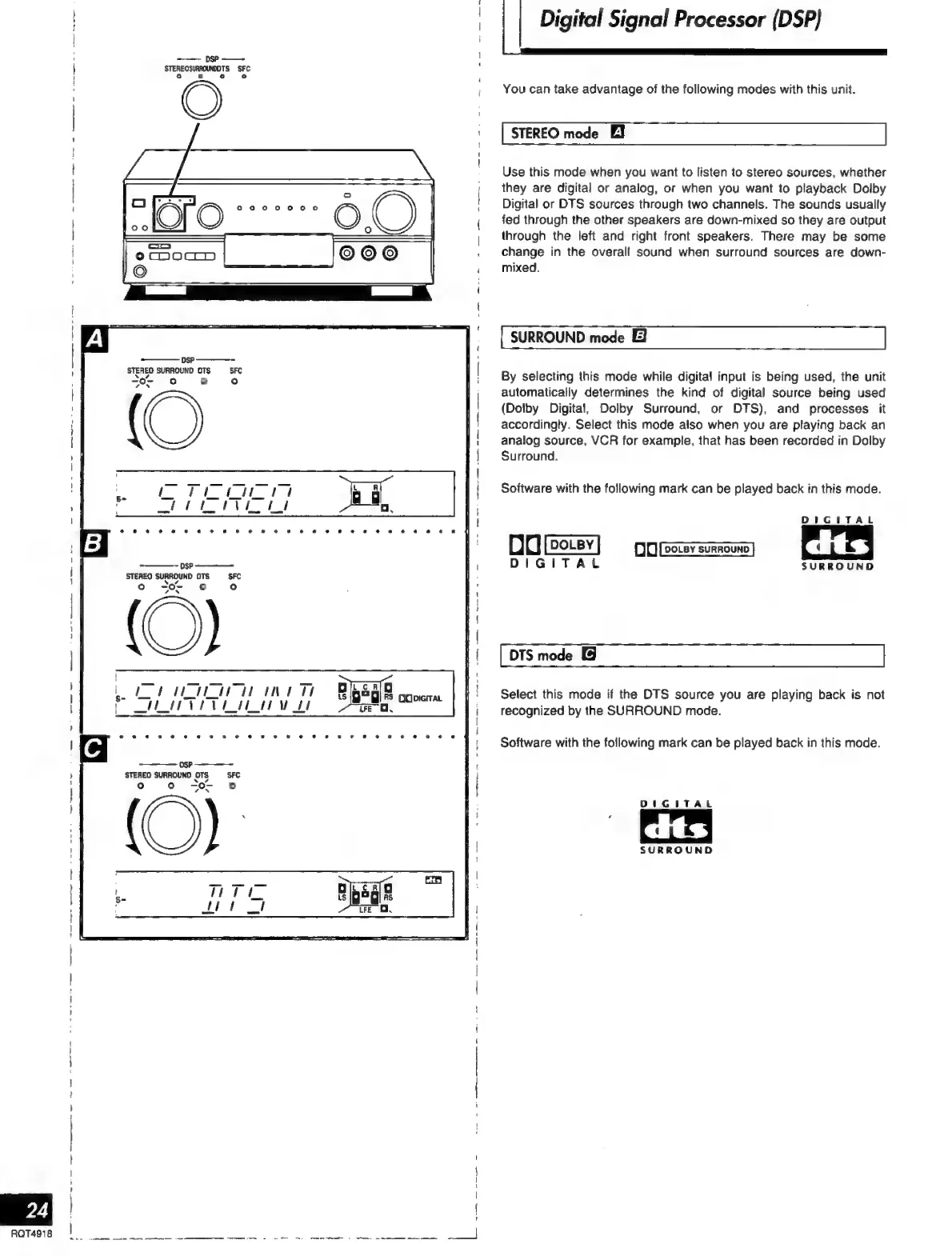
You
can
take
advantage
of
the
following
modes
with
this
unit.
STEREO
mode
EI
Use
this
mode
when
you
want
to
listen
to
stereo
sources,
whether
they
are
digital
or
analog,
or
when
you
want
to
playback
Dolby
Digital
or
DTS
sources
through
two
channels.
The
sounds
usually
fed
through
the
other
speakers
are
down-mixed
so
they
are
output
through
the
left
and
right
front
speakers,
There
may
be
some
change
in
the
overall
sound
when
surround
sources
are
down-
mixed.
SURROUND
mode
El
By
selecting
this
mode
while
digital
input
is
being
used,
the
unit
automatically
determines
the
kind
of
digital
source
being
used
(Dolby
Digital,
Dolby
Surround,
or
DTS),
and
processes
it
accordingly.
Select
this
mode
also
when
you
are
playing
back
an
analog
source,
VCR
for
example,
that
has
been
recorded
in
Dolby
Surround.
Software
with
the
following
mark
can
be
played
back
in
this
mode.
DIGITAL
DO
[oer]
=
pns]
DIGITAL
SURROUND
DTS
mode
Select
this
mode
if
the
DTS
source
you
are
playing
back
is
not
recognized
by
the
SURROUND
mode.
Software
with
the
following
mark
can
be
played
back
in
this
mode.
DIGITAL
SURROUND

Related product manuals