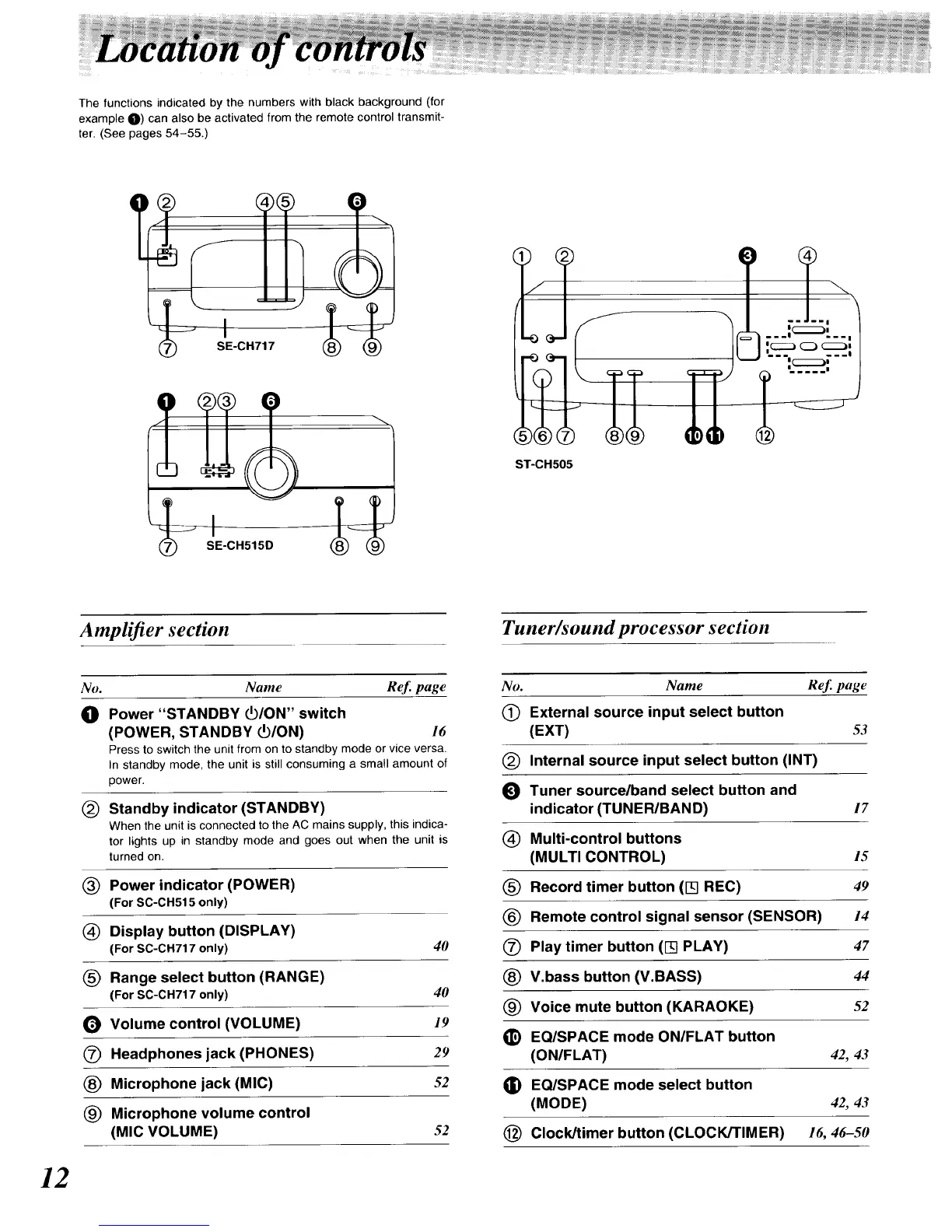
The functions indicated by the numbers with black background (for
example O) can also be activated from the remote control transmit-
ter. (See pages 54-55.)
II
)
Amplifier section
No. Name Ref. page
Tuner/sound processor section
No. Name ReJ_page
(_ External source input select button
(EXT) 53
(_) Internal source input select button (INT)
_1 Tuner source/band select button and
indicator (TUNER/BAND) 17
(_) Multi-control buttons
(MULTI CONTROL) 15
(_) Record timer button (I-q REC) 49
Remote control signal sensor (SENSOR) 14
(_ Play timer button (I-q PLAY) 47
V.bass button (V.BASS) 44
(_ Voice mute button (KARAOKE) 52
_) EQISPACE mode ON/FLAT button
(ON/FLAT) 42, 43
G) EQ/SPACE mode select button
(MODE) 42, 43
(_) Clock/timer button (CLOCK/TIMER) 16, 46-50
_D Power "STANDBY _/ON" switch
(POWER, STANDBY PO/ON) 16
Press to switch the unit from on to standby mode or vice versa.
In standby mode, the unit is still consuming a small amount of
power.
(_ Standby indicator (STANDBY)
When the unit is connected to the AC mains supply, this indica-
tor lights up in standby mode and goes out when the unit is
turned on.
(_ Power indicator (POWER)
(For SC-CH515 only)
(_) Display button (DISPLAY)
(For SC-CH717 only) 40
(_ Range select button (RANGE)
(For SC-CH717 only) 40
_) Volume control (VOLUME) 19
(_) Headphones jack (PHONES) 29
(_ Microphone jack (MIC) 52
(_) Microphone volume control
(MIC VOLUME) 52
12






 To Next Page