iiiii_iiiiiiiii2ii_i_ii_i_i_i_i_i_ii_i_i_iii_ii_i_i_i_i_i_ii_i_i_iiii_i_i_iiii_i_i_%iii_i_;i_iiiiiiii_i;_ii_i_ii_;ii_iii_i_;!_ii_ii;_;i_iiiii_i_i_ii_iii_ii_iii:i:i;i;iii_ii__i:iii;i_ii_iii_ _ii_®iiiii_iiJ_i_iiii_i_i_iiiiii_i_ii_i_iiii_i_i_iii_i_i_iiiiiiiiiiii_@i_i_i_@_ii_iii_1_i_iiii_iiiii_iiii_ii_iiiiiiiiiiiiJiiiiiiiiiiiiiiiiiiiii_i_iiiii_ii_iiiii_iiiiii;iiii_i_i_i_iii!iii;!ii!_i_ii:_;i_ii_iii_J_®iiiii_J_
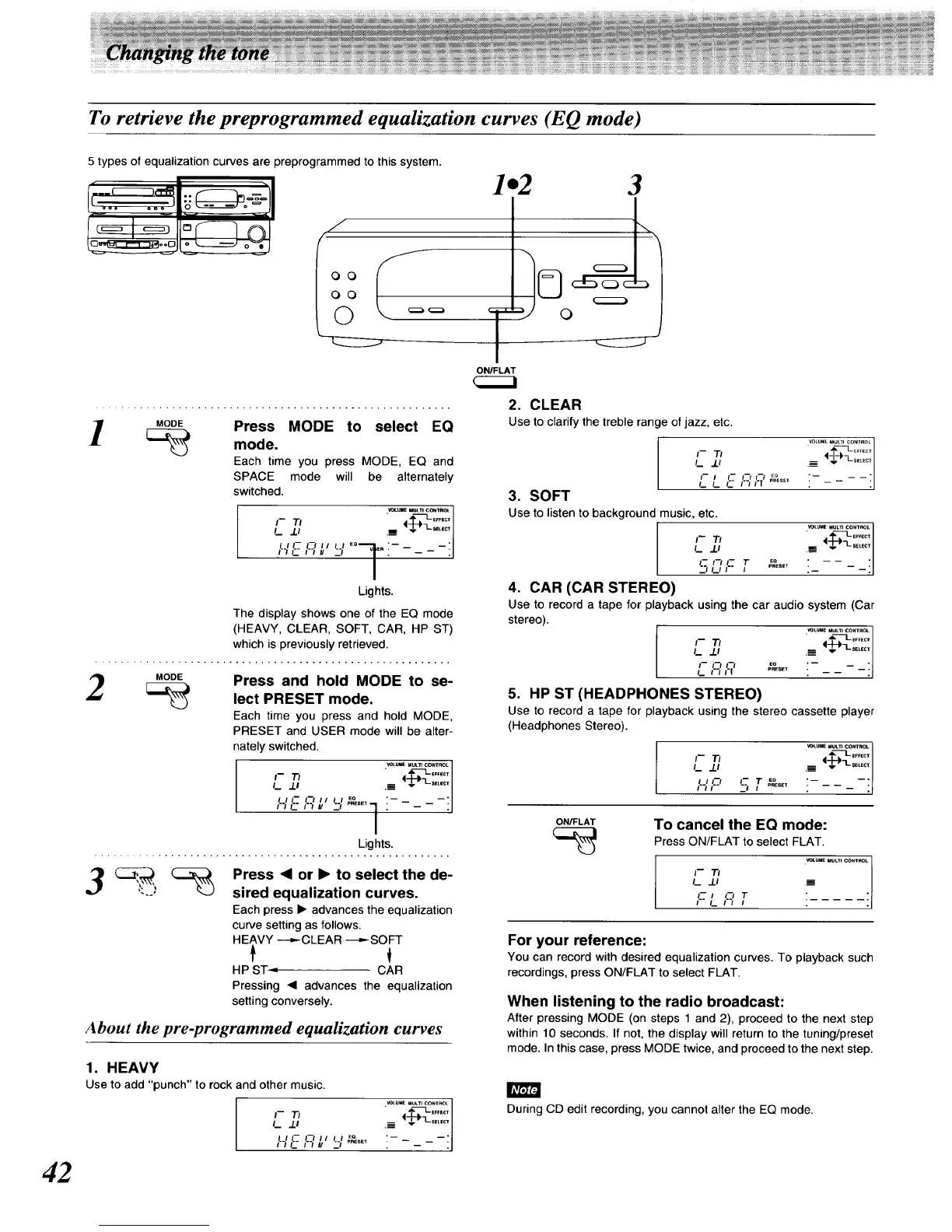
To retrieve the preprogrammed equalization curves (EQ mode)
42
5 types of equalization curves are preprogrammed to this system.
_'---_-_1.. _ =/
I
..I
O0
3
ONIFt.AT
_OOF Press MODE to select EQ
! mo.e
Each time you press MODE, EQ and
SPACE mode will be alternately
switched.
III-- ]
Lights.
The display shows one of the EQ mode
(HEAVY, CLEAR, SOFT, CAR, HP ST)
which is previously retrieved.
_OOE Press and hold MODE to se-
lect PRESET mode.
Each time you press and hold MODE,
PRESET and USER mode will be alter-
nately switched.
C'F'_u l'_ ] i ------ l
I
Lights.
3 ress• o.• ,ose,ec,,.e
"--' sired equalization curves.
Each press • advances the equalization
curve setting as follows.
HEAVY ----,,.-CLEAR ---,,--SOFT
HP ST -, CAR
Pressing • advances the equalization
setting conversely.
About the pre-programmed equalization curves
1. HEAVY
Use to add "punch" to rock and other music.
._LU_ MULTICOmROL
_EFFECT
'-";' "-':%':i
-HL-'--I" '--,'...... "
2. CLEAR
Use to clarify the treble range of jazz, etc.
t- Tt
/_ 3.1
,._L c'-'- 16'IT'"_"_*o'
3. SOFT
Use to listen to background music, etc.
VOLUmMULTICONTROL
• ,'t_ ......
4. CAR (CAR STEREO)
VOLUMI _ MULTI CONyROL
_._ ./J
I-- f--/ I-- EQ
-',,,,-- ; i-----;
Use to record a tape for playback using the car audio system (Car
stereo).
L. 1_ .__
I-- 1"7 I'-/ _o
5. HP ST (HEADPHONES STEREO)
Use to record a tape for playback using the stereo cassette player
(Headphones Stereo).
_/p c r ,o
.... pRESE_
ON/FLAT
To cancel the EQ mode:
Press ON/FLAT to select FLAT.
I I-- 7"1 "_UUE MgLff C_IROL
_--_ 0 T
I I._ t l I
For your reference:
You can record with desired equalization curves. To playback such
recordings, press ON/FLAT to select FLAT.
When listening to the radio broadcast:
After pressing MODE (on steps 1 and 2), proceed to the next step
within 10 seconds. If not, the display will return to the tuning/preset
mode. In this case, press MODE twice, and proceed to the next step.
During CD edit recording, you cannot alter the EQ mode.






 To Next Page