Only compact discs having this mark can be used _I-ICOMPAIElr'
with this unit.
dIGITAL AUDIO
To
remove a disc from its case
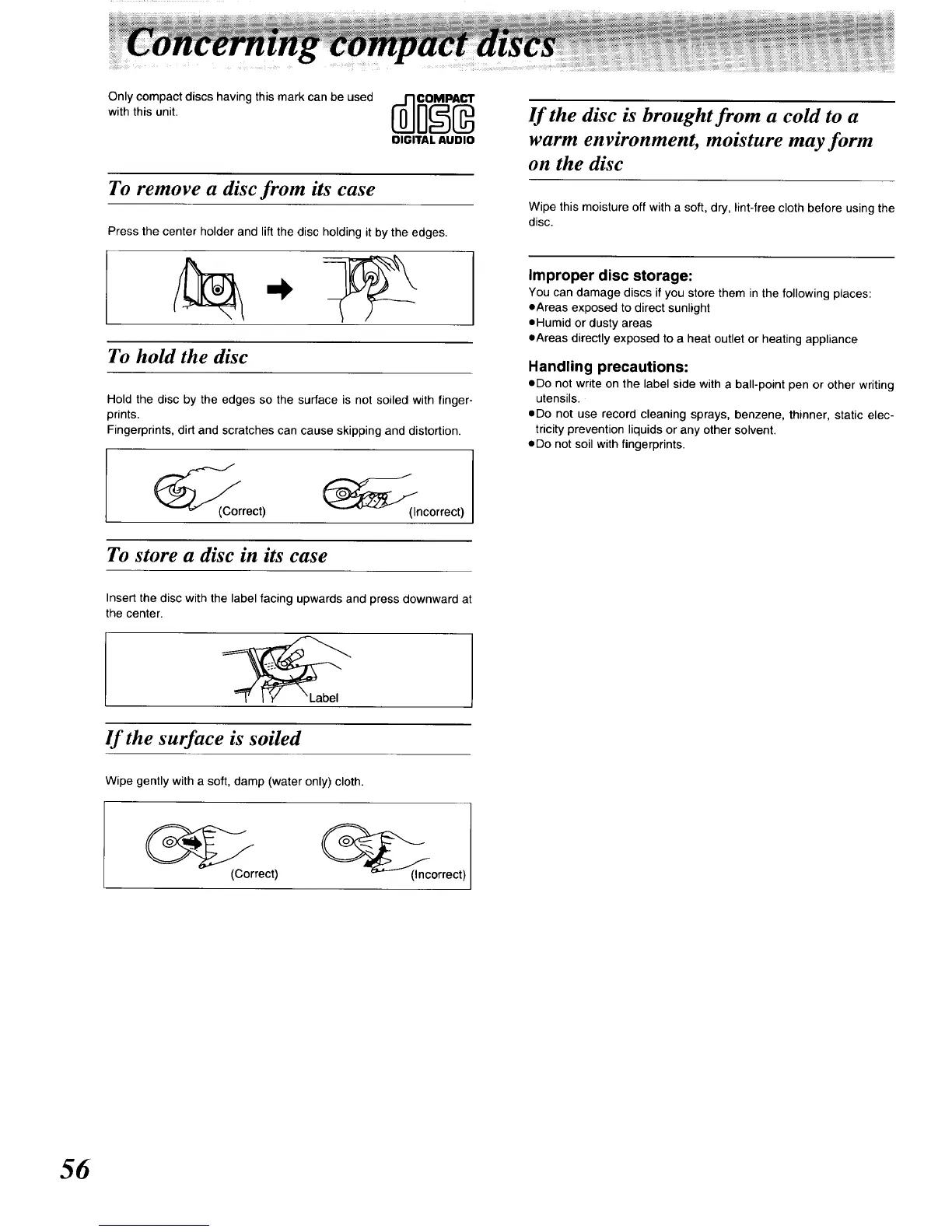
Press the center holder and lift the disc holding it by the edges.
If the disc is brought from a cold to a
warm environment, moisture may form
on the disc
Wipe this moisture off with a soft, dry, }int-free cloth before using the
disc.
To hold the disc
Hold the disc by the edges so the surface is not soiled with finger-
prints.
Fingerprints, dirt and scratches can cause skipping and distortion.
_C/o{Correct) __(Incorrect)
To store a disc in its case
Insert the disc with the label facing upwards and press downward at
the center.
If the surface is soiled
Wipe gently with a soft, damp (water only) cloth.
Improper disc storage:
You can damage discs if you store them in the following places:
eAreas exposed to direct sunlight
eHumid or dusty areas
eAreas directly exposed to a heat outlet or heating appliance
Handling precautions:
eDo not write on the label side with a ball-point pen or other writing
utensils.
eDo not use record cleaning sprays, benzene, thinner, static elec-
tricity prevention liquids or any other solvent.
eDo not soil with fingerprints.
(Correct) (Incorrect)
56






 To Next Page