EasyManua.ls Logo

TechniSat Digit ISIO S2 - User Manual

TechniSat Digit ISIO S2
48 pages
Print Icon
To Next Page IconTo Next Page
Loading...
DiSEqC
1.2
Kurzanleitung
Digit ISIO S2
Digit ISIO S2
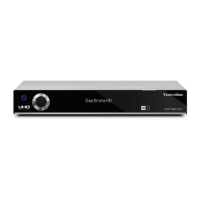
Digitaler Twin-HD-Receiver
mit Internetzugang
 

 
 

DiSEqC
1.2
K-BDA_Digit ISIO S2(DVB30)_RC3.qxd 13.05.2014 10:45 Seite 1
Kurzanleitung
Digit ISIO S2
Digit ISIO S2
Digitaler Twin-HD-Receiver
mit Internetzugang
 

 
 

DiSEqC
1.2
K-BDA_Digit ISIO S2(DVB30)_RC3.qxd 13.05.2014 10:45 Seite 1
Quick start manual
Digit ISIO S2
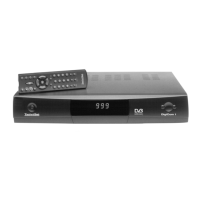
Digital Twin HD Receiver
with Internet access
With CONAX card reader and an interface
for accepting a CI/CI+ module,
plus DVR recording function via the USB interface.
For reception of free-to-air and encrypted
(e.g. VIACCESS, CONAX, IRDETO, SECA etc.)
HD satellite channels.

Questions and Answers

  • V
    Victor MillerSep 7, 2025
    Why is DVR recording no longer possible on my TechniSat TV Receiver?
    • B
      Benjamin HillSep 7, 2025
      If DVR recording is no longer possible on your TechniSat TV Receiver, the selected storage medium may be full. Delete existing recordings. You may also attach and use another storage medium.
  • D
    Deborah RyanAug 22, 2025
    How to fix TechniSat TV Receiver remote control not working?
    • A
      angela19Aug 22, 2025
      If your TechniSat TV Receiver remote control isn't working, it might be due to the wrong remote control code being used. Try setting the correct remote control code. Another possibility is that the batteries are dead. In this case, replace the batteries.
  • M
    Matthew GeorgeSep 4, 2025
    What to do if TechniSat TV Receiver cannot be operated, switched on or off?
    • D
      Dr. Cynthia DyerSep 4, 2025
      If your TechniSat TV Receiver cannot be operated, switched on, or switched off, it might be due to a defective data stream, causing the receiver to be blocked. Hold down the On/Stand-by button on the receiver or the remote control for approximately 5 seconds. You can also disconnect the mains plug for about 5 seconds, then reconnect the receiver. As a last resort, perform a Flash-Reset (Warning: All personal settings will be lost): Remove the mains adapter, press and hold the Standby and up arrow key, reinsert the mains adapter while holding the buttons, keep holding for about 5 seconds, then release. "Factory setting" should appear on the display.
  • J
    jeffery21Sep 3, 2025
    Why is there no sound or wrong audio playing on my TechniSat TV Receiver?
    • W
      William ChambersSep 3, 2025
      If there is no sound or the wrong audio playing on your TechniSat TV Receiver, Dolby Digital might be active, or the wrong audio language may be selected. Check the setting in the menu. Also, check Dolby Digital/language selection.
  • W
    williambrownSep 2, 2025
    How to fix TechniSat TV Receiver picture not fully visible or distorted?
    • A
      ashleyjamesSep 2, 2025
      If the picture on your TechniSat TV Receiver is not fully visible or is distorted, the picture format may not be set correctly; check the picture format. Alternatively, the wrong picture display/zoom may be selected; check the picture display/zoom in the menu. Also, check the zoom setting.
  • M
    Mark ElliottAug 31, 2025
    How to fix TechniSat TV Receiver no sound via HDMI but picture OK?
    • J
      James WilliamsSep 1, 2025
      If you have picture but no sound via HDMI on your TechniSat TV Receiver, the wrong HDMI sound format may be selected. Check the HDMI sound format.
  • A
    Angela LawrenceAug 30, 2025
    What to do if TechniSat TV Receiver has sound but no TV picture?
    • E
      ebeanAug 30, 2025
      If your TechniSat TV Receiver has sound but no picture, check if radio mode is active and the radio background image is switched off. Also, ensure the Scart plug is connected properly.
  • C
    Catherine MaciasAug 28, 2025
    Why does my TechniSat TV Receiver show square blocks, freeze frame, or "no signal"?
    • D
      David CarrollAug 29, 2025
      The intermittent appearance of square blocks, freeze frames, no sound, or a "no signal" message on your TechniSat TV Receiver could be due to heavy rain or snow; remove any snow from the dish antenna. It could also be that the antenna is incorrectly adjusted, a dish too small for your location, or an obstacle between the dish and satellite, such as a tree. Ensure the dish has a clear line of sight.
  • I
    iedwardsAug 27, 2025
    How to troubleshoot no picture via HDMI on TechniSat TV Receiver?
    • T
      taylor89Aug 27, 2025
      If you're getting no picture via HDMI on your TechniSat TV Receiver, the HDMI resolution being used might not be supported by your TV. Try modifying the HDMI resolution for the correct device or connect via a Scart lead.
  • H
    Hector NicholsAug 26, 2025
    What to do if TechniSat TV Receiver has no picture, no sound, and the display is not on?
    • T
      Tammy ThomasAug 27, 2025
      If your TechniSat TV Receiver has no picture, no sound, and the display is off, the problem is likely due to no mains voltage. Check the mains adapter and plug.

Summary

Please Read This First

Safety Advice

Essential safety precautions for operating the digital receiver to prevent hazards and damage.

Connecting the DVB Receiver

External Unit Connections and Operation

Connecting antenna signals and configuring external unit operations.

Initial Installation

AutoInstall Wizard Overview

Guide to the automatic installation process for setting up the receiver.

Country, Picture, and Antenna Setup

Configuring basic settings like country, picture format, and antenna signals.

Antenna Configuration Details

Detailed settings for adapting the receiver to antenna setup.

Network Configuration

Checking and setting up the receiver's network connection.

Software Updates

Information on checking for and installing new software versions.

Channel Search and ISIPRO

Methods for searching for channels and updating the channel list.

Loading EPG Data

Downloading Electronic Programme Guide (EPG) data for programme information.

Basic Operation

Main Menu and Navigation

Accessing and navigating the main menu and submenus.

Operating the Unit

Selecting a Channel

Navigating and choosing channels using various input methods.

Channel List Navigation

Browsing and selecting channels from the on-screen list.

Receiving Encrypted Channels

Inserting smartcards or CI/CI+ modules for encrypted content.

Timer Recordings

Setting up various timer functions for recording programmes.

DVR Recording

DVR Recording Modes

Overview of instant, timer-controlled, and timeshift recording.

Instant Recording

Starting immediate recording of the current programme.

Timeshift Function

Enabling time-shifted viewing by recording and playing simultaneously.

DVR Playback and Navigator

Accessing and starting playback of recorded content.

Troubleshooting Guide

Signal Reception Problems

Addressing issues with receiving channels, snow, and no signal.

Antenna and LNB Issues

Solutions for antenna adjustment, LNB defects, and rotation problems.

Receiver Not Operating

Troubleshooting when the receiver cannot be operated or is blocked.

TechniSat Warranty

How to Get Your Three-Year Warranty

Step-by-step guide for registering products and claiming warranty.

Making a Claim Under Warranty

Warranty Claim Requirements

Conditions for invoking warranty, including registration and issue resolution.

TechniSat Digit ISIO S2 Specifications

General IconGeneral
Signal sourceSatellite
Digital signal format systemDVB-S, DVB-S2
Personal Video Recorder (PVR) included-
Tuner typeDigital
Product colorSilver
Number of tuners2 tuner(s)
Channels quantity10000 channels
Audio output channels- channels
Favorite list TV programs10000
Digital Satellite Equipment Control (DiSEqC)1.0, 1.2, Sat-CR
Audio formats supportedFLAC, M4A, MP2, MP3, OGG, WAV
Image formats supportedBMP, GIF, JPG, PNG, TIF
Video formats supportedASF, AVI, H.264, MKV, MOV, MP4, MPEG1, MPEG2, MPEG4, MPG, TS, TS4, VOB, WMV
Built-in HDDNo
USB 2.0 ports quantity3
USB 3.2 Gen 1 (3.1 Gen 1) Type-A ports quantity0
AC input voltage230 V
AC input frequency50 Hz
Power consumption (standby)0.2 W
Power consumption (typical)13 W
Operating temperature (T-T)5 - 35 °C
Operating relative humidity (H-H)10 - 75 %
Display typeVFD

Related product manuals