EXCITE/EXCITE+ LINE - ASSEMBLY KIT VISIO/VISIOWEB-UNITY3.0
Installation Manual UNITY 3.0- Rev. 1.0
e-mail: support@technogym.com
Pag. 36
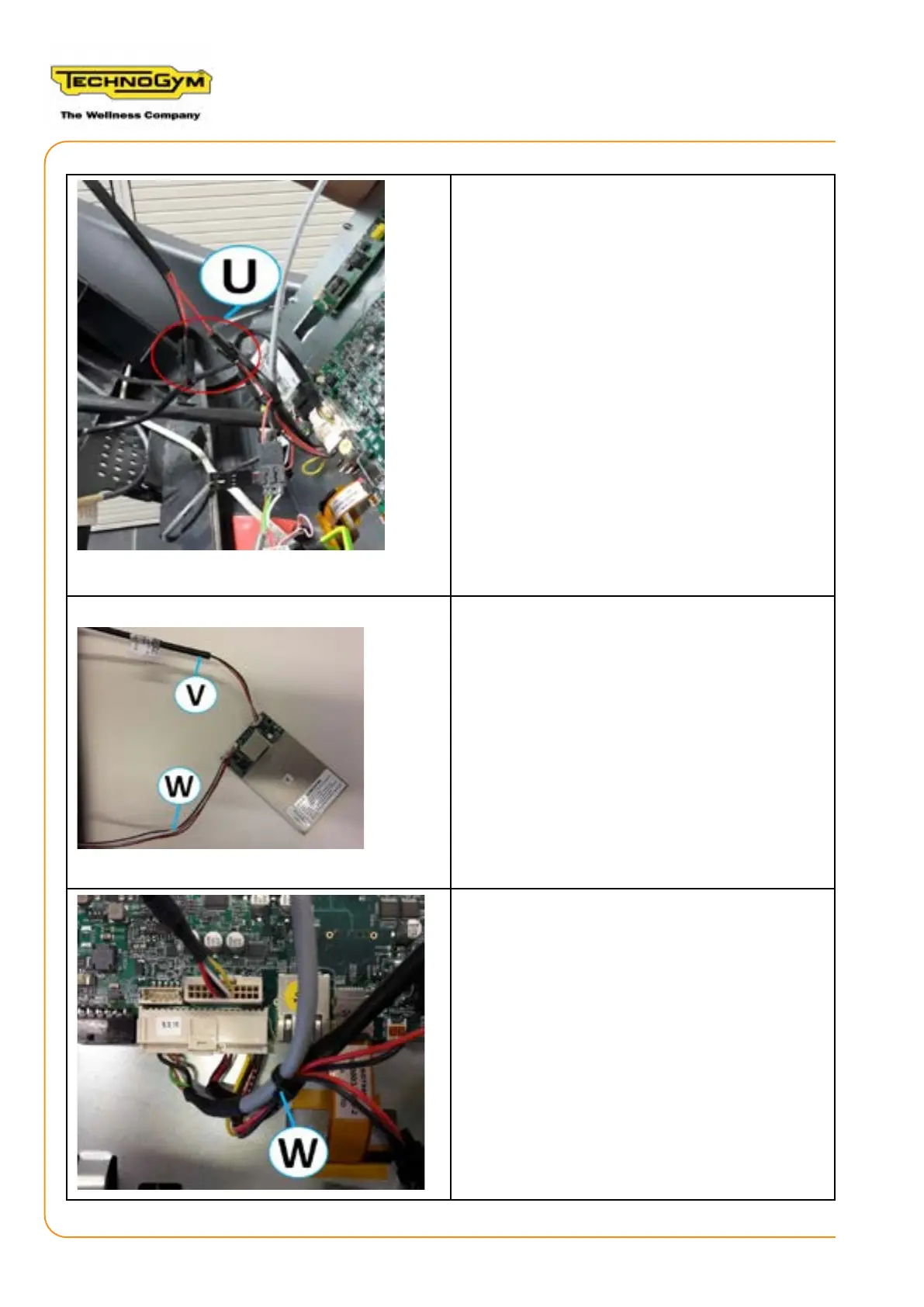
11.Connect the female connector of the ON/
OFF fan cable (U) to the male connector of the
fan cable.
12.Connect the male connector of the ON/OFF
fan cable (U) to the female connector of the po-
wer cable.
13.Connect the TGS/NFC cable (V)
0WCU0693xx to the NFC board 0WR00973xx.
14.Connect the connector of the peripherals
USB/NFC cable (W) 0WCU0809xx, to the NFC
board 0WR00973xx, in order to connect the
NFC board to the CPU board of the Display.
15.Ensure that the 40-pole connector of the pe-
ripherals USB/NFC cable (W) 0WCU0809xx is
connected to the CPU board of the Display.














 To Next Page