TD350 Series VFD Basic operation instructions
-48-
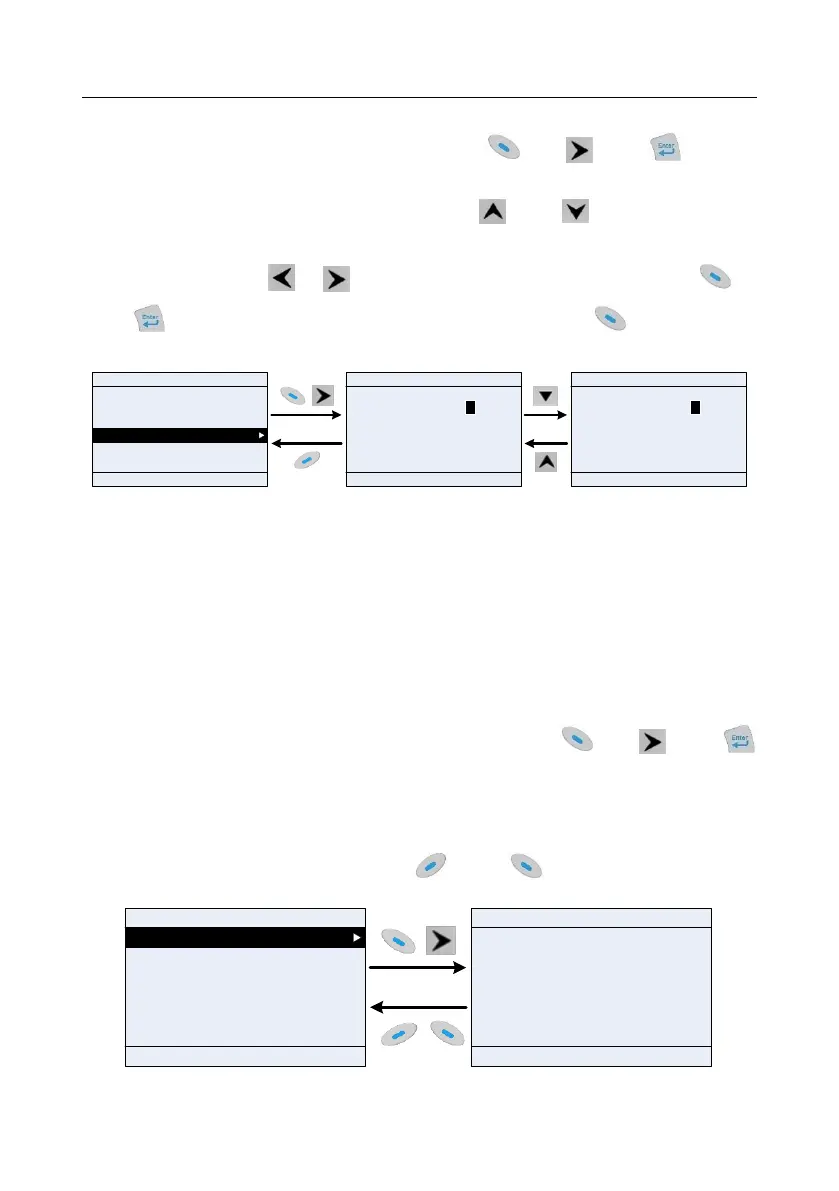
5.4.6 Parameter setting edit interface
In the fourth-level menu in "Parameter setting" menu, press key, key or key to
enter parameter setting interface. After entering the edit interface, set the parameter from low bit to
high bit, and the bit under setting will be highlighted. Press key or key to increase or
decrease the parameter value (this operation is valid until the parameter value exceeds the max.
value or min. value); press or to shift the edit bit. After parameters are set, press
key or key to save the setting and return to the previous menu. Press to maintain the
original parameter value and return to the previous menu.
01: TD350
16:02:35
Fwd
Local Ready
P00.00: Speed Ctrl
P00.01: RunCmd Channel
P00.02: Comm Cmd Channel
P00.03: Max Output Freq
P00.04: RunFreq Up limit
P00.05: RunFreq Low limit
Max Output Freq Hz
050.00
Max : 630.00
Min : 50.00
Present:50.00
Auth: √
Default : 50.00
Max Output Freq Hz
050.01
Max : 630.00
Min : 50.00
Present:50.00
Auth: √
Default : 50.00
EditReturn
Select
HomepageReturn
Confirm
HomepageReturn
Confirm
Fig 5.16 Parameter setting edit interface
In parameter selection edit interface, the "Auth" on the top right indicates whether this parameter can
be modified or not.
"√" indicates the set value of this parameter can be modified under current state.
"×" indicates the set value of this parameter cannot be modified under current state.
"Present" indicates the value saved last time.
"Default " indicates the default value of this parameter.
5.4.7 Monitoring states
In the fourth-level menu of "State parameter/fault record" menu, press key, key or
key to enter state parameter monitoring interface. After entering state parameter monitoring interface,
the actual parameter value will be displayed in real time, this value is the actually detected value
which cannot be modified.
In state parameter monitoring interface, press key or key to return to the previous
menu.
HomepageReturn
Confirm
Set Freq Hz
0.00
Max : 50.00
Min : 0.0
01: TD350
16:02:35
Fwd
Local Ready
01: TD350
16:02:35
Fwd
Local Ready
AddReturn
Select
P17.00: Set Freq
P17.01: OutpFreq
P17.02: Ramp Ref Freq
P17.03: Outp Volt
P17.04: Outp Cur
P17.05: Motor Speed
Default : 0.0
Fig 5.17 State monitoring interface



 To Next Page