TD350 Series VFD Basic operation instructions
-49-
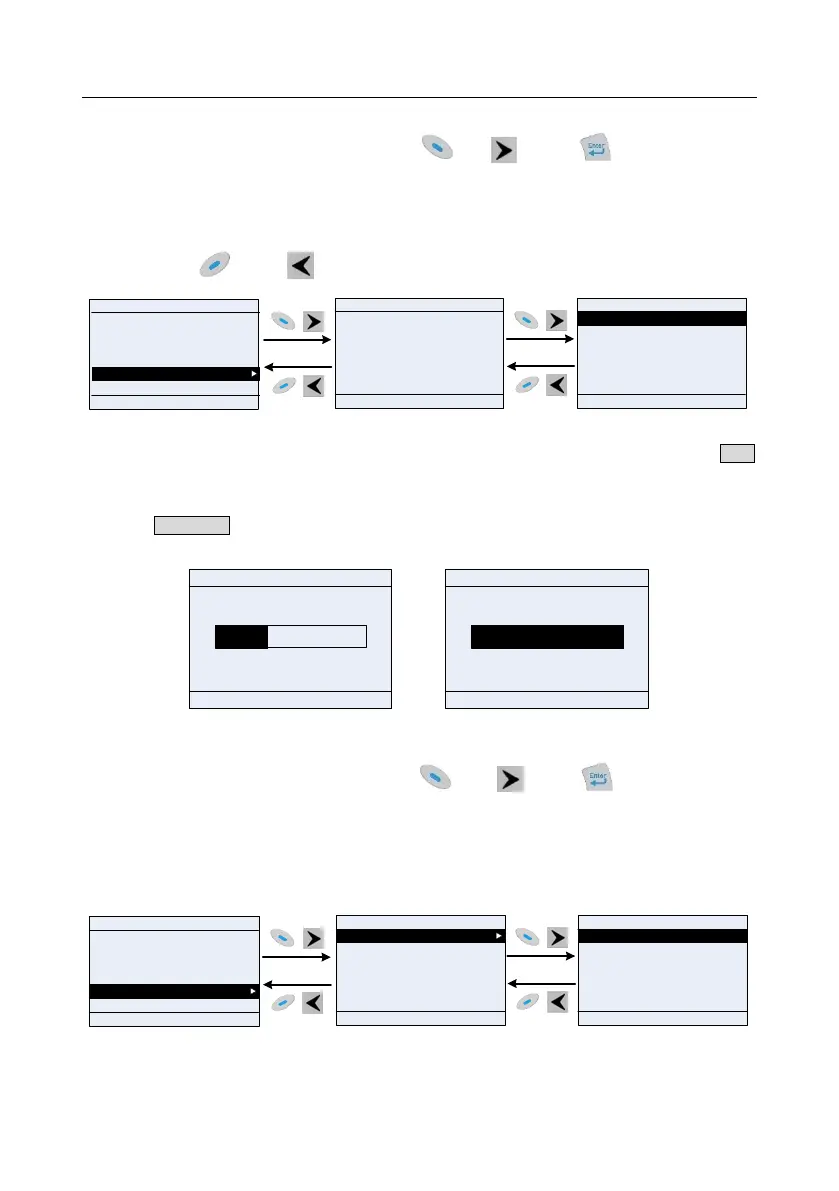
5.4.8 Autotuning motor parameter
In "Motor parameter autotuning" menu, press key, key or key to enter motor
parameter autotuning selection interface, however, before entering motor parameter autotuning
interface, users must set the motor nameplate parameters correctly. After entering the interface,
select motor autotuning type to carry out motor parameter autotuning. In motor parameter autotuning
interface, press key or key to return to the previous menu.
01: TD350
16:02:35
Fwd
Local Ready
HomepageReturn
Confirm
Confirm the motor nameplate prm are set
correctly!
HomepageReturn
Confirm
Complete parameter rotary autoning
Complete parameter static autoning
Partial parameter static autoning
01: TD350
16:02:35
Fwd
Local Ready
16:02:35
Parameter setting
User defined parameter setting
State parameter/fault record
Motor parameter autotuning
Parameter copy/Restore default
System setting
Fwd
Local Ready
HomepageReturn
Select
01: TD350
Complete para rotary autoning2 AM
Partial para static autoning2 AM
Fig 5.18 Parameter autotuning operation diagram
After selecting a motor autotuning type, enter motor parameter autotuning interface, and press RUN
key to start motor parameter autotuning. After autotuning is done, a message will pop out indicating
autotuning is successful, and then it will return to the main interface of stop. During autotuning, users
can press STOP/RST key to terminate autotuning; if any fault occur during autotuning, the keypad will
display a fault interface.
Auto step:1
Parameter autotuning is on
01: TD350
16:02:35
Fwd
Local Run
Auto step:3
Parameter autotuning is on
01: TD350
16:02:35
Fwd
Local Run
HomepageReturn
Stop
Fig 5.19 Parameter autotuning finished
5.4.9 Parameter backup
In "Parameter copy/Restore default" menu, press key, key or key to enter function
parameter backup interface and function parameter restoration setting interface to upload/download
VFD parameters, or restore VFD parameters to default value. The keypad has three different storage
areas for parameter backup, and each storage area can save the parameters of one VFD, namely it
can save parameters of three VFD in total.
UL local func prm to keypad
DL complete func prm of keypad
DL non-motor group func prm of keypad
DL motor group func prm of keypad
01: TD350
16:02:35
Fwd
Local Ready
HomepageReturn
Confirm
16:02:35
Parameter setting
User defined parameter setting
State parameter/fault record
Motor parameter autotuning
Parameter copy/Restore default
System setting
Fwd
Local Ready
HomepageReturn
Select
16:02:35
memory area 1: BACKUP01
memory area 2: BACKUP02
memory area 3: BACKUP03
Restore func prm to default
Fwd
Local Ready
Edit
Return
Select
01: TD350
01: TD350
Fig 5.20 Parameter backup operation diagram



 To Next Page