TD350 Series VFD Basic operation instructions
-50-
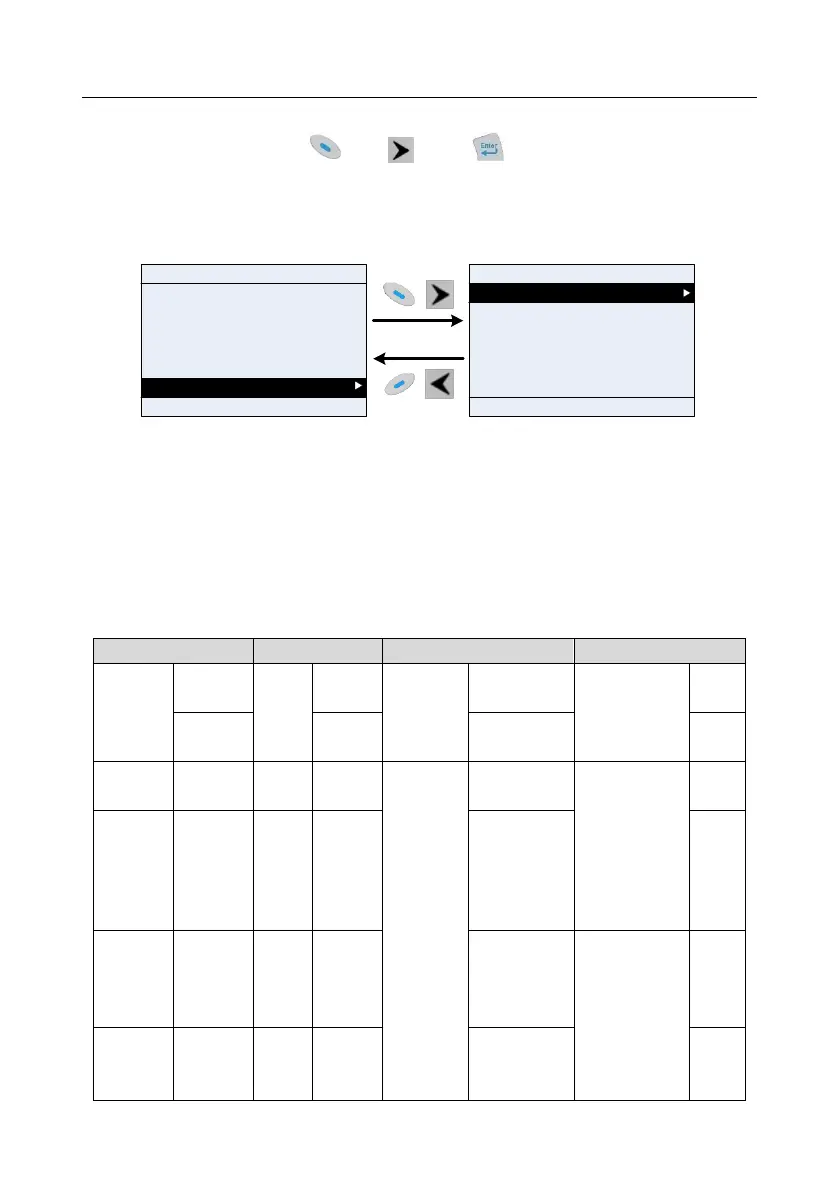
5.4.10 System setting
In "System setting" menu, press key, key or key to enter system setting interface
to set keypad language, time/date, backlight brightness, backlight time and restore parameters.
Note: Clock battery is not included, and the keypad time/date needs to be reset after power off. If
time-keeping after power off is needed, users should purchase the clock batteries separately.
16:02:35
Parameter setting
User defined parameter setting
State parameter/fault record
Motor parameter autoning
Parameter copy/Restore default
System setting
Fwd
Local Ready
HomepageReturn
Select
16:02:35
Language selection
Time/date
Backlight brightness control
Backlight time control
Fwd
Local Ready
HomepageReturn
Select
Init enable
Init setting
01: TD350
01: TD350
Fig 5.21 System setting diagram
5.4.11 Power-on setup wizard
The keyboard supports the power-on guiding function, mainly for the first power-on situation, guiding
the user to enter the setting menu, and gradually implementing basic functions such as basic
parameter setting, direction judgment, mode setting and autotuning. The power-on guiding enable
menu guides the user to enable power-on to boot each time. Power-on guiding setting menu guides
the user to set step by step according to the functions.
The power-on guide is shown as below.
Whether to test
the motor
rotation
direction?
Press the JOG
button first. It is
currently
forward, Is it
consistent with
the
expectations?



 To Next Page